+971-8000321216




There are many tasks that a lawyer needs to handle for their legal practice. It can be a big struggle to keep every record of the case by hand. They spend a lot of time while searching for documents in their physical space. Legal professionals can’t afford to miss a hearing of their case. An AI legal case management system is a smart and convenient way to handle the cases. It helps in keeping up-to-date information of the cases. The innovative features of the system help in organizing the case documents. Through AI legal assistant development, firms can further enhance how efficiently they manage client data and internal workflows.
The system enables the lawyers to keep an eye on how well their case is going ahead. It helps in improving the legal services and better client satisfaction. The user-friendly design helps the legal team to work together and communicate with clients. AI court case management system development can help improve efficiency and lower the cost of operations. Want to know how is AI used in case management? This blog can help you learn everything about the AI legal case management system. Learn how its beneficial for the firms.
How Does AI Case Management Software Improve Efficiency for Law Firms?
An AI case management software for law firms helps in handling the routine legal tasks. It enhances the productivity and lowers the costs. The law firms can use this software to organize documents and analyze data.
Handles Routine Tasks
AI enables lawyers to manage documents and maintain a schedule. This saves time and allows them to focus on more important tasks. The software can point out the key information in contracts and warn users of any risks. AI can reduce errors and improve the accuracy in legal work.
Looks into the Future
AI can go through the past case data to tell about the case outcomes for future. This helps in making informed decisions about making an effective strategy for cases.
Enhances Communication with Clients
The lawyers can use the AI tools to communicate with clients. The AI software for law firms can send messages to give updates. AI chatbots can answer queries on the system. This can lead to better client satisfaction.
Provides Legal Information
The software helps the lawyers in simpler and faster research. Tools can show the legal information in a clear way. This makes it easier for lawyers to get knowledge about legal concepts.
Key Components that an AI Legal Practice Management Software Should Have
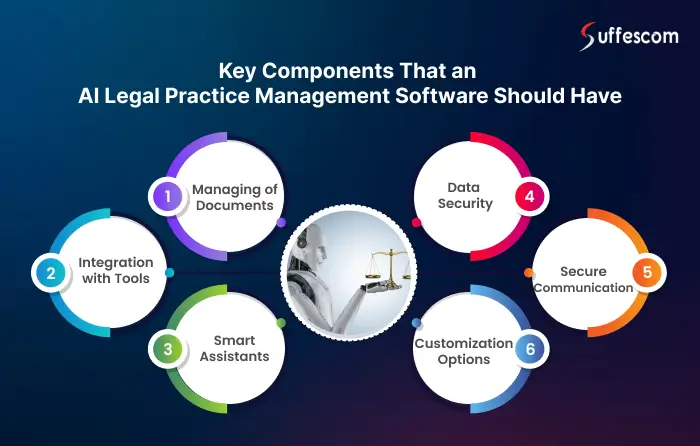
An AI legal practice management software should have advanced features for an enhanced user experience. The lawyers can keep a track of time and handle their billing through the software.
Managing of Documents
White label Legal Document Management Software uses cloud technologies to keep the legal information secure. This can be the legal contracts and court details. AI court case management system development can enhance these capabilities by automating case tracking and document organization. This can help in reducing the chances of any mistakes. The lawyers can easily make changes in documents and get alerts for deadlines.
Integration with Tools
The software should allow integration with accounting software and document management system. This can help to ensure exchange of data. It leads to a smooth workflow and improves efficiency.
Smart Assistants
AI assistants can fix appointments and provide personalized advice on legal matters. It can also warn lawyers about risks. They can help in efficient handling of workflows. These features become even more powerful when paired with AI legal assistant development, enabling improved decision-making and client interactions.
Data Security
The user data can be kept secure with advanced security features. Compliance with data protection laws can help to avoid penalties. Regular security checks can help to identify the issues. It can tell about any risk to the data.
Data Migration Old to New Platform
AI powered legal case management systems automates process with secure data migration, seamlessly transferring client records, billing histories, and legal documents from legacy platforms—ensuring data integrity, compliance, minimal downtime, and a smooth transition to modern, scalable practice management solutions.
Secure Communication
Communication features ensure security when sending messages and videos to the clients. The legal AI software should allow secure sharing of the documents.
Customization Options
AI software should allow users to customize workflows. This can help in fulfilling the needs of law firm. AI can understand the user preferences and provide personalized recommendations.
Ensure Seamless Integration with AI Legal Case Management System
Build AI legal software for time tracking and document management.
Features of Our AI Legal Case Management System
- AI-Powered Document Management: Automatically organize, tag, version-control, and search thousands of legal documents. OCR technology converts scanned files into searchable digital records. Bulk upload from email, cloud storage, or USB is fully supported.
- Intelligent Case Timeline Tracker: Visual timelines show every milestone, hearing date, motion deadline, and action item across all active cases. Color-coded alerts warn attorneys days in advance of approaching deadlines.
- Predictive Case Outcome Analysis: The AI analyzes historical verdicts, judge preferences, jurisdiction trends, and case facts to produce a probability score for different outcomes, helping attorneys build stronger strategies.
- Conflict of Interest Detection: Before onboarding a new client, the system automatically cross-references all existing clients, cases, and parties to detect potential conflicts protecting the firm from ethical violations.
- Automated Billing & Time Tracking: Capture billable hours automatically as attorneys work. Generate accurate invoices, track payment status, and flag overdue accounts. Integrates with QuickBooks, Xero, and other accounting platforms.
- AI Legal Research Assistant: Summarize case law, statutes, and regulations in plain language. Pull relevant precedents from integrated legal databases. Save hours on research that typically takes days.
- Secure Client Portal: Clients log in to view case progress, upload documents, sign forms digitally, communicate with their attorney, and receive automated updates, all within an encrypted, compliant environment.
- Role-Based Access Controls: Define exactly what each user attorney, paralegal, receptionist, or client can view, edit, or share. Full audit trails track every access and change for accountability.
- Court Date & Deadline Automation: Sync with court calendars to auto-import hearing dates, filing deadlines, and statutes of limitations. Multi-channel reminders via email, SMS, and in-app notifications ensure nothing is missed.
- Multi-Language Support: Serve clients across jurisdictions and geographies. The system supports document translation, multi-language client portals, and jurisdiction-specific legal templates.
- E-Signature Integration: Collect legally binding signatures on contracts, agreements, and forms digitally. Integrated with DocuSign, Adobe Sign, and other major e-signature platforms.
- Analytics & Reporting Dashboard: Custom reports on case outcomes, firm revenue, attorney utilization, client retention, and operational efficiency. Export as PDF, Excel, or share directly with stakeholders.
AI Legal Case Management Across Practice Areas
Criminal Law
Track defendant history, court dates, evidence logs, and plea negotiations. AI flags sentencing patterns and helps public defenders manage high caseloads efficiently.
Family Law
Manage divorce proceedings, child custody agreements, and asset division filings with sensitive document controls and client communication tools that respect privacy.
Corporate & Mergers Law
Handle multi-party deal documentation, due diligence checklists, NDA management, and regulatory filings across complex transactions with full version control.
Immigration Law
Track visa statuses, application deadlines, government correspondence, and client eligibility changes. Automated alerts prevent costly lapses in immigration timelines.
Real Estate Law
Organize property deeds, title searches, mortgage documents, and closing checklists. AI extracts key terms from contracts and flags unusual clauses before signing.
Intellectual Property Law
Manage patent filings, trademark renewals, licensing agreements, and infringement cases. AI monitors registration deadlines and sends proactive renewal alerts.
Employment & Labor Law
Track HR disputes, EEOC filings, employment contracts, and compliance documentation. AI identifies similar past settlements to guide current negotiation strategy.
Personal Injury / Tort Law
Automate medical record requests, insurance correspondence, and settlement calculations. Predictive analytics estimate compensation ranges based on comparable verdicts.
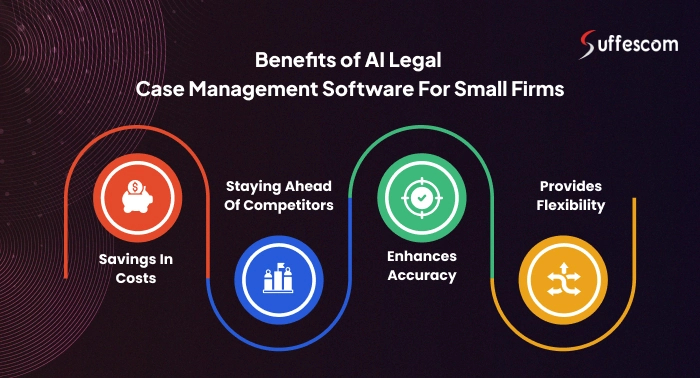
Benefits of AI Legal Case Management Software Development for Small Firms
AI legal case management software for small firms can help to address the unique challenges. It can help to simplify the legal tasks and improve revenue. This is how adopting the software can be beneficial.
Savings in Costs
The lawyers don’t need to handle everything by hand. The software can handle all the legal tasks to save time and money. AI software can keep a record of the data and fix appointments.
Staying Ahead of Competitors
The software allows firms to offer better service quality to the clients. AI can provide quicker answers to the queries. AI tools can provide a clear view of the future for making decisions.
Provides Flexibility
AI legal case management system can easily adapt and handle more cases. There is no need to hire staff to work on the cases. The software has advanced tools that carefully examine the contracts.
Enhances Accuracy
AI can reduce errors and speed up legal work. AI tools can identify the changes in regulations and risks. This helps the legal firms to ensure compliance and avoid any costs.
Our AI Legal Case Management Development Process
Phase 1 - Discovery & Requirement Analysis
Our team conducts in-depth discovery sessions to understand your firm's workflows, pain points, caseload volume, compliance requirements, and integration needs. We produce a detailed scope document and wireframes.Phase 2 - UI/UX Design
Our designers create intuitive, role-specific interfaces for attorneys, paralegals, clients, and administrators. You receive clickable prototypes for review and feedback before a single line of code is written.Phase 3 - Backend & AI Development
Our engineers build the core system — database architecture, API layer, AI models for document analysis, predictive analytics, and NLP-based search. Security protocols and compliance frameworks are implemented from day one.Phase 4 - Frontend Development & Integration
The client-facing portal, attorney dashboard, billing module, and all third-party integrations are built and connected. The system is assembled into a cohesive, tested product.Phase 5 - QA, Testing & Compliance Audit
Rigorous quality assurance including load testing, security penetration testing, data compliance audits, and user acceptance testing with your team.Phase 6 - Deployment & Data Migration
We deploy the system to your preferred cloud environment (AWS, Azure, or GCP), migrate your existing case data, and run parallel operations to ensure zero disruption to your firm.Phase 7 - Training & Post-Launch Support
Full training for all user roles, documentation, and video walkthroughs. Dedicated post-launch support with SLA-backed response times. Ongoing updates and feature additions as your firm grows.Custom Development vs. Off-the-Shelf Legal Software - Which Is Right for You?
| Factor | Custom AI System (Suffescom Solutions) | Off-the-Shelf Software |
| Tailored to your workflow | ✅ Fully customized | ❌ Generic templates |
| Scalability | ✅ Grows with your firm | ⚠️ Plan upgrade required |
| Integration with your tools | ✅ Custom APIs | ⚠️ Limited connectors |
| Ownership of data & IP | ✅ 100% yours | ❌ Vendor-controlled |
| Recurring subscription fees | ✅ No monthly lock-in | ❌ Monthly/annual fees |
| Support & SLA | ✅ Dedicated support | ⚠️ Ticket-based only |
| Feature flexibility | ✅ Add anything you need | ❌ Limited to vendor roadmap |
Challenges of Implementing AI Case Management Software for Law Firms
It can be hard to adopt AI case management software for law firms. The cost can be higher and you might need to train staff to use the new technology.
Higher Costs
Setting up the software requires a higher spending. You need to pay for making updates and customizing the software.
Need for Data Security
AI systems examine vast data of the clients. But there is a higher risk of data security. Comply with laws to protect the client data.
Integration with Systems
Integrating AI solutions can be difficult. This is because many firms do all the legal work by hand. There might be issues with the compatibility of the system.
Training the Staff
Legal professionals might not have the skills to utilize the AI legal practice management software. Training programs can help the staff to learn how to use the software efficiently.
Cost For AI Legal Practice Management Software Development
AI software has advanced features to ensure smooth legal operations. This can add to the cost of development. But the total costs will depend on your business requirements. Consider these factors to understand the cost to develop a lawyer app and software:
Data Requirements
AI systems require high-quality data to ensure better performance of software. The cost of collecting and storing data can be higher. The cost can also depend on how complex the data is. Security measures can also increase the costs.
- Less Complex Data: $5,000- $10,000
- More Complex Data: $10,000- $20,000
Model Used for Deploying the Software
The cost of cloud-based solutions depends on the number of users and features. It requires less cost than on-premise systems.
- Cloud-Based Solutions: $5,000- $10,000
- On-Premise Systems: $10,000- $20,000
Making Updates to the Software
The development team needs to keep a regular check on the performance. They make updates and fix issues to ensure that the system runs smoothly.
- Making Updates to the Software: $5,000- $8,000
Complexity of Features
The basic features of software include simple time tracking and calendars. AI features that handle the legal work require a higher cost.
- Basic Features: $5,000- $10,000
- Advanced Features: $10,000- $20,000
Compliance with Regulations
There is a need to comply with regulations for protecting data. Regular checking of security requires a higher cost.
- Security and Compliance: $5,000- $10,000
These factors can affect the cost of legal software. Carefully understand your needs and budget to make the right decision.
Who Benefits from an AI Legal Case Management System?
Solo Practitioners: Managing an entire practice alone is overwhelming. AI takes over scheduling, document drafting, and deadline tracking, so you can focus on winning cases, not chasing paperwork.
Mid-Size Law Firms: Coordinate with multiple attorneys, paralegals, and support staff without confusion. AI centralizes all case data, assigns tasks automatically, and flags bottlenecks before they become problems.
Large Legal Enterprises: Handle thousands of active cases simultaneously with intelligent routing, predictive analytics, and enterprise-grade compliance tools built directly into the platform.
Corporate Legal Departments: In-house legal teams can manage contracts, regulatory filings, litigation tracking, and vendor agreements through a single unified AI dashboard.
Legal Aid Organizations: Stretch limited resources further. Automate intake, qualify cases faster, and serve more clients without scaling headcount.
Government Legal Bodies: Manage public litigation, policy compliance, and regulatory caseloads with full auditability and secure access controls.
Get Insights to Make Informed Legal Decisions
Make an AI legal software with a stunning interface for smooth navigation.
How Our AI Legal Case Management System Works
Step 1: Case Intake & Client Onboarding
The system automatically captures client information through smart intake forms. AI validates data, checks for conflicts of interest, and opens a structured case file instantly, no manual entry required.Step 2: Document Organization & Analysis
All uploaded documents, contracts, court filings, evidence, correspondence are automatically tagged, indexed, and stored. AI reads and summarizes lengthy documents, flagging key clauses, risks, and deadlines.Step 3: Task Assignment & Workflow Automation
Based on the case type, the system assigns tasks to the right team members, sets automated reminders for court dates and filing deadlines, and generates checklists to keep the case on track.Step 4: Legal Research & Predictive Insights
The AI scans case history, precedents, and jurisdiction-specific regulations to provide attorneys with research summaries and predicted case outcomes based on comparable past cases.Step 5: Client Communication & Updates
Clients receive automated status updates, can securely message their attorney, and access their case portal 24/7. AI chatbots handle routine queries without attorney involvement.Step 6: Billing, Invoicing & Time Tracking
Every attorney action is logged automatically for accurate time tracking. The system generates itemized invoices, sends payment reminders, and integrates with accounting tools seamlessly.Step 7: Reporting & Analytics
Firm leadership gets real-time dashboards showing case win rates, attorney performance, revenue trends, client satisfaction scores, and workload distribution, all powered by AI.How AI Legal Case Management Software Enhances Notarial Services
Along with legal document management and client communications, our AI legal case management app streamlines notarial tasks and authenticates legal documents more efficiently and securely. Our
- Simplified document verification & authentication
- Boost security for notarial documents
- Remote notarization support
- Efficient workflow for notaries
By including these AI-enhanced notarial features, you demonstrate how AI not only optimizes case management but also supports the broader legal infrastructure, including notarization services.
Hire Suffescom Solutions for the Best AI Case Management Software Development for Lawyers
AI legal software can help in achieving better efficiency and client satisfaction. It can help streamline operations and reduce costs. Suffescom Solutions is the leading company to build the best AI case management software for lawyers. We create software for personalized legal advice and the handling of client data. These systems help in handling the legal tasks and making better decisions.
We can understand your requirements and provide support after the launch of software. Our team utilizes advanced technologies for a user-friendly software. Build a secure and personalized software for managing your legal cases. Contact our experts for a customized solution.
FAQs
1. How long does it take to develop a custom AI legal case management system?
Development timelines vary based on complexity, but a standard system with core features typically takes 12–16 weeks from discovery to deployment. Enterprise-scale systems with deep integrations may take 20–24 weeks.
2. Can the system be integrated with our existing practice management software?
Yes. We build custom API integrations with virtually any existing software, Clio, MyCase, PracticePanther, Smokeball, or proprietary internal tools ensuring no disruption to your current workflows.
3. Is the system cloud-based or can it be hosted on our own servers?
Both options are available. We offer cloud-based deployment (AWS, Azure, GCP) for scalability and lower maintenance, as well as on-premise deployment for firms with strict data sovereignty requirements.
4. How does the AI handle sensitive attorney-client privileged information?
All privileged communications and documents are stored under strict access controls accessible only to authorized personnel. Encryption, audit trails, and role-based permissions ensure privilege is never compromised.
5. What happens to our existing case data during the migration?
Our team manages the complete data migration process from your current system to the new platform with zero data loss guarantees, rollback capabilities, and parallel operation periods to verify accuracy before full cutover.
6. Does the system support multiple office locations or remote teams?
Yes, The system is designed for distributed teams with cloud access from any device, location-based access controls, team collaboration tools, and real-time synchronization across all offices.
7. What ongoing support do you provide after launch?
We offer tiered support packages ranging from standard business-hours ticket support to 24/7 dedicated account management with guaranteed SLA response times. All packages include security updates and bug fixes.
8. Can the system scale as our firm grows?
The architecture is built on scalable cloud infrastructure. Whether you go from 10 attorneys to 100, or expand into new practice areas, the system scales horizontally without performance degradation.
9. Is training provided for staff who are not tech-savvy?
Yes, We provide role-based training sessions, video tutorials, written documentation, and a dedicated onboarding specialist for the first 60 days post-launch.