+971-8000321216



Built your app on Lovable Cloud and wondering what comes next? As applications grow, many startups and SaaS businesses choose to migrate to a dedicated Supabase instance for greater control and flexibility. But why are teams moving away from managed environments, and how can you successfully migrate from Lovable Cloud to Supabase?
The process to migrate Lovable app to your own Supabase instance involves moving your application's database, authentication, and backend configurations to a dedicated Supabase project that you fully control. This gives you ownership of your data and infrastructure while enabling greater customization, improved scalability, better cost management, and the flexibility to integrate third-party services as your application evolves.
In this guide, you'll learn why businesses migrate from Lovable Cloud to Supabase, the benefits of managing your own Supabase instance, and the step-by-step process for completing the migration with minimal disruption to your users and operations.
Why Migrate from Lovable Cloud to Supabase?
While Lovable Cloud provides a fast and convenient way to build and launch applications, growing businesses often require more control over their backend infrastructure. As applications scale, factors such as data ownership, customization, performance optimization, and long-term flexibility become increasingly important.
Migrating to a dedicated Supabase instance allows teams to move beyond the limitations of a managed environment and take full ownership of their backend. Instead of relying on platform-managed configurations, organizations can customize their database architecture, security policies, authentication workflows, and integrations according to their specific requirements.
Some of the most common reasons businesses migrate from Lovable Cloud to Supabase include:
Full Data Ownership
By using your own Supabase instance, you retain complete control over your application's data, database configurations, backups, and access permissions. This reduces dependency on third-party infrastructure and provides greater transparency over how your data is managed.
Greater Backend Flexibility
A dedicated Supabase project allows developers to customize database schemas, security rules, authentication settings, and API integrations without being restricted by a managed platform's default configurations.
Improved Scalability
As user traffic and application complexity increase, having direct control over your backend infrastructure makes it easier to optimize performance, manage resources efficiently, and scale your application based on business needs.
Better Cost Management
Managing your own Supabase environment provides greater visibility into infrastructure costs and allows you to choose plans, resources, and configurations that align with your budget and growth strategy.
Easier Third-Party Integrations
Many growing applications rely on external services for analytics, payments, customer support, AI functionality, and automation. A dedicated Supabase instance offers greater flexibility when integrating these services into your backend architecture.
Reduced Vendor Dependence
Migrating to your own Supabase project gives you more control over your technology stack and reduces reliance on a single managed environment, making future development and infrastructure decisions easier to manage.
Prerequisites Before Migrating from Lovable Cloud to Supabase
Before migrating your application, it's important to prepare your existing Lovable project and new Supabase environment. Taking time to review these prerequisites can help prevent data loss, configuration issues, and unnecessary downtime during the migration process.
Access to Your Lovable Project
Ensure you have administrative access to your Lovable application, including access to project settings, database configurations, authentication settings, and any connected third-party services. This information will be required when recreating your backend environment in Supabase.
A New Supabase Project
Create a dedicated Supabase project where your application's data and backend services will be migrated. Make note of your project's URL, API keys, database credentials, and authentication settings, as these will be needed when updating your application.
Database Backup
Before making any changes, create a complete backup of your existing application data. Having a backup ensures you can restore critical information if unexpected issues arise during the migration process.
Review Authentication Configuration
If your application uses user authentication, document your current authentication methods, user roles, permissions, and access policies. This will make it easier to replicate your authentication setup within Supabase.
Inventory of Integrations and Services
Identify any external services connected to your application, such as payment gateways, analytics platforms, AI services, email providers, storage solutions, or automation tools. These integrations may require updates once your application is connected to the new Supabase instance.
Environment Variables and API Keys
Review your application's environment variables and API configurations. During the migration, you'll need to replace existing backend credentials with the new Supabase project details to ensure uninterrupted connectivity.
Testing Environment
Whenever possible, perform the migration in a staging or testing environment before updating your production application. This allows you to validate database connections, authentication flows, and application functionality before going live.
With these prerequisites in place, you're ready to begin the migration process and move your application's data and backend services from Lovable Cloud to your dedicated Supabase instance.
What Gets Migrated from Lovable Cloud to New Supabase Instance?
A Supabase migration for Lovable apps involves more than moving application data from one database to another. To ensure the application continues functioning correctly, multiple backend components must be migrated and validated.
The primary components that typically require migration include:
Database Schema
Tables, columns, relationships, indexes, views, triggers, database functions, and Row Level Security (RLS) policies.
Application Data
All records stored within the database, including user-generated content, application settings, and business data.
Authentication
User accounts, authentication providers, login methods, session management, roles, and permissions.
Storage
Uploaded files, storage buckets, access policies, and file references stored within the database.
Edge Functions and Backend Logic
Custom functions, scheduled jobs, webhooks, and backend workflows that support application functionality.
Environment Variables and Integrations
API keys, third-party services, payment gateways, email providers, AI integrations, and deployment configurations.
A successful migration requires each of these components to be reviewed, migrated, tested, and validated before production traffic is moved to the new Supabase environment.
How to Migrate from Lovable Cloud to Supabase
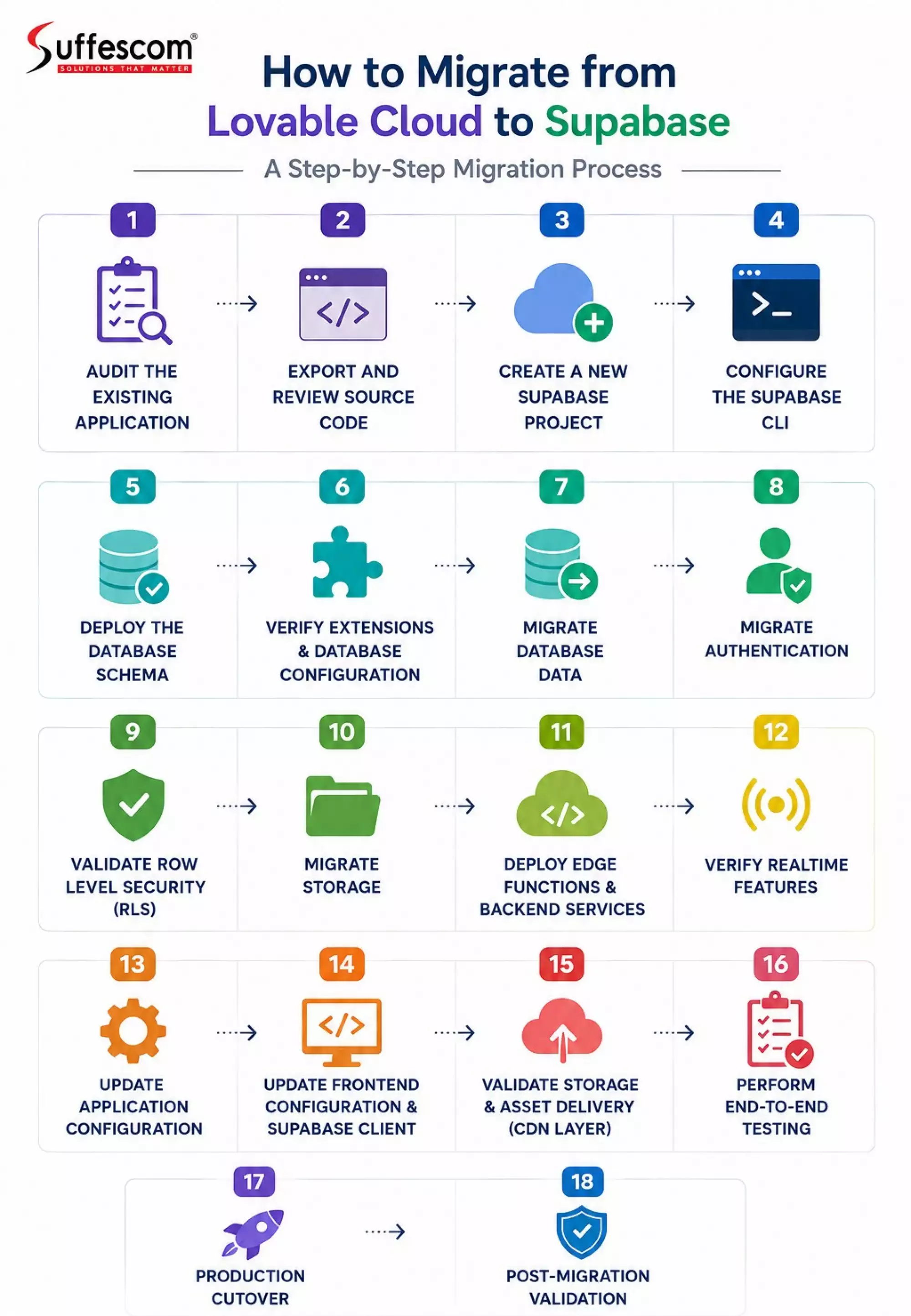
Audit the Existing Application
Before creating a new Supabase project, document everything currently used by the application.
Database
Review:
- Tables
- Columns
- Data types
- Primary keys
- Foreign keys
- Indexes
- Views
- Database functions
- Triggers
- Row Level Security (RLS) policies
- Database extensions
Authentication
Identify:
- Email and password authentication
- Magic links
- Google OAuth
- GitHub OAuth
- Other social providers
- User roles and permissions
Storage
Review:
- Storage buckets
- Folder structures
- Uploaded files
- File references stored in database tables
Backend Services
Document:
- Edge Functions
- Webhooks
- Scheduled jobs
- Third-party integrations
Application Configuration
Search the codebase for all Supabase-related variables and secrets:
VITE_SUPABASE_URL
VITE_SUPABASE_ANON_KEY
SUPABASE_URL
SUPABASE_SERVICE_ROLE_KEY
The goal is to create a complete inventory of everything that depends on the existing backend.
Export and Review Source Code
Connect the Lovable project to GitHub and clone the repository locally.
git clone https://github.com/your-org/your-project.git
cd your-project
Review the repository structure and locate Supabase-related assets such as:
supabase/
├── migrations/
├── functions/
├── config.toml
Some projects include complete migration histories, while others may require manual schema verification. Always validate the exported schema before deployment.
Create a New Supabase Project
Create a new Supabase project and choose:
- Appropriate deployment region
- Strong database credentials
- Point-in-Time Recovery (PITR) if required
- Production-grade security settings
Record:
Project URL
Anon Key
Service Role Key
Project Reference ID
These values will be required throughout the migration.
Configure the Supabase CLI
Install and authenticate the CLI.
npm install -g supabase
supabase login
Link the new project.
supabase link --project-ref YOUR_PROJECT_REF
Verify connectivity.
supabase projects list
Deploy the Database Schema
Database structure should always be migrated before data.
Apply migrations:
supabase db push
Verify that all database objects were created successfully.
Confirm:
- Tables
- Constraints
- Indexes
- Functions
- Triggers
- Views
- RLS policies
Validate the schema:
SELECT table_name
FROM information_schema.tables
WHERE table_schema = 'public';
Verify Extensions and Database Configuration
Many applications depend on PostgreSQL extensions.
Verify installed extensions:
SELECT extname
FROM pg_extension;
Common examples include:
pgcrypto
uuid-ossp
vector
pg_trgm
postgis
Missing extensions can cause application failures even when tables migrate successfully.
Migrate Database Data
After schema validation, migrate application data.
Import data according to foreign-key dependencies.
Typical order:
Parent tables
Reference tables
Dependent tables
Junction tables
The exact sequence should be determined by actual database relationships.
After import, validate record counts for every table.
SELECT COUNT(*)
FROM table_name;
Source and destination counts should match.
Migrate Authentication
Authentication should be treated separately from application data.
Review:
- Users
- Identities
- OAuth providers
- User metadata
- Role assignments
A common migration mistake is moving profile data without migrating authentication records.
For applications with existing users, verify that authentication data is migrated using a supported migration strategy and test login flows before production deployment.
Validate:
- Login
- Registration
- Password reset
- OAuth sign-in
- Session refresh
Validate Row Level Security
Verify that all RLS policies exist and behave correctly.
Review policies:
SELECT *
FROM pg_policies;
Verify RLS status:
SELECT
tablename,
rowsecurity
FROM pg_tables
WHERE schemaname = 'public';
Common symptoms of RLS issues include successful authentication but empty query results.
Migrate Storage
Create required storage buckets.
Verify:
- Bucket names
- Access policies
- Public/private settings
Transfer all files to the new project.
Validate:
- File counts
- Folder structure
- Upload permissions
- Download permissions
If the application stores absolute file URLs, update references to the new storage domain.
Deploy Edge Functions and Backend Services
Deploy all Edge Functions.
supabase functions deploy
Verify deployment:
supabase functions list
Reconfigure required secrets.
Examples:
STRIPE_SECRET_KEY
OPENAI_API_KEY
RESEND_API_KEY
GOOGLE_CLIENT_SECRET
AWS_ACCESS_KEY_ID
Also recreate:
- Scheduled jobs
- Cron tasks
- Webhook endpoints
Verify Realtime Features
If the application uses Supabase Realtime, verify that subscriptions continue working after migration.
Test:
- Live updates
- Presence channels
- Broadcast events
- Replication-enabled tables
Realtime configuration is frequently overlooked during migrations.
Update Application Configuration
Replace all environment variables with values from the new project.
Typical examples:
VITE_SUPABASE_URL=
VITE_SUPABASE_ANON_KEY=
Also review:
supabase/config.toml
and any deployment platform secrets.
Update Frontend Configuration & Supabase Client
After backend migration, update your frontend application to connect to the new Supabase project.
Replace the old Supabase project URL and anon key in your environment variables and reinitialize the Supabase client.
Also verify that authentication flows, session handling, and protected routes continue to work correctly.
If your app uses real-time features, ensure subscriptions are reconnected to the new backend instance.
Validate Storage & Asset Delivery (CDN Layer)
If your application uses Supabase Storage for images, videos, or file uploads, you must validate all asset delivery after migration.
Check that:
Storage buckets exist in the new project
File uploads and downloads work correctly
Public and private access policies are applied
Signed URLs are regenerated where required
Old file URLs are updated or replaced
In many applications, Supabase Storage acts as a CDN layer for serving media assets, so broken links or outdated URLs can directly impact user experience.
Perform End-to-End Testing
Test every critical workflow before production cutover.
Authentication
- Sign up
- Sign in
- Sign out
- Password reset
- OAuth login
Database Operations
- Create
- Read
- Update
- Delete
Storage
- Upload
- Download
- Delete
Backend Services
- Edge Functions
- Emails
- Webhooks
- Scheduled jobs
Permissions
Test all user roles and permission levels.
Production Cutover
When validation is complete:
- Enable maintenance mode.
- Stop new writes to the old environment.
- Run a final incremental data sync.
- Validate critical record counts.
- Update environment variables.
- Deploy the application.
- Monitor logs and errors.
Post-Migration Validation
After launch, verify:
SELECT COUNT(*) FROM auth.users;
SELECT COUNT(*) FROM storage.objects;
SELECT * FROM storage.buckets;
SELECT * FROM pg_policies;
Monitor:
- Authentication errors
- API errors
- Storage access issues
- Function failures
- Realtime events
Keep the original environment available for rollback until the new deployment is fully validated.
Common Failures in Lovable Cloud to Supabase Migration
Row Level Security (RLS) Blocking Data Access
After migration, applications often return empty data even when login works. This usually happens when RLS is enabled but policies are missing or incorrectly configured in the new Supabase project. Without proper policies, authenticated users cannot access tables.
Authentication Breaks or Login Failures
Authentication issues occur when OAuth settings, user identities, or configuration details are not correctly migrated. This can lead to failed logins, broken redirects, or password reset flows not working in the new environment.
Broken Storage Files and Media URLs
File URLs often break after migration because Supabase Storage paths are tied to the original project. This results in missing images, broken uploads, or inaccessible media if references are not updated properly.
Missing PostgreSQL Extensions
Some database features may fail if required PostgreSQL extensions are not enabled in the new Supabase instance. Functions or queries depending on extensions like uuid-ossp or pgcrypto may stop working silently.
Edge Functions Not Working After Deployment
Edge Functions can fail after migration due to missing environment variables, outdated secrets, or incorrect redeployment. This often breaks backend processes like payments, emails, or API integrations.
Frontend Still Pointing to Old Supabase Project
If frontend environment variables are not updated, the application may continue connecting to the old backend. This leads to inconsistent data, failed requests, or complete application errors.
Data Inconsistency After Migration
Incorrect migration order can cause missing or mismatched data, especially when foreign key relationships exist. If dependencies are not respected, some records may fail to migrate correctly.
Realtime Features Not Syncing
Realtime subscriptions may stop working after migration if channels are not properly reinitialized. This affects live updates, presence features, and broadcast events.
Incorrect Environment Variable Configuration
Missing or incorrect API keys can break multiple parts of the application at once, including authentication, storage, and backend services. Proper configuration is essential for stability.
Best Practices for Successful Lovable Cloud to Supabase Migration
Migrating from Lovable Cloud to Supabase requires careful planning to avoid downtime, data loss, or broken application flows. Following proven best practices ensures a smooth transition and stable production deployment.
Always Start with a Full Audit
Before migration, document everything in your existing Lovable Cloud setup, including database schema, authentication flows, storage buckets, and backend services. A missing dependency is one of the most common causes of migration failure.
Use a Staging Supabase Project First
Never migrate directly to production. Create a staging Supabase instance to validate schema, data, and authentication before switching live traffic.
Migrate Schema Before Data
Database structure must always be created first in Supabase before importing data. This avoids foreign key conflicts, missing tables, and broken relationships.
Version-Control All Migrations
Use Supabase CLI migration files so schema changes are tracked and reproducible. This also helps rollback in case of failures.
Test Authentication Early
Authentication is often the most fragile part of migration. Validate:
- OAuth providers
- Email/password login
- Session handling
- Role-based access
- Validate RLS Policies Separately
Row Level Security (RLS) can silently block all data access if misconfigured. Test policies with multiple user roles before production cutover.
Migrate Storage in Parallel
Do not leave file migration for last. Migrate storage buckets alongside database migration to avoid broken media URLs.
Keep Old Environment Active for Rollback
Do not shut down Lovable Cloud immediately after migration. Keep it active until Supabase is fully validated in production.
Run End-to-End Testing with Real Users
Simulate real workflows:
- Signup → login → CRUD operations
- File uploads/downloads
- Payment flows (if any)
- Realtime updates
Update Environment Variables Carefully
A single incorrect key can break the entire app. Double-check:
- Supabase URL
- Anon key
- Service role key
- Third-party API keys
How Long Your Lovable Migration to Supabase Will Take?
The migration timeline depends on app complexity, data size, and backend architecture.
Basic Applications (MVP / Early-stage SaaS)
Duration: 2–6 hours
Includes:
- Simple database schema
- Basic auth (email/password)
- No complex storage or edge functions
Typical flow:
- Schema migration
- Data export/import
- Basic auth setup
- Frontend config update
Medium Applications (Growing SaaS Products)
Duration: 1–3 days
Includes:
- Multiple tables with relationships
- OAuth authentication
- Storage buckets
- Some edge functions or integrations
Work involved:
- Full schema migration
- Auth + role mapping
- Storage migration
- API key reconfiguration
- End-to-end testing
Large / Production-Scale Applications
Duration: 3–7+ days
Includes:
- Complex relational databases
- High-volume user data
- Realtime features
- Multiple integrations (Stripe, AI APIs, webhooks)
- Background jobs / scheduled functions
Work involved:
- Phased migration strategy
- Staging validation
- Incremental data sync
- Realtime testing
- Full rollback strategy preparation
Cost of Migrating from Lovable Cloud to Your Own Supabase
Migration cost depends on technical complexity, downtime tolerance, and data volume.
DIY (Internal Team)
Cost: Low monetary cost, high time investment
Engineering hours: 5–40+ hours depending on complexity
Hidden cost: risk of downtime, misconfigured RLS, broken auth
Best suited for:
- Small MVPs
- Simple apps with limited users
Freelancers / Contractors
Cost: $200 – $2,000+ (₹15,000 – ₹1.5L approx.)
Depends on:
- Database size
- Auth complexity
- Storage migration
- Edge function rewriting
Risk:
- Inconsistent quality
- Missing edge-case handling
Lovable Migration Experts (Recommended for SaaS)
Cost: $1,000 – $10,000+ (₹80,000 – ₹8L+)
Includes:
- Full audit
- Zero-downtime migration
- Staging + production pipeline
- RLS + auth validation
- Post-migration monitoring
Best suited for:
- Production SaaS apps
- Revenue-generating systems
- Apps with strict uptime requirements
Conclusion
Migrating from Lovable Cloud to Supabase is more than just a backend switch; it is a foundational infrastructure upgrade that directly impacts scalability, performance, and long-term product flexibility. For growing SaaS platforms and startups, this migration often becomes necessary when they need deeper control over their database architecture, authentication flows, storage layer, and backend logic.
However, the migration process is not always straightforward. It involves careful coordination between database schema migration, data transfer, authentication replication, storage migration, environment configuration, and strict validation of security policies like Row Level Security (RLS). Even a small misconfiguration can lead to broken login systems, missing data, or inaccessible application features.
This is why many companies prefer working with experienced engineering teams. At Suffescom Solutions, we specialize in basic backend migrations to production-ready custom systems without risking data integrity or user experience.
Frequently Asked Questions
Why do companies migrate from Lovable Cloud to Supabase?
Most companies migrate when they outgrow the limitations of managed platforms like Lovable Cloud. Supabase offers full PostgreSQL control, advanced authentication options, real-time capabilities, and scalable backend infrastructure. This makes it more suitable for production-grade SaaS applications. Additionally, businesses prefer Supabase because it reduces vendor lock-in and allows deeper customization of backend logic, security rules, and integrations.
Is migrating from Lovable Cloud to Supabase risky?
The migration itself is not risky if planned properly, but improper execution can lead to issues like broken authentication, missing data relationships, or misconfigured Row Level Security (RLS). The biggest risk comes from skipping testing or migrating without a staging environment. When handled by experienced Lovable migration experts at Suffescom, these risks are significantly reduced through structured migration workflows and validation checkpoints.
How long does a full migration take in real scenarios?
The timeline depends on application complexity:
- Small MVPs or prototypes: 2–6 hours
- Mid-size SaaS applications: 1–3 days
- Large-scale production systems: 3–7+ days
However, enterprise applications with heavy integrations, large datasets, and real-time features may take longer due to testing, validation, and incremental migration steps. A proper timeline also includes post-migration monitoring to ensure system stability.
Can I migrate Lovable to Supabase with zero downtime?
Yes, you can migrate from Lovable Cloud to Supabase with zero downtime if you run both systems in parallel and sync data continuously. In most real cases, it results in zero user-visible downtime rather than a completely instant backend switch.
Can authentication be migrated without user disruption?
Yes, but it requires careful handling. User credentials, OAuth providers, session handling, and metadata must be mapped correctly from Lovable Cloud to Supabase Auth. In many cases, password hashes cannot be directly migrated, so users may need password reset flows depending on the setup.
What happens to my files and storage after migration?
Files stored in Lovable Cloud do not automatically transfer to Supabase. They must be manually migrated into Supabase Storage buckets. After migration, file URLs often change, so database references need to be updated accordingly.
It is also important to reconfigure access policies for public and private buckets. Without proper setup, users may experience broken images, missing uploads, or permission errors when accessing stored files.
Do I need to hire experts for Lovable Cloud Migrate to new Supabase instance?
For simple applications, in-house teams may handle the migration. However, for production SaaS platforms, expert help is highly recommended. Migration involves backend architecture decisions, security policies, data integrity validation, and production cutover planning.
Suffescom, being a leading custom enterprise software development company, provides structured migration services that include system audits, staging setup, zero-downtime migration strategies, and post-deployment monitoring, helping reduce both technical risk and business downtime.
What is the safest migration strategy?
The safest approach is a phased migration strategy:
- Create a staging Supabase project
- Migrate schema first, then data
- Validate authentication and RLS policies
- Sync storage and backend functions
- Run parallel testing with real workflows
- Perform incremental data sync
- Switch production traffic only after validation
This approach minimizes downtime and ensures rollback is possible if issues arise. Most enterprise-grade migrations follow this model to maintain system stability throughout the transition.