Are you still using PHP 7.4 or PHP 8.1 for your business application? Well, it might be working fine for you; your team has mastered the PHP version, and the transition to the new version seems like an unnecessary risk. However, sticking with an outdated PHP version may bring various issues, including security vulnerabilities, support for external libraries, framework updates, and many others.
However, eventually, it will become harder to stick with the same version of PHP than plan its update. It is not only about installing a newer version of PHP on your server but ensuring that all the existing code, frameworks, libraries, and other elements continue functioning properly after the upgrade. Otherwise, any minor compatibility issue can disrupt business processes such as user authentication, money transfers, and other processes.
Understanding what needs to be done before the PHP version transition will help you estimate the amount of effort required for the transition. The version of PHP itself, application's age, and used dependencies will also matter.
In this guide, we'll explain how to assess your existing PHP application, identify compatibility issues, address breaking changes, and migrate from PHP 7.4 or 8.1 to a newer supported version. This is also going to include testing, deployment, migration pitfalls, costs, and determining when it is better to upgrade your existing code base versus recreate some parts of your application.
PHP Versions Are Evolving – Is Your Application Moving with Them?
As we mentioned earlier, both PHP 7.4 and PHP 8.1 have reached end-of-life (EOL) and, as such, are not supported by the PHP project anymore in terms of security updates and fixes. Applications that are still on unsupported versions will face difficulties maintaining their security, compatibility, and stability in the long run.
The below statistics demonstrate PHP versions adoption rates and legacy versions usage rate, as well as migration tendencies identified by PHP developers.
PHP Still Powers a Significant Share of Websites
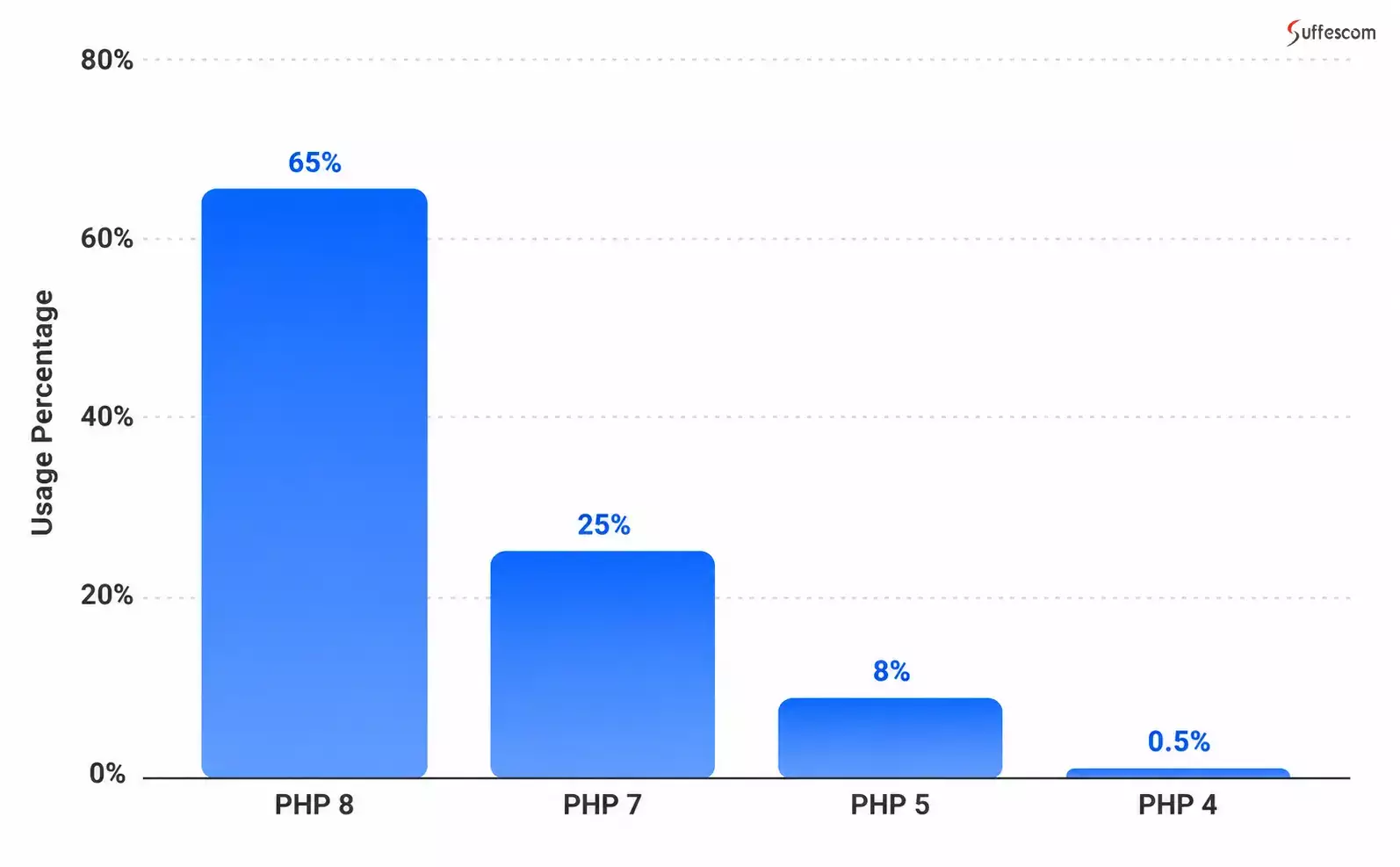
Source: W3Techs PHP usage statistics
PHP's continued adoption shows that it remains relevant for business applications, content management systems, and web platforms. The distribution of the versions also shows that quite a number of websites that run on PHP have opted for previous major versions.
This poses the need for companies to analyze the exact PHP version used in the apps they employ. Upgrading to PHP 8 is not enough to ensure that the app is being run on a supported version of PHP, considering PHP 8.1 has become end of life.
PHP 7 Usage Decreases With Increasing Adoption of PHP 8
Year-over-year comparison of adoption makes the trend clear:
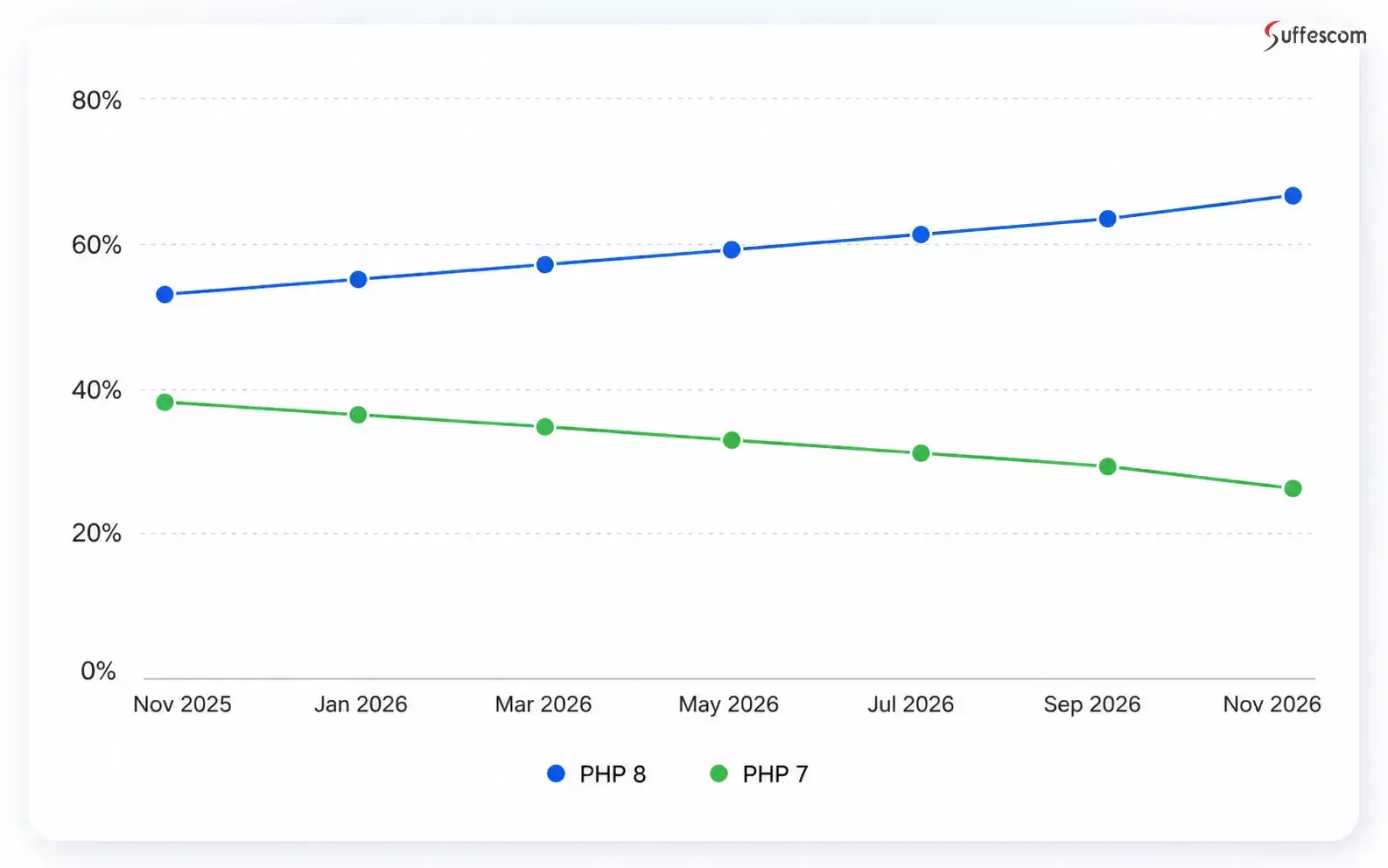
Source: W3Techs historical PHP version statistics
During this time, the adoption of PHP 8 grew by 14.1%, while the adoption of PHP 7 dropped by 12%. This proves that people tend to move to the new versions of PHP, though there is still a large number of legacy applications.
Why Companies Should Move from PHP 7.4 and 8.1 Versions
The program will keep functioning on PHP 7.4 and 8.1, yet it doesn't mean that the technologies which underlie it are still supported. PHP 7.4 became out of support in November 2022, and PHP 8.1 followed in December 2025. There are no updates from the PHP community regarding these versions any longer.
The more time passes since the date when your company stops updating the system, the more difficult the further process will be. The programs and libraries which you use keep evolving and you will have to make a lot of compatibility updates when you move to the new PHP version.
PHP Support Deadlines: Which Versions Still Receive Updates?
PHP releases follow a four-year support lifecycle: two years of active support, followed by two years of security-only support. Once a version reaches EOL, it no longer receives official security or bug fixes from the PHP project.
Official PHP Release Lifecycle - As of November 2026
| PHP Version | Security Support Ends | Status |
| PHP 7.4 | November 28, 2022 | End of life |
| PHP 8.1 | December 31, 2025 | End of life |
| PHP 8.2 | December 31, 2026 | Security-only support |
| PHP 8.3 | December 31, 2027 | Security-only support |
| PHP 8.4 | December 31, 2028 | Active support |
| PHP 8.5 | December 31, 2029 | Active support |
Source: PHP Official Supported Versions. Active support includes regular bug fixes; security-only support is limited to security issues.
This timeline contains one thing that should be mentioned during preparation for migration since switching from PHP 7.4 and 8.1 is only half of the task. The other one includes making sure that you will have sufficient time to support your PHP version.
For example, the date of end-of-life for PHP 8.2 approaches in December 2026. Therefore, this version is just a temporary one that you need to switch to. The period of support for PHP 8.4 and 8.5 depends on its compatibility with your application.
What Happens When You Decide to Use the Outdated PHP Version?
It means that you will not update it, but also that you risk dealing with issues with security, cost of maintenance, and ability to meet future requirements of your business.
1. Security issues are more difficult to resolve
No more updates will be delivered by the PHP community to the unsupported version. If some vulnerability concerns the PHP version used in the application, additional measures have to be taken to prevent possible problems. It is especially true for applications dealing with payment processing, storing customers' information, finance-related data, and authentication.
2. Framework and library compatibility becomes a constraint
Releases of modern frameworks, composer packages, and third party libraries become more dependent on newer versions of PHP. Being at PHP 7.4 or 8.1 could prevent the system from receiving new updates. Developers could need to use old libraries and frameworks or replace some components due to their incompatibility with the current system.
3. Maintenance will be more complicated
Outdated code, obsolete functions, expired extensions, and compatibility issues with the existing dependencies may lead to problems while maintaining the system. It could take extra time to resolve all these issues rather than focus on improving the system itself.
4. Migration will be harder
By postponing the system update, developers allow compatibility issues to accumulate and increase. When upgrading finally happens, it could take a lot of time to make code changes, update dependencies, frameworks, and regression testing than an earlier, planned transition would have required.
5. Technology upgrades become harder to plan
An outdated PHP ecosystem is an obstacle to choosing frameworks, hosting solutions, and integration possibilities. All of the above-mentioned elements could make implementing any improvements and developing application capabilities even harder, without solving the problem that already exists.
Implications for business: The use of PHP 7.4 and 8.1 might appear a less risky decision nowadays, but in the long term, it will become a much bigger risk for the company's operations. Planning migration could give the opportunity for a company to solve all of its compatibility issues.
What's Changing During PHP Migration From PHP 7.4 to PHP 8.1?
The extent of efforts required for PHP migration may depend on the current version of the application. Migration to a newer version of PHP from 7.4 will require a greater number of compatibility changes than moving from PHP 8.1, since PHP 7.4 applications need to take into account changes that were introduced in PHP 8.0 and higher.
This is because PHP 7.4 application should consider compatibility with the modifications made throughout PHP 8.x version, whereas the PHP 8.1 application will have been modified to work with most of the significant changes that were done to PHP 8.0.
Moving from PHP 7.4: Handling Significant Compatibility Issues
The PHP 7.4 application has a larger compatibility issue in upgrading to PHP 8.x. Significant changes were made in PHP 8.0 in language behavior, error handling, function arguments, and types. The code which did not cause any problems in PHP 7.4 will cause errors or behave differently in a newer version.
Some areas that need attention include:
- Stricter type handling: PHP 8 introduced more consistent type checks and changed how certain invalid operations are handled. Code relying on loose or unexpected type conversions may need adjustments.
- Changed function behavior: Several internal functions changed their parameter requirements or behavior. For example, passing invalid argument types to certain built-in functions can now trigger a TypeError instead of producing a warning or unexpected result.
- Removed features and functions: Features deprecated in earlier releases were removed in PHP 8.0. Applications using them need alternative implementations.
- Comparison and error-handling changes: Comparisons between numbers and non-numeric strings behave differently, while several operations that previously generated warnings may now throw exceptions or errors.
- Dependency compatibility: Older frameworks, Composer packages, and PHP extensions may not support the target version, requiring upgrades or replacements.
For instance, programs that use loose comparison for validation purposes when entering numbers will produce different outputs after the upgrade. Likewise, applications that pass inappropriate parameters to native functions will not function properly anymore. The above should be determined and tested prior to the deployment.
Migration from PHP 8.1: Emphasis on Changes in Latest Versions
As many of the changes in PHP 8.0 have already been incorporated in PHP 8.1 programs, the migration will require fewer changes in terms of the language itself. However, the migration to PHP 8.4 or 8.5 will call for an examination of changes introduced in PHP 8.2, 8.3, 8.4, and the target versions.
These include:
- Deprecated dynamic property creation: PHP 8.2 will mark creating undeclared properties in most classes as deprecated. Programs that make use of this feature will be required to explicitly declare those properties.
- Implicitly nullable parameter declarations: In PHP 8.4, the declarations of parameters with a non-nullable type that assigns null as its default value are deprecated and need updating.
- Updating the library and framework: The dependencies supported by PHP 8.1 are not always compatible with the next version(s). They have to be checked.
- Extension compatibility: The required PHP extensions have to be installed in the target environment.
- Regression testing of the application: The application workflows, such as authentication, API requests, database operations, scheduled jobs, payment processing, etc., must be checked for any unexpected issues.
For instance, an extension that defines properties at run time will throw deprecation warnings after switching to PHP 8.2 and onward. While this might not break anything right away, it could cause some problems in the future upgrades and maintenance.
How Does the Migration Effort Differ?
| Migration consideration | PHP 7.4 application | PHP 8.1 application |
| Language compatibility | Requires reviewing major PHP 8.0 changes and subsequent releases | Focuses on changes introduced after PHP 8.1 |
| Deprecated and removed features | May involve features deprecated or removed across several releases | Requires addressing later deprecations and removals |
| Framework and dependencies | Older versions may require substantial upgrades or replacement | May need targeted dependency updates |
| Code refactoring | Can involve broader changes to existing code | Often more focused, depending on code quality |
| Testing requirements | Requires thorough compatibility and regression testing | Also requires regression testing, with attention to later-version changes |
Choosing a PHP Version That Supports Your Application's Future
Choosing a PHP version for migration requires more than checking which release is currently available. The target version must work with the application's existing architecture, framework, dependencies, and hosting environment while offering a sufficient support window.
For example, moving directly from PHP 7.4 to the newest release may seem like the best way to avoid another upgrade. However, if the existing framework or essential libraries do not support that release, the migration could require additional refactoring or component replacements. In some cases, a slightly older but compatible release may be a more practical intermediate target.
Before finalizing the target version, evaluate these factors:
1. Check Your Framework's PHP Compatibility
Start by identifying the framework and its current version. Frameworks such as Laravel, Symfony, and CodeIgniter have specific PHP version requirements across their releases.
Check whether the existing framework version supports your intended PHP target. If it does not, determine whether a framework upgrade is available and what changes that upgrade will introduce.
2. Review Composer Dependencies and Libraries
Your application could have several libraries that handle authentication, payments, reporting, APIs, and others, and there could be more than one hundred libraries that you use in your project for those purposes. Even when your PHP code is good and all the necessary dependencies are properly installed, just one old library may become the reason why your project will not work on the desired version of PHP.
Do a review of dependencies using Composer to see which packages need an update, replaced, or removed. It is important to know if the selected packages are supported.
3. Check the Compatibility of PHP Extensions and Hosting Environment
However, extensions such as PDO, OpenSSL, cURL, GD, and mbstring will have to be installed in most cases for the software installations. In addition to this, it is imperative to ensure that the software extensions have been installed and are compatible with the desired version of PHP.
Further, it is essential to find out whether your web host, operating system, database driver software, and deployment platform are compatible with your desired PHP version.
4. Look at the Remaining Time for Support
Do not choose a version only because your current application supports it. How long will support for this application be available?
A good migration must provide you with a suitable period until the next migration is required. Projects started in November 2026 will have more support time with PHP 8.5 as compared to PHP 8.4, but the final choice still depends on framework, dependency, and infrastructure compatibility.
5. Decide Between Direct and Staged Migration
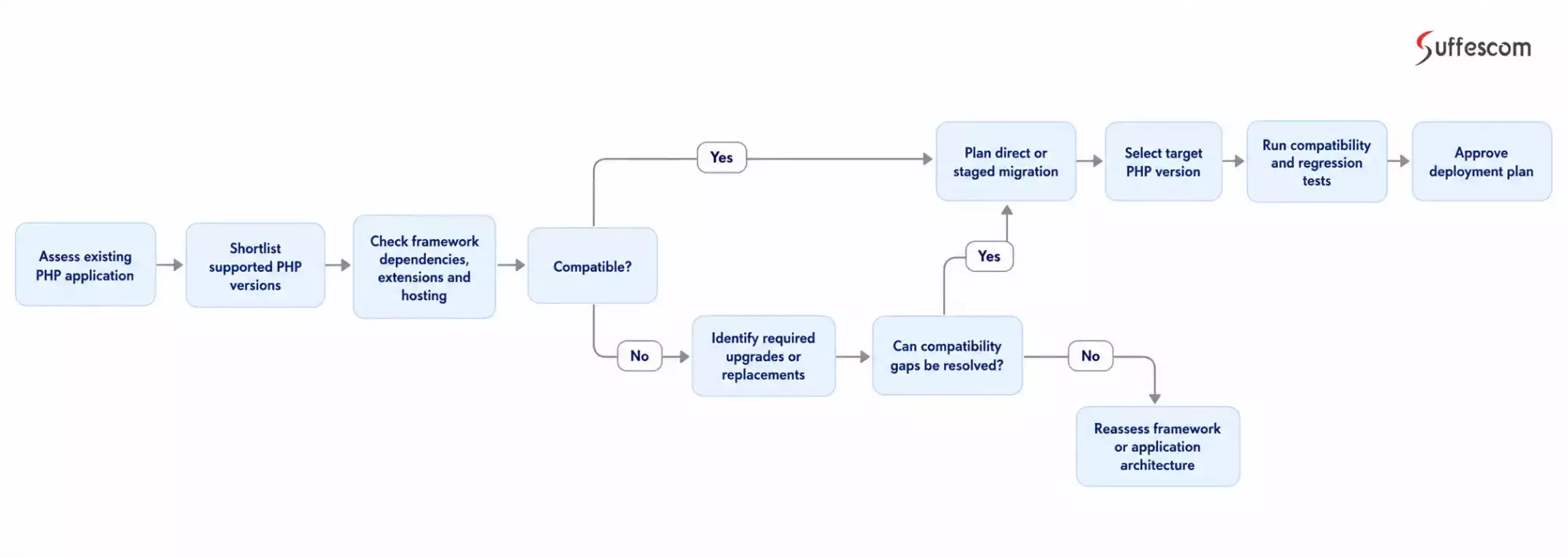
Not every application needs to upgrade through each PHP release individually. A direct upgrade may be practical when the framework, dependencies, and codebase support the target version.
However, older applications with extensive custom code or outdated dependencies may benefit from a staged approach. This could involve upgrading the framework and packages first, resolving compatibility issues, and then moving the application to the target PHP runtime.
The right approach depends on the changes required and how much risk the application can tolerate during migration.
PHP Migration Target: What Should You Evaluate?
| Evaluation area | What to verify | Why it matters |
| PHP release | Active and security support dates | Avoids another upgrade too soon |
| Framework | Minimum and supported PHP versions | Prevents framework incompatibility |
| Composer packages | Version constraints and maintenance status | Identifies dependency conflicts |
| PHP extensions | Availability and version compatibility | Prevents runtime errors |
| Hosting environment | PHP runtime, server, and database support | Ensures production readiness |
| Application code | Deprecated features and breaking changes | Identifies required refactoring |
| Testing capability | Automated tests and critical workflows | Reduces deployment risk |
A Simple Decision Flow for Selecting Your PHP Target
Use the following sequence before committing to a migration version:
Migrating PHP 7.4 and 8.1 Applications Without Disrupting Day-to-Day Operations
Upgrading a PHP application while users are actively accessing it requires more than a successful code deployment. Business applications may be processing payments, updating orders, handling account balances, generating invoices, or running background jobs during the migration. If these operations are interrupted or processed inconsistently, the impact can extend beyond temporary downtime.
The migration strategy should account for active user sessions, database transactions, queued jobs, and external system integrations. The objective is to move to the new PHP environment while preserving transaction integrity and keeping business operations available wherever the infrastructure allows.
Key Considerations for Handling Live Transactions
1. Identify Critical Transactions and Background Jobs
Before migration, map the operations that cannot be interrupted or repeated incorrectly. These may include payment processing, order submissions, fund transfers, invoice generation, scheduled reports, and asynchronous jobs.
Identify which operations run through database transactions, message queues, scheduled tasks, and external APIs. This helps determine which processes need to finish, pause, or resume during deployment.
2. Choose a Deployment Strategy That Minimizes Downtime
The deployment approach should reflect the application's availability requirements and infrastructure.
- Maintenance-window deployment: Temporarily restrict new transactions while the application is upgraded. Complete in-flight operations, deploy the new runtime, run verification checks, and reopen access.
- Blue-green deployment: Prepare a separate environment with the new PHP version, validate it, and switch traffic after confirming readiness. This can reduce downtime, provided database and session compatibility are handled.
- Rolling or canary deployment: Gradually move traffic to the new environment where the infrastructure supports it. This requires careful compatibility between old and new application instances, shared databases, sessions, and background workers.
Not every application migration needs zero downtime. The right strategy depends on transaction volume, infrastructure, application architecture, and acceptable service interruption.
3. Protect Database Consistency During the Switch
A PHP runtime upgrade does not automatically require database changes, but application or framework upgrades performed alongside it may introduce schema or query changes.
Review database compatibility before deployment. If schema changes are necessary, plan them so that existing and new application versions can safely operate during the transition where required. Take verified backups and define a recovery procedure before making production changes.
4. Manage Queued Jobs and In-Progress Operations
Background workers should be handled as part of the migration plan. Depending on the queue system, workers may need to stop accepting new jobs, finish or safely release in-progress jobs, and restart under the new PHP runtime.
Also check that jobs can be retried safely. Idempotency controls help prevent duplicate payments, repeated order creation, or other unintended effects if a job is processed more than once.
5. Validate Transactions Before Restoring Full Traffic
After deployment, test the workflows that matter most to the business. Verify payment status updates, order records, account balances, database writes, API callbacks, scheduled jobs, and transaction logs.
Monitor application errors, queue failures, response times, and database activity. Reconcile critical transaction records where appropriate before considering the migration complete.
A Practical Workflow for Migrating an Application With Live Transactions
A controlled migration should follow a sequence that protects active operations before, during, and after deployment.
The exact steps will vary by architecture, but the following workflow provides a practical starting point:
- Assess: Identify critical transactions, active sessions, queues, integrations, and database dependencies.
- Prepare: Test the new PHP environment, validate dependencies, back up data, and prepare recovery procedures.
- Control traffic: Choose a maintenance window or gradual traffic-switching strategy and manage in-flight operations.
- Deploy: Release the compatible application build and restart required services and background workers.
- Verify: Test critical workflows, inspect transaction records, and monitor application health.
- Resume: Restore normal traffic and continue monitoring for errors or inconsistent transactions.
PHP Migration Cost and Timeline: What Should You Budget?
The cost of migrating a PHP application depends on its complexity, current framework, dependencies, and the amount of code that needs modification. A simple PHP version upgrade may take a few weeks, while applications with outdated frameworks, custom integrations, and legacy code can require several months.
Estimated PHP Migration Cost in the US
The following estimates provide a general starting point for businesses planning a PHP migration with a US-based development team.
| Application complexity | Estimated timeline | Estimated cost |
| Simple application | 2–4 weeks | $5,000-$10,000+ |
| Medium business application | 4–8 weeks | $10,000-$30,000+ |
| Complex legacy application | 8–16+ weeks | $30,000-$60,000+ |
What Affects PHP Migration Costs?
Five factors have the greatest influence on the overall budget:
- Codebase complexity: Larger applications and poorly documented legacy code require more assessment and refactoring.
- Framework and dependencies: Outdated frameworks and incompatible Composer packages may need major upgrades or replacements.
- Custom functionality: Deprecated features, custom modules, and business-specific logic can increase development effort.
- Third-party integrations: Payment gateways, APIs, database drivers, and PHP extensions need compatibility checks.
- Testing and deployment: Regression testing, staging, production deployment, and rollback planning add to the project timeline.
How Suffescom Approaches PHP Application Migration
A successful PHP migration starts with understanding the application, not simply selecting a newer PHP version. Through our custom PHP development services, we assess the existing codebase, review framework and dependency compatibility, and identify the changes required to move the application to a supported PHP release.
The assessment should give your team a clear picture of the migration scope, including:
- Recommended PHP version: A suitable target based on the application's framework, dependencies, hosting environment, and support lifecycle.
- Compatibility gaps: Code changes, deprecated features, unsupported packages, and extensions that need attention.
- Business-critical workflows: Application functions that require focused testing, such as payments, authentication, reporting, and data processing.
- Migration scope and estimate: The development work, testing requirements, deployment constraints, and expected effort.
Our approach also considers the PHP project's official migration documentation, automated compatibility checks, security vulnerabilities testing, and manual code review. This helps identify technical issues before they affect production workflows.
Migrating a PHP 7.4 Application Built on an Older Framework
An application running PHP 7.4 may also depend on an outdated framework or heavily customized components. The first priority is to determine whether those components can be upgraded to maintained releases or need replacement. This establishes a realistic migration path instead of treating the PHP version change as an isolated update.
Upgrading a PHP 8.1 Application With Outdated Dependencies
Some PHP 8.1 applications are held back by third-party packages, SDKs, or extensions that no longer support newer PHP releases. The assessment identifies the affected dependencies and evaluates whether they can be updated, replaced, or adapted. Critical integrations, particularly payment and authentication workflows, are then included in regression testing.
Modernizing an Application With Limited Test Coverage
When an application has few automated tests, migration risks are harder to identify. In this situation, the team should first document expected business behavior and establish test cases for important workflows. Automated compatibility checks can highlight potential code issues, while functional and regression tests help verify that the application continues to behave as expected.
Migrating Within a Fixed Hosting or Deployment Window
Some businesses need to upgrade PHP before a hosting provider removes support for an older version. The migration plan must account for environment configuration, extension availability, database connectivity, scheduled jobs, and background workers. Deployment rehearsals, production validation, and a recovery plan help reduce the risk of service disruption.
The objective is to make the migration predictable: establish which PHP version the application can move to, identify what needs to change, validate business-critical functionality, and define a deployment plan before production release.
Conclusion
Migrating from PHP 7.4 or 8.1 is not just a version update. It involves checking framework compatibility, reviewing third-party dependencies, addressing deprecated code, and making sure essential business workflows continue to function after deployment.
The right migration strategy depends on your application's condition. A well-maintained codebase may only need targeted compatibility fixes, while an application built on outdated frameworks or unsupported components may require broader modernization. Choosing a supported PHP version, testing critical functionality, and planning deployment carefully can help reduce migration risks and avoid unnecessary rework.
If your business application still relies on PHP 7.4 or 8.1, now is the time to assess what an upgrade will involve. Suffescom helps evaluate your existing PHP application, identify compatibility issues, modernize outdated components, and plan a migration aligned with your technical and business requirements.
Frequently Asked Questions
1. Is PHP 7.4 still supported?
No. PHP 7.4 reached the end of its official security support on November 28, 2022. It no longer receives security fixes from the PHP project, so applications running this version should be assessed for migration to a supported release.
2. Is PHP 8.1 end of life?
Yes. PHP 8.1 reached the end of its security support on December 31, 2025. Businesses still using it should review their framework, dependencies, and hosting environment before upgrading to a supported PHP version.
3. Which PHP version should I upgrade to?
The right target depends on framework compatibility, third-party packages, PHP extensions, and hosting support. PHP 8.4 or 8.5 may be suitable targets for many applications, but the latest version is not automatically the best choice. Check the application's dependencies and the PHP support lifecycle before deciding.
4. Can I migrate directly from PHP 7.4 to PHP 8.4 or 8.5?
Yes, a direct migration may be possible, but it requires checking all relevant breaking changes across the intervening PHP releases. Framework and dependency compatibility, deprecated features, extensions, and application workflows should be tested before deployment. A staged upgrade may be safer for complex legacy applications.
5. How long does PHP migration take?
A straightforward PHP migration may take 2–4 weeks. Medium-sized business applications can require 4–8 weeks, while complex legacy systems modernization may take 8–16 weeks or longer. The actual timeline depends on codebase complexity, dependency updates, testing requirements, and deployment constraints.
6. How much does it cost to migrate a PHP application?
For a US-based development team, a simple migration may cost around $5000-$10,000, while a medium-sized business application may require $12,000-$30,000. Complex legacy migrations can exceed $60,000. These are indicative planning estimates; an assessment of the existing application is needed for a reliable quotation.
7. Will upgrading PHP affect my existing application or database?
It can. PHP upgrades may change how certain functions, types, extensions, and dependencies behave. Database compatibility also needs to be checked, particularly if the migration involves changing database drivers or infrastructure. Regression testing should cover data access, transactions, authentication, and other critical workflows.
8. How can I check whether my PHP application is compatible with a newer version?
Start by checking the framework's supported PHP versions, Composer dependency requirements, and installed PHP extensions. Tools such as PHPCompatibility can identify many version-related code issues. However, automated checks cannot verify every runtime behavior, so manual code review and application-level testing are also necessary.
9. Should I upgrade my existing PHP application or rebuild it?
Upgrade the existing application when its architecture, framework, and codebase remain maintainable. Consider rebuilding or modernizing selected components when outdated dependencies, unsupported frameworks, or architectural limitations make incremental upgrades too costly or risky. A technical assessment can help compare both approaches.
10. How can I migrate a PHP application without disrupting live transactions?
Use a deployment strategy suited to the application's traffic and transaction requirements. Prepare and test the new environment, maintain database consistency, manage background queues, and validate critical workflows before restoring normal traffic. Blue-green deployment or a planned maintenance window may be appropriate depending on the system.