Key Takeaways:
- PHP security depends on maintaining a patched runtime, secure application code, updated dependencies, and properly configured servers.
- PHP2Shell vulnerabilities (CVE-2026-109618 and CVE-2026-109619) highlight the risks of unpatched PHP environments, including potential remote code execution and memory disclosure.
- Common PHP security vulnerabilities include SQL injection, XSS, CSRF, insecure file uploads, remote code execution, and insecure deserialization.
- Regular security testing through SAST, DAST, Composer audits, and manual penetration testing helps identify vulnerabilities before they are exploited.
- Effective remediation involves applying security patches, replacing unsafe code, updating vulnerable dependencies, strengthening server configurations, and retesting fixes.
- Unsupported PHP versions and complex legacy dependencies require planned upgrades or migration, supported by continuous monitoring and a long-term security strategy.
PHP powers millions of websites and web apps, so their security matters to companies relying on them. Vulnerabilities of PHP apps and their runtimes may lead to leaking information about systems, compromising server security by allowing hackers access to run bad scripts on them. SQL injections, XSS vulnerabilities, unsafe file processing problems, and old versions of PHP are some examples of these issues, which may allow attackers to enter into systems easily.
PHP2Shell has some recent vulnerabilities, so we need to secure our PHP environment from these attacks at the runtime level. The RCE and memory disclosure attacks are harmful to an application, so these potential risks should be checked properly before deployment.
Locating vulnerable versions of PHP that we have used in our project and finding out how much we depend on them will reduce risks to a certain level. The guide contains information on the various PHP security risks, the PHP2Shell risk assessment process, and how to detect, solve, and avoid security problems in PHP.
PHP2Shell Vulnerability: Understanding the Critical 2026 PHP Security Flaw
The October 2026 CISA alert advises users to promptly address two new critical vulnerabilities that may enable an attacker without authentication to remotely execute code and possibly gain access to process memory due to the PHP2Shell security vulnerability.
- CVE-2026-109618: Memory corruption due to improper handling of out-of-memory conditions.
- CVE-2026-109619: Use-after-free bug related to stale request references.
In contrast to application-layer vulnerabilities, the aforementioned vulnerabilities are native to the PHP runtime environment and hence may impact any application regardless of its underlying CMS or framework.
Why Does It Matter?
CVE-2026-109618 – Out-of-Memory Handling
Incorrect initialization of internal request data during handling of out-of-memory conditions will cause PHP to access invalid memory areas, which can be exploited by an attacker for memory corruption and remote code execution.
CVE-2026-109619 - Stale Global State
PHP can maintain a reference to the memory even after deallocating it. This can be exploited for use-after-free and memory corruption and remote code execution.
Which PHP Versions Are Affected?
PHP2Shell can affect PHP versions prior to the ones that have patches fixing the security vulnerabilities for each affected branch. These patches were issued by the PHP development team on October 21, 2026.
The following table lists the initial fixed releases:
| PHP Branch | Initial Fixed Release |
| PHP 8.2 | 8.2.35 |
| PHP 8.3 | 8.3.36 |
| PHP 8.4 | 8.4.27 |
| PHP 8.5 | 8.5.12 |
Earlier versions in these branches require the relevant security updates. PHP 8.1 and older versions are also a concern because they are outside regular upstream security support.
Affected deployment environments include:
- PHP-FPM
- Apache mod_php
- php-cgi
- FrankenPHP
- LiteSpeed
What Happens If PHP2Shell Is Exploited?
Exploitation may result in:
- Remote code execution: Running code on the compromised server.
- Memory leakage: Sensitive information may be disclosed from process memory.
- Compromised server: Unauthorized access to application files and associated systems.
- Application service disruption: Interruption of the application’s services and business activities.
- Follow-up attacks: Exploited credentials may be used against other systems.
How to Verify Your PHP Environment Is Patched Against PHP2Shell
Once you know about the vulnerabilities of PHP2Shell, your next task would be to figure out which applications use those particular versions of PHP and if the patches for security have been installed or not.
Here, one would need to first check the PHP version being used by each of the applications. A developer may issue these commands:
- php --version
- php --ini
- php -m
The commands show the selected PHP CLI version, configuration files, and loaded extensions, respectively, according to the PHP command line interface documentation.
However, the tests will not tell you which PHP interpreter is used for your site. The server may have multiple PHP versions, and PHP-FPM pools, containers, and web server setups may have their own runtimes. You must check the actual runtime environment prior to drawing conclusions on updates.
Check the runtime of your application in PHP against the mentioned fixed PHP versions above. In case you have an older one, refer to PHP or your host provider's security advisories for further information if the fix has been done.
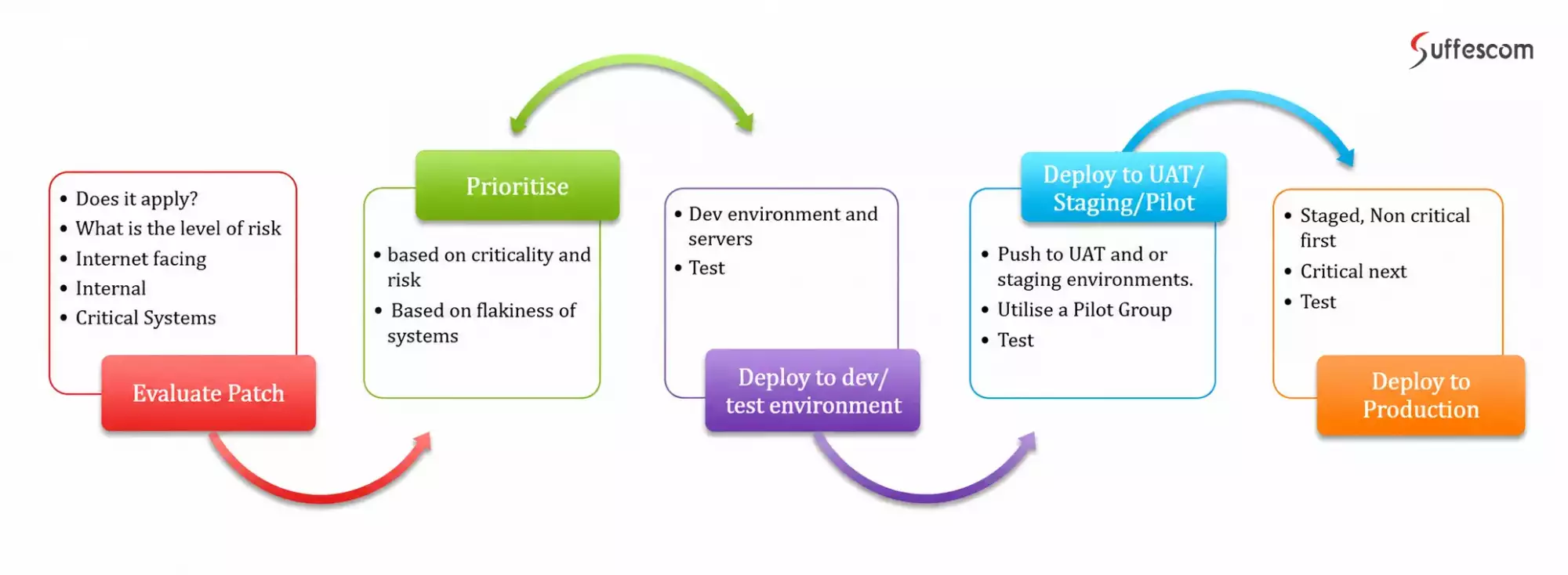
For an IT review, maintain a status for each application:
- Verified as fixed: The security patch is verified by either runtime or vendor evidence.
- Affected and needs fixing: The affected version of PHP is known, but the fix is not yet done.
- Unverified: Runtime evidence or supporting information is not available.
- Isolate the suspect compromise: A scan that produces an inconclusive result or lack of support from your hosting company's support is considered unverified until proven otherwise. Designate someone to get the necessary information and schedule a review date.
What If Legacy Dependencies Block Your PHP Upgrade?
For many organizations, PHP2Shell cannot be patched simply by updating the server. The applications that use PHP version 7.4 or 8.1 may have outdated framework, packages, or functions that make it hard to upgrade them to PHP 8.2.35+, or 8.4.27+.
In case there is no way for upgrading:
- Temporary Perimeter Security Measures to Implement: Employ WAF virtual patching, eliminate unneeded PHP paths, and establish memory limits.
- Segment Risky Applications: Separate high-risk applications running old versions of PHP from the rest of the network by limiting access to internal databases and credentials.
- Strategize for a Phase-Based Migration Plan: Perform audits of legacy syntax, update third-party libraries, and test applications in a staging environment prior to migration of production traffic.
If different PHP environments and hosting providers managed by various teams are making a successful migration to a new PHP version difficult due to legacy code, Suffescom's professional PHP security and upgrade services can help assess risks, refactor incompatible code, and migrate applications.
Application-Level Security Weak Points Attackers Look for in PHP Environments
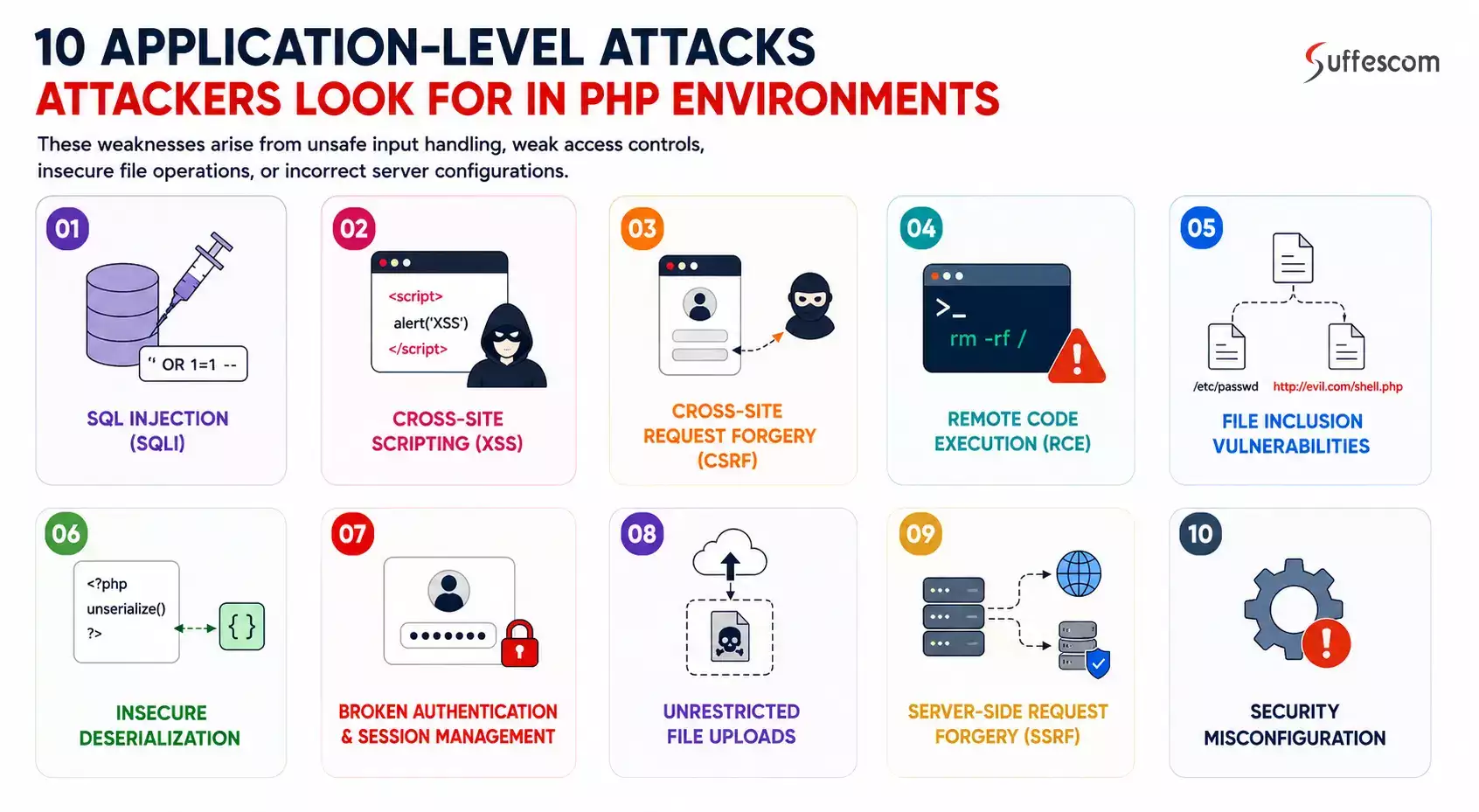
While PHP2Shell reveals potential threats in the PHP runtime, the following application-level security vulnerabilities may be introduced by inadequate input validation, improper access control, insecure file handling mechanisms, or misconfigured servers:
SQL Injection (SQLi)
SQL injection vulnerability appears when user input is inserted into SQL queries without proper validation. An attacker is able to change queries so as to access, modify, or delete unauthorized data stored in databases. In PHP applications, the use of dynamically created SQL queries instead of prepared ones becomes the root cause of this vulnerability.
Cross-Site Scripting (XSS)
Cross-site scripting occurs when the untrusted data is presented within the browser during the execution of a certain script. The session of the user becomes vulnerable since the attacker can inject a malicious script, which will then be executed within the user's browser, and this can lead to session token theft, modification of the presented content, and actions being carried out by the affected user.
Cross Site Request Forgery (CSRF)
A CSRF attack happens whereby the victim's browser is tricked into sending an unnecessary request to the application that he or she is already using. CSRF involves the attack being carried out by causing the user to perform the request for modification of the account without their knowledge or approval. Proper CSRF tokens and suitable cookie configuration, such as SameSite, should be used in PHP applications for requests that involve changes.
Remote Code Execution (RCE)
Application-based RCE occurs when there is some way of causing the PHP application to run commands or code that is controlled by the attacker. Insecure usage of eval, insecure command execution, or insecure dependency could allow for these attacks to take place. These attacks could potentially grant access to the application server.
File Inclusion Vulnerabilities
Local File Inclusion (LFI) and Remote File Inclusion (RFI) occur when an application uses untrusted input to determine which files to load. LFI may expose sensitive server files or, in certain conditions, enable code execution. RFI can allow an attacker to load malicious code from an external location when the environment permits it.
Insecure Deserialization
PHP applications may use serialization to store or transfer complex data structures. Problems arise when an application unserializes untrusted data without validating it. A crafted serialized object may trigger unintended behavior through available classes and their methods, potentially resulting in file operations, data manipulation, or code execution.
Broken Authentication and Session Management
Weak authentication and session controls allow attackers to gain unauthorized access. Weaknesses include predictable session identifiers, insufficient session expiration, insecure password recovery, and failure to regenerate session IDs. PHP applications should use secure password hashing, regenerate session IDs after authentication, enforce appropriate session timeouts, and protect session cookies with Secure, HttpOnly, and SameSite settings.
Unrestricted File Uploads
File upload features can become an entry point for attacks when applications rely on file extensions or client-provided content types. Attackers may upload executable files, malicious scripts, or oversized files that consume server resources. PHP applications should validate file content, restrict permitted formats and sizes, generate safe filenames, and store uploads outside executable web directories whenever possible.
Server-Side Request Forgery (SSRF)
SSRF occurs when an application makes server-side requests to URLs or network locations controlled by an attacker. A vulnerable PHP feature that fetches external images, imports data, or connects to third-party services may be abused to reach internal systems or cloud metadata endpoints.
Security Misconfiguration
Security misconfiguration can expose a PHP application even when its code does not contain a direct vulnerability. Examples include publicly accessible configuration files, exposed error messages, directory listing, unnecessary services, excessive file permissions, and insecure PHP settings.
How to Test PHP Applications for Security Vulnerabilities
Identifying security weaknesses in a PHP application requires a combination of automated testing and manual assessment. Automated tools can detect known vulnerability patterns, while manual testing helps uncover issues involving application logic, access permissions, and unexpected user behavior.
A practical PHP security testing process should include:
Static Application Security Testing (SAST)
SAST tools examine PHP source code without executing the application. They help identify unsafe coding patterns, insecure function usage, hardcoded credentials, and potential security weaknesses during development.
Tools such as SonarQube and Semgrep can help developers detect issues early and review vulnerable code before deployment.
Dependency and Package Security Testing
PHP applications often rely on third-party libraries and packages managed through Composer. Outdated or vulnerable dependencies can introduce security risks even when the application's own code is properly maintained.
Use dependency auditing tools to:
- Identify packages with known security advisories.
- Review outdated or abandoned dependencies.
- Check whether vulnerable package versions have available fixes.
- Assess transitive dependencies that may introduce additional risks.
Composer's built-in audit command can help identify dependencies affected by known security advisories.
Dynamic Application Security Testing (DAST)
DAST evaluates a running application by sending requests and analyzing its responses. Unlike source-code analysis, it tests the application from an external perspective.
Tools such as OWASP ZAP and Burp Suite can help assess exposed endpoints, request handling, security headers, and application behavior under different input conditions.
Testing should cover authenticated and unauthenticated areas, APIs, and important business workflows.
PHP2Shell Vulnerability Testing
PHP2Shell requires a separate runtime-level security assessment because source-code scans alone cannot establish whether the underlying PHP installation is protected.
Security teams should:
- Verify patch status against official PHP or hosting-provider advisories.
- Confirm that the deployed runtime is the patched build, including containerized and managed environments.
- Review vendor security notices for backported fixes.
- Use trusted vulnerability testing methods to identify potentially exposed installations.
- Avoid testing exploit payloads against production systems. Any controlled exploit validation should take place in an authorized, isolated environment.
Manual Security Testing and Penetration Testing
Automated scans cannot reliably assess every application-specific risk. Manual testing helps validate security controls and identify weaknesses that depend on how different application features interact.
A penetration test should examine:
- Access permissions across user roles.
- Authentication and account recovery workflows.
- API access and sensitive data exposure.
- File and document handling.
- Business-critical transactions and workflows.
- Security controls between integrated services.
Evaluating and Prioritizing Security Findings
A security assessment is useful only when its findings lead to actionable fixes. Document each issue with its affected component, evidence, potential impact, severity, and recommended remediation.
Prioritize findings based on exploitability, business impact, data sensitivity, and exposure rather than relying only on the number of vulnerabilities detected.
A Developer's Approach to Fixing PHP Security Vulnerabilities
Fixing PHP security vulnerabilities requires addressing the underlying issue across application code, dependencies, runtime environments, and server configurations. The remediation approach should eliminate the root cause, validate the changes, and prevent the same weakness from recurring.
Apply Official PHP Security Updates
Runtime vulnerabilities require security updates to the PHP installation itself. Keep PHP environments on supported branches and apply official security releases according to relevant PHP or hosting-provider advisories.
For managed hosting, containers, and custom PHP builds, verify that the deployed runtime includes the required patches. Application-level code changes alone cannot remediate a vulnerable PHP runtime.
Replace Unsafe Code Patterns
Review vulnerable application components and replace unsafe implementations with secure alternatives. For example, database queries should use parameterized statements rather than directly inserting user input into SQL queries.
$stmt = $pdo->prepare("SELECT * FROM users WHERE email = :email");
$stmt->execute(['email' => $email]);
Similarly, user-controlled content should be encoded appropriately before being displayed in HTML.
echo htmlspecialchars($userInput, ENT_QUOTES | ENT_SUBSTITUTE, 'UTF-8');
These changes help address common weaknesses involving unsafe database queries and untrusted output.
Update or Remove Vulnerable Dependencies
Review Composer packages for known security advisories and replace vulnerable versions with supported releases. Where a dependency is no longer maintained, assess a secure alternative.
Composer's audit command provides an initial dependency security check:
composer audit
Dependency updates should also include compatibility testing to avoid introducing application failures.
Strengthen Server and PHP Configuration
Reduce unnecessary exposure by reviewing PHP settings, enabled extensions, file permissions, and web-server configurations. Disable unused functionality, restrict access to sensitive files, and prevent production environments from exposing detailed error messages.
For example, production configurations should avoid displaying PHP errors publicly:
display_errors = Off
log_errors = On
Apply these settings to the active production PHP configuration, including PHP-FPM or hosting-level overrides where applicable. Ensure error logs are stored securely and cannot be accessed publicly.
Secure Application Data and Credentials
Protect authentication credentials, session data, and sensitive business information through established security mechanisms. Passwords should be stored using secure hashing functions rather than plaintext or reversible encryption.
$hash = password_hash($password, PASSWORD_DEFAULT);
// During login
if (password_verify($submittedPassword, $hash)) {
// Authentication successful
}
Credential exposure should also trigger appropriate rotation and access reviews across connected databases, services, and infrastructure.
Retest After Remediation
Every security fix should be validated before being considered complete. Repeat the relevant security tests, confirm that the original weakness is no longer present, and check for regressions in affected application workflows.
Maintain remediation records covering the affected component, changes applied, validation results, and outstanding risks.
Best Practices for Building a Long-Term PHP Application Security Strategy
PHP security requires ongoing attention throughout the application lifecycle. Businesses should establish processes that help development and IT teams identify new risks, maintain secure environments, and respond quickly when security issues emerge.
- Use supported PHP versions: Plan upgrades before a PHP branch reaches the end of support, and avoid relying on unsupported runtime versions.
- Integrate security checks into development: Run code analysis, dependency audits, and security tests as part of the development and release process.
- Follow least-privilege access: Give developers, administrators, application processes, and service accounts only the permissions they need.
- Protect production environments: Separate development, staging, and production systems, restrict administrative access, and secure deployment credentials.
- Monitor application activity: Review server logs, authentication events, unusual requests, and unexpected changes to application files.
- Maintain tested backups: Keep protected backups of application data and configurations, and periodically verify that recovery procedures work.
- Establish a patch management process: Assign responsibility for monitoring security advisories, assessing affected systems, applying updates, and documenting completion.
- Conduct periodic security assessments: Reassess applications after major releases, infrastructure changes, new integrations, or significant security disclosures.
These practices help businesses move from reactive vulnerability fixes to a consistent application security process.
When Should Businesses Consider Professional PHP Security Services?
Not every PHP security issue requires external support. However, businesses should consider professional assistance when vulnerabilities extend beyond routine maintenance or require specialized development and security expertise.
Professional support can be valuable when:
- Repeated security incidents occur: Applications continue experiencing suspicious activity, unauthorized access, or recurring vulnerabilities despite internal fixes.
- Applications handle sensitive data: Financial records, customer information, payment details, or other confidential data require stronger security controls and regular assessments.
- Internal security expertise is limited: Development teams lack the experience or resources to conduct penetration testing, investigate complex vulnerabilities, or implement secure architecture changes.
- Legacy PHP applications need assessment: Older applications may contain outdated dependencies, unsupported components, and security weaknesses that require careful remediation.
- Applications undergo major changes: New integrations, API development, infrastructure migrations, and feature releases can introduce security risks that need independent assessment.
- Compliance requirements become more demanding: Businesses subject to PCI DSS, GDPR, or other applicable requirements may need specialized compliance consulting to assess security, address gaps, and implement safeguards.
- A security breach is suspected: organizations may need incident investigation, vulnerability containment, recovery support, and measures to prevent similar incidents.
Businesses that need development expertise to strengthen or modernize their applications can explore PHP development services. Our qualified PHP security experts team help address code-level weaknesses, improve application architecture, and support ongoing maintenance.
Conclusion
PHP security is not a one-time task. New vulnerabilities, outdated dependencies, legacy code, and changing application requirements can introduce risks at different stages of development and deployment. Addressing these issues requires businesses to keep PHP environments updated, test applications regularly, and fix security weaknesses before they lead to data exposure or system compromise.
The PHP2Shell vulnerabilities further demonstrate why runtime security deserves the same attention as application-level protection. A secure PHP application depends on both a patched runtime and properly implemented application code.
Businesses that lack the in-house expertise to assess, secure, or modernize their PHP applications can seek support from an experienced development team. Suffescom assists businesses in strengthening their application architecture, addressing code-level flaws, and developing more secure PHP solutions to deal with potential security vulnerabilities.
Frequently Asked Questions About PHP Security Vulnerabilities
1. Is PHP secure for developing business applications?
Yes. PHP can support secure business applications when developers use supported PHP versions, follow secure coding practices, maintain dependencies, and implement appropriate application and infrastructure security controls. Security depends on how the application is developed, configured, and maintained.
2. What are the most common PHP security vulnerabilities?
Common PHP application vulnerabilities include SQL injection, cross-site scripting (XSS), cross-site request forgery (CSRF), remote code execution, insecure file uploads, file inclusion, and insecure deserialization. These weaknesses often result from unsafe input handling, inadequate access controls, or insecure application configurations.
3. Can PHP2Shell allow unauthenticated attackers to compromise a WordPress or other PHP-based website?
Yes. PHP2Shell affects the underlying PHP runtime, so websites using WordPress, Drupal, Joomla, or custom PHP applications may be exposed if they run a vulnerable PHP build. Successful exploitation can allow attackers to execute code remotely without logging in, potentially compromising the server. Updating the CMS, themes, or plugins alone does not fix the runtime vulnerabilities. The PHP installation itself must receive the appropriate security update.
4. How often should PHP applications undergo security testing?
PHP applications should undergo security testing during development, before major releases, and after significant code or infrastructure changes. Regular assessments are also important for applications handling sensitive data or supporting critical business operations. The testing frequency should reflect the application's risk and exposure.
5. How can I confirm whether my website is patched against PHP2Shell (CVE-2026-109618 and CVE-2026-109619)?
First, identify the PHP runtime actually serving your website rather than relying only on the CLI version. The initial fixed releases are PHP 8.2.35, 8.3.36, 8.4.27, and 8.5.12. If your hosting provider or Linux distribution uses backported security patches, check its advisory or package records because the displayed PHP version may not change. Confirm that the deployed runtime includes fixes for both CVEs before marking the application as protected.
6. Does updating PHP automatically fix application security vulnerabilities?
No. Updating PHP addresses vulnerabilities in the runtime that are fixed by the relevant release. It does not automatically resolve application-level weaknesses such as SQL injection, insecure authentication, or improper file handling. These require separate code-level and configuration changes.
7. Which tools can developers use to test PHP security?
Developers at Suffescom use tools such as SonarQube and Semgrep for static code analysis, OWASP ZAP and Burp Suite for dynamic application testing, and Composer Audit for dependency security checks. These tools cover different aspects of application security and work best as part of a broader testing strategy.
8. Can outdated PHP versions cause security risks?
Yes. Unsupported PHP versions no longer receive regular upstream security fixes, leaving known vulnerabilities unaddressed. Applications running these versions may also depend on outdated libraries and incompatible components, increasing maintenance and security challenges.
9. How do I know if my PHP application has security vulnerabilities?
A PHP application can be assessed through source-code analysis, dependency audits, dynamic security testing, and manual penetration testing. Reviewing security advisories and monitoring application activity also helps identify potential risks. No single scan can guarantee that an application is completely secure.
10. What should businesses do if their PHP application is running an unsupported version?
Businesses should assess application compatibility, identify outdated dependencies, and plan a migration to a supported PHP branch. If an immediate upgrade is not possible, temporary risk-reduction measures such as network isolation and restricted access can help limit exposure. These measures should not replace a planned migration.