Key Takeaways:
- Cloud migration is more than moving workloads. A successful migration depends on preparation, controlled cutovers, data consistency, and measurable business outcomes.
- 73% of organizations operate hybrid cloud environments, according to Flexera's 2026 State of the Cloud Report, based on 753 cloud decision-makers and users worldwide.
- Cloud migration costs typically range from $15,000 to $300,000+, based on Suffescom's published estimates. Complex enterprise projects may cost more.
- Migration timelines vary from 1–3 months for basic projects to 6–12+ months for advanced migrations, depending on scope and complexity.
- Assess readiness first. Map application dependencies, infrastructure constraints, security requirements, and recovery objectives before moving workloads.
- Choose the right migration strategy. Rehosting, replatforming, and refactoring involve different costs, risks, and engineering effort.
Cloud migrations may seem simple, but they often fail due to issues like database synchronization problems, failed API integrations, or stopped workflows during cutovers. An application move is just a small aspect of it. Companies should be concerned about maintaining data security and uptime of services during this period, as well as ensuring that all components are functioning properly while they undergo an upgrade process.
An effective plan for cloud migration should be based on its benefits, such as better scalability, improved infrastructure management, increased resiliency of applications against failures, faster response times from customers due to less downtime during outages, etc. There is an urgent need to plan carefully; according to Flexera's 2026 State of the Cloud Report, based on a survey of 753 cloud decision-makers and users worldwide, 73% of companies have hybrid clouds. The study shows how difficult it is to manage workloads in various systems but doesn't address issues related to migrations.
Purchasing an on-premises solution isn't sufficient; you need to choose a migration tool as well. The document provides an overview of assessing loads for migrations, selecting a strategy for moving out-of-state or rolling back changes, protecting information security during these processes, testing efficiency levels before implementing them on your system, and controlling expenses without causing any major impact on operations.
Cloud Migration Strategy and Business Continuity Requirements
An effective cloud migration plan is aligned to meet business continuity goals, technical needs, and disaster recovery plans. Teams must define measurable service objectives before selecting migration methods.
Translate Business-Critical Workflows into Availability and Recovery Objectives
Define SLO targets like uptime percentage, response time limits, and failure rate based on current performance metrics of our system at scale. Define Recovery Time Objectives (RTOs), Service Restoration Time Objective, and Recovery Point Objective. Transaction-heavy systems might need more stringent limits compared to read-only applications.
Evaluate peak usage rates of databases for writing operations; check dependency on APIs; determine where data is stored (data residency); establish retention periods; ensure compliance through contracts. These requirements determine whether workloads need continuous replication, a controlled write freeze, or a planned maintenance window.
Define Migration Ownership and Decision Authority
The owner applies for validation of functionality, the cloud architect approves target architecture, and the database administrator verifies replication and data consistency. Connectivity is checked by network engineers, whereas the security team reviews access control policies, cryptography standards, and regulatory requirements.
The DevOps or SRE team monitors deployment performance, latency, error rate, and infrastructure capacity. The business stakeholder validates important processes, whereas a designated change management team authorizes changes to be rolled back if they exceed certain limits.
Plan Migration Windows Around Business Activity
Choose migration windows based on actual business activity, not just technical team availability. Review peak transaction periods, reporting cycles, scheduled batch jobs, month-end processing, and seasonal demand before assigning workloads to migration waves.
Coordinate planned changes with business teams, customer support, vendors, and other stakeholders who depend on the affected systems. If a migration could affect customer-facing services, prepare communication plans and identify alternative workflows that teams can use during temporary service limitations.
List this task as part of an organization's migration responsibility matrix. Align recovery objectives and tested procedures with the AWS Well-Architected Reliability Pillar.
Cloud Migration Readiness Assessment and Dependency Mapping
An effective cloud migration readiness evaluation determines which applications are ready for relocation to a new environment, those that must be fixed beforehand, and others requiring further preparation. Without knowledge of dependency relationships between moving servers, performance needs, and failure modes for restoration purposes, it may cause disruption to linked systems as well as organizational processes.
Build a Workload Inventory
Inventory software products like applications, servers, database environments, and version control systems, as well as their current state for maintenance purposes. Record business owner records, technical owner records, and application criticalities. Also, record data classification, regulatory requirements, and contractual limitations.
Capture CPU, memory, storage utilization, peak demand, throughput, and response-time baselines. Capture availability requirements of documents, recovery time objectives (RTOs), recovery point objective (RPO), licensing restrictions, and acceptable migration window. The inventory is an important basis to prioritize and migrate waves of projects.
Map Dependencies Across Databases and External Services
Apply app discovery tools for config analysis of networks; analyze flows between them as well as architectural documents mapping out upstream or downstream relationships among components. Shared database service provider (DBaaS), authentication server or identity management system, API gateway, certificate authority, data store, and integration point for other systems.
A program can be launched from a server but might not work if there is no access to credentials for login, background jobs, or any other service of that type available on its source environment. Check for dependencies between nodes and latency sensitivity of links prior to allocating tasks during migrations.
Validate Cloud Compatibility, Network Capacity, and Recovery Readiness
Operating system support check, runtime compatibility test, software license verification, database version checks, and destination service limitations check. Estimate transfer throughput using data volume, available bandwidth, change rates, and the migration window.
Check for valid network routes to DNS firewalls and storage IOPS, as well as connections among related systems. Backup testing and a disaster recovery plan should be done prior to moving data instead of just having a working backup job at hand.
Establish Evidence-Based Go/No-Go Criteria for Every Workload
Only when there is no issue of dependency on other systems, incompatibility problems, or lack of a backup plan can an application be migrated to another system. If there are unsupported components, unknown dependencies, failed restoration tests, or no rollback procedure available, then it needs to be fixed by an authorized person under formal approval of this policy.
Keep track of the task completion rate for all risks, including their proof-of-concept data source, remediation owner, due date, and approval status. For a systematic approach to discover and assess resources of cloud services like Azure Migrate or Google Cloud Migration Planning.
The 7 Rs of Cloud Migration and Workload Selection
Cloud migration is an option for moving, upgrading, replacing, retaining, or retiring current applications. Application architecture, business value, technical debt, and acceptable migration risks are factors that determine which way to go for an organization’s needs.
Workloads According to the Modernization Requirements
- Rehost: Move Workload Rehost With Minimal Code Changes. It is suitable for compatible applications that require an infrastructure relocation. However, there are still some limitations such as scalability problems, configuration issues, and operational inefficiencies.
- Replatform: Modify specific aspects, such as switching to an administered DBMS system or upgrading software applications during execution time. Check for compatibility issues, data transfer needs, integration problems, and performance during a go-live transition phase.
- Refactor or re-architect: Redesign application architecture to support scalability, resiliency, and cloud-native services. It needs more engineering work, regression tests, and dependency modifications, which increases the difficulty of implementing it properly.
However, it may be slower than a complete overhaul due to issues like old system requirements that are incompatible with current applications or licenses. Choose an option based on its technical viability, testability needs, organizational goals, and availability of resources for restoration purposes.
Workloads Based on Business Value
- Repurchase: Replace a current product with another company's to use as their own. Evaluate the portability of data between systems, identity management features, and limitations on customizing applications to specific needs for users migrating from another platform.
- Relocate: Move compatible virtualized workloads to a different type of host system without much modification. Check for hypervisor support, networking setup, license validity, and availability of backup options.
- Retain: Keep workloads within their existing infrastructure due to dependency issues, compliance requirements, or organizational needs that prevent an immediate move out of place.
- Retire: Decommission redundant applications after checking data retention, ownership, integrations, and downstream dependencies.
Terminology varies across frameworks, so document the selected strategy and its rationale for every workload.
Comparison of the 7 Rs
| Decision factor | What the assessment should determine |
| Business criticality | Acceptable interruption and operational impact |
| Dependency complexity | Connected systems requiring coordinated changes |
| Data consistency | Tolerance for replication lag or write pauses |
| Engineering effort | Required code, configuration, and architecture changes |
| Cost and value | Whether modernization justifies additional investment |
| Recovery feasibility | Whether service and data can recover safely after failure |
Sequence Migration Waves Around Business Dependencies and Risk
Migrate groups of tasks based on dependencies between them, importance level, difficulty of implementation, and availability for deployment purposes. If a basic software program is dependent upon important operations of an organization, then it shouldn't be moved by anyone else.
Develop an application selection table that records selected migrations for applications, including their own choice of migration type, assigned waves, risk levels, responsible owners, dependency requirements, and acceptance conditions. For sequence management purposes, use Google Cloud’s migration-wave planning guidance for decision-making.
It helps to develop an effective cloud migration plan by linking modernization decisions with risks of operations, business goals, and levels of preparedness for implementation.
Ready to Move to the Cloud Without Disrupting Operations?
Plan your migration around application dependencies, data integrity, and business continuity requirements.
Cloud Landing Zone Architecture and Production Readiness
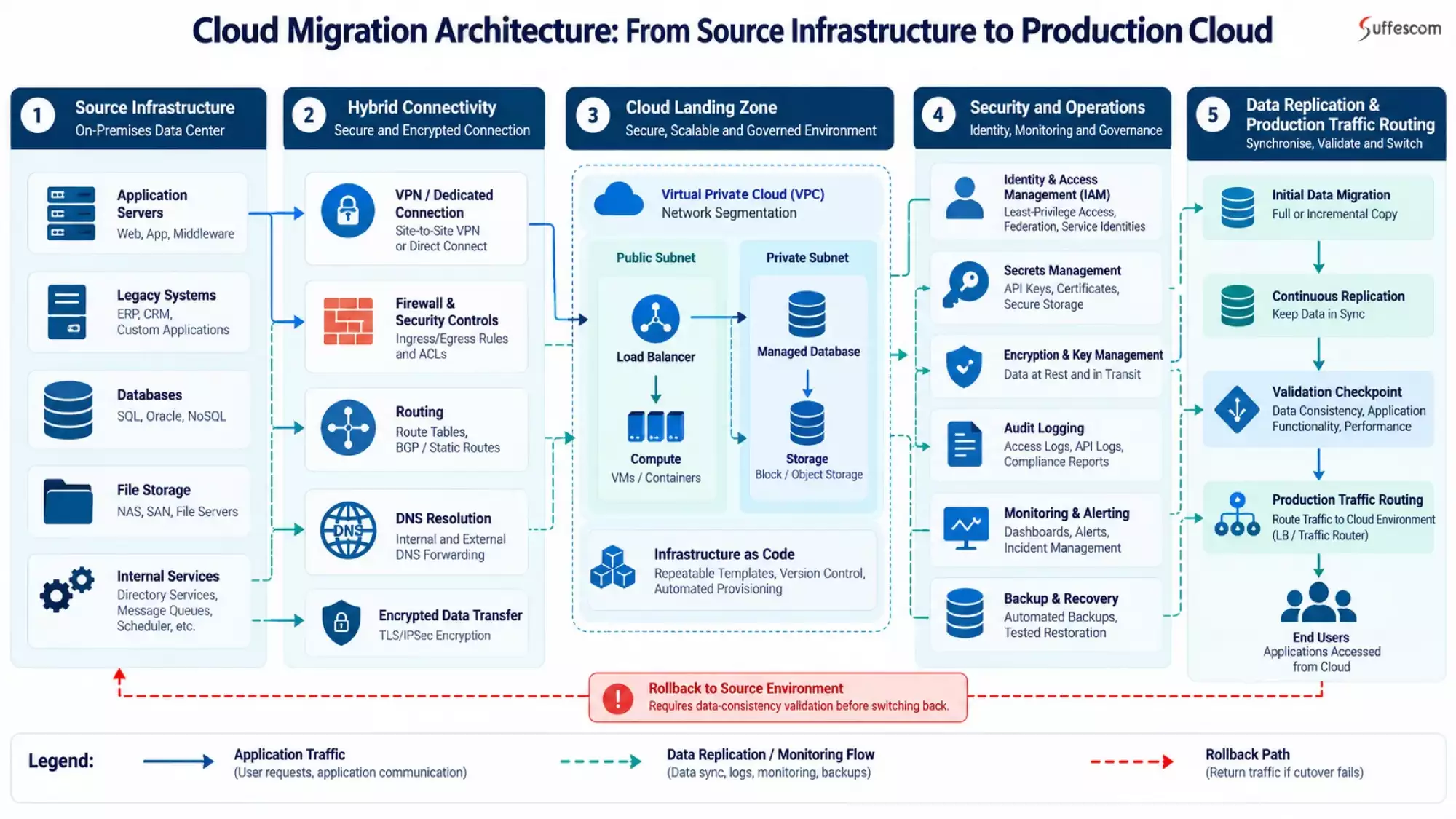
Cloud landing zones provide a foundation for networks, identities, management systems, and infrastructure needed to host applications securely. Setting up this foundation during migration prevents configuration issues and ensures smooth integration of new services with current ones.
Design Network Architecture for Hybrid Cloud Connectivity
Plan IP address ranges to avoid overlapping source infrastructure with cloud networks. Set up network partitioning and routing table configuration for VPNs and private connections between devices as needed by applications. Specify ingress and egress policies for restricting access from unauthorized sources or locations.
Check for network connectivity to those systems that are going to stay off-premises. DNS lookup test port requirements for applications' path. Latency measurement of connection to time-sensitive transactional services and distributed applications. Network dependency documentation for coordinated change management during migrations.
Configure Identity and Security Controls for the Cloud Landing Zone
Least-privilege IAM implementation through role-based permissions and identity federation if needed. Administrative privileges should be separate from applications' standard rights. Use a managed secret service for storing credentials and API keys instead of storing them in application code or config files.
Set up data-at-rest and in-transit encryption together with proper key management rules. Implement a secret rotation policy for certificates and track their validity dates. Enable auditing of identities, activities, admin tasks, and infra modifications. Logging should be integrated into an appropriate security monitoring system for better centralization of information.
Standardize Infrastructure Provisioning With Infrastructure as Code
Version control of the infrastructure-as-code (IaC) template for consistent network setup, computing power requirements, data center space needs, and security policy implementation. Infrastructure management by means of a review process for deployments rather than manual configurations. Resource tagging, naming conventions, and environmental configurations are used for governance purposes as well as managing operations effectively.
Automated policy checks run before provisioning changes. Check out system design documents for unplanned changes, too many privileges granted to users, or misconfigurations. Identify discrepancies between declared vs. actual deployment for infrastructure; detect these via an experimentation approach to identify variances from planned deployments. Such methods are more convenient for replicating, auditing, and maintaining a cloud environment.
Establish Production-Ready Cloud Operations
Manage post-migration workload management through an operating system. Configure infrastructure and application monitoring, centralized logging, alert routing, and dashboard access. Ownership of alert management should be assigned so that appropriate personnel have access to necessary telemetry information regarding system performance problems and service outages.
Check if resources are sufficient for an application’s needs, such as CPU usage, RAM utilization rate, disk space requirements, and bandwidth availability of a system. Ensure that operational team members are aware of deployment logs, architectural specifications for environments, and system configuration specifics. Address any issues related to monitoring, capacity, and operational access prior to approval of a landfall site for load balancing purposes.
Which Cloud Migration Techniques Reduce Downtime, and What Are Their Limitations?
To reduce cloud migration downtime, it is necessary to select methods that are compatible with an app's design specifications, its need for data integrity, and its dependency on hardware resources. There are various requirements for each method, as well as their chances of failing. An appropriate technique for managing disruptions is possible but not 100% reliable to prevent any kind of outage completely.
Blue-Green Deployment for Controlled Environment Switching
Blue-green deployment maintains separate source and destination environments. Validation of configurations, dependencies, and applications occurs before teams switch production traffic via a load balancer or routing layer. In case of failure, traffic may go back to its old state if there is no problem with this system anymore. Stateful applications require secure data sync and write rights since there is no automatic compatibility between different systems.
Canary Releases for Gradual Traffic Migration and Risk Containment
A canary release sends some amount of production traffic to an endpoint first, then increases that portion later on. Track request monitoring for latency levels and error rate statistics of transactional data at defined limits. Stop or reverse a rollout when there is degradation of performance and inconsistency detected by you. Reliable traffic control systems such as AWS is needed for this approach, but they might not be suitable to use on tightly coupled applications.
Continuous Replication for Data-Intensive Workloads
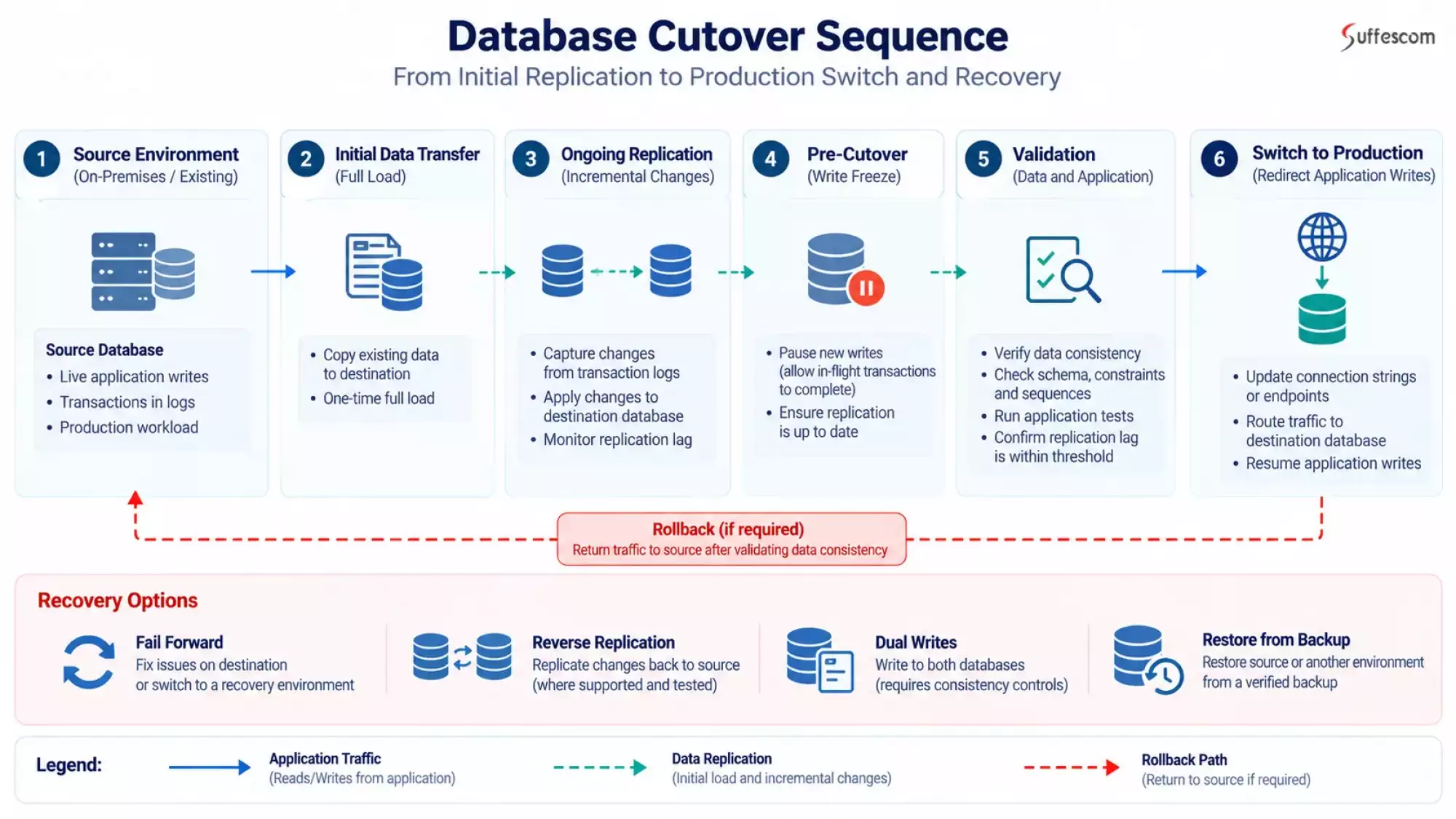
The continuous replication process copies an existing database to another location for later modifications prior to a switch-over event. Replication delay monitoring, transfer failure detection, and destination capacity management. Coordinate sources' writing before switching to perform a full sync of all files at once for validation purposes. High change rate, network limitations, and consistency needs might require some time to write before starting again; an extended cutover period could be required.
Phased Migration for Applications With Cross-System Dependencies
Coordinate movement of tasks among teams without affecting database access points such as API endpoints, division queue services, and the identity management system (IDM). Check validation of routes and authentication rates for latency issues among different platforms. A phased approach to migration may reduce its impact on a particular system. Components tightly coupled might have to be moved as a whole.
DNS and Load-Balancer Cutover for Controlled Traffic Redirection
Load balancing can be used for directing traffic towards a validated target. Set up a TTL value beforehand if necessary, or consider cache and persistent client connection issues. Set up connection draining so that fewer requests reach out and go to retired ones. A DNS change does not ensure a seamless switchover to another system without any downtime.
Select Migration Tools and Automation Based on the Workload
Select an appropriate tool based on its
Source Platform
Target Environment
Data Volume
Compatibility Constraints
Acceptable Downtime.
- Discovery and dependency mapping: Inventory of servers and discovery and app usage statistics for resources and service dependencies.
- Server and application migration: Replicate or transfer compatible workloads, checking operating system, storage, and architecture limitations.
- Database migration and replication: Transfer initial datasets, synchronize ongoing changes, and use change data capture where supported.
- Automation of Infrastructure and Deployment: Automation is achieved through using IaC tools for configuring environments to be consistent across multiple deployments.
- Monitoring and validation: Tracking of replication delay, app status, and performance issues; error detection post-cutover.
Database Migration, Replication, and Transaction Consistency
Database migration is a critical phase during an organization’s move to the cloud, as it relies heavily upon reliable information availability, consistency, and accuracy for its success. An effective database migration plan should take into consideration engine compatibility, ongoing writes, replication lag, and transaction integrity.
Select a Database Migration Method
Select a migration strategy according to the type of sources or targets, database, engine version, topology load capacity, and uptime requirement.
- Native replication: Supported by this system and used for syncing updates between databases. Downtime may be reduced by this method. However, it is dependent upon engine compatibility and configuration issues as well as replication constraints.
- Database migration services: It loads initial data and syncs it periodically if available. Check for source-to-target compatibility, support of certain types of data objects, and limitations imposed by services.
- Log-based change data capture (CDC): Reads a log file of transactions from databases and applies those changes to another system or application. Log storage capacity supports operation performance, order, and replication speed.
- Backup and Restore: Transfer of an uninterrupted copy from the source location to the target site. It is suitable for workloads that can tolerate more downtime. However, large databases might need prolonged restoration and validation time.
To migrate a cloud database without any disruption initially, first transferring all of its data and then continuously changing it would be ideal only with the right cloud consulting approaches. Nevertheless, it should be compatible with those engine types, schema definitions, and writing styles used by them.
Monitor Replication Lag and Validate the Destination
The replication delay is a measure of latency between sources and destinations when they are out of sync. Monitor lag, replication errors, transaction throughput, and source log retention throughout migration. Large amounts of high-volume data transfer rates may lead to longer cutover times due to low bandwidth at a given point in time.
Check for schema compatibility, type of data, indexes, constraint storage procedures, and app-specific DB object validation. Sequence numbers and auto-increment are used to avoid conflicts. Verify order of transactions and references when needed by a replication process. Match rows count, important aggregate values, and data from source to target database. Replication is successful, but it doesn't guarantee full data integrity.
Coordinate the Final Write Freeze and Synchronization
Cut over at an interval of time for writing stop/reading halt. Stop new source transactions; allow in-flight transaction completion; wait for replication to catch up. Check for a certain amount of delay before doing an end-to-end sync and validating it at its target location.
Change the update app connection string, secret key, or database endpoint for writing data at the source. Only open transactions when there are no issues related to query requirements, permission settings, constraint rules, or workflow of an application. The source should be kept for a while after cutting over to meet cut-over acceptance requirements before making any decisions on recovery.
Design a Recovery Path for Transactions
When a target site receives fresh data, it will become outdated relative to its source database. Redirecting applications to another site may result in lost sales and inconsistency of data.
Select an approach for post-cutover recovery.
- Fail-forward: Repair at fail-forward, move towards an available recovery point containing live information.
- Reverse replication: Replication is a process of replicating destination changes back to their origin for testing purposes if they are not suitable or effective.
- Dual writes: Write to two database systems through an explicit consistency mechanism and a fault-tolerance control system. Incomplete failures may lead to inconsistency of database data.
- Backup and Restore: Recover from an approved backup if it meets your requirements for recovery time and possible data loss.
What Should a Production Cutover and Rollback Runbook Contain?
Cloud migration is a process that converts it into an actionable set of steps for implementation purposes. The documentation for a rollback process for migrating from cloud services includes stopping at which point during an upgrade, protecting information while doing so, and authorization by whom regarding restoration after failure occurs. The two projects need to be practised during the pre-production move-in period.
Set Go/No-Go Criteria Before the Migration Window Opens
Measure acceptability levels to replicate delay time, transactional integrity, app response times, rate errors, security measures, and storage space availability. Verify if important processes are validated and monitored properly. The thresholds are based on current load levels, SLAs, and agreed-upon RTOs instead of some fixed numbers.
Record proof is needed for approving a cut-over, pausing an operation, or rejecting it. Assign responsibility for meeting all criteria.
Assign a Cutover Owner
Assign an interim manager for managing timelines, milestones, and interdepartmental agreements. Technical lead for the application development team, database management, network administration, system maintenance, cybersecurity, and support services monitoring department. Determine who is involved in verifying important processes within an organization.
Escalation paths for documents and communication lines for the change approval process and decision-making power. Who has authority to stop immigration, roll back changes, or implement a "fix for the future" strategy? It avoids contradictory directions for emergency situations.
Define Rollback Triggers
Set up an alarm system to detect persistent increases in failure rates of transaction timeouts, unreasonable delays during replication problems, and security breaches. Specify an upper limit on time to assess failure before stopping, pausing, or restarting again.
Rollback should take into consideration any write operations done to a database during the cut-over process. Once a destination accepts production transactions, it might become outdated compared to the original database. To avoid rerouting of data before redirection, check if a backward copy operation, reconciliation process, or other proven method would be effective for preserving recent write operations. Don't route any user to an older version of a database until you verify its integrity and establish who owns it.
Execute the Runbook in a Rehearsed Order With Timestamped Evidence
Pre-flight checklists for cloud migrations should include orderly procedures such as pre-flight checks, replication verification, write coordination, final synchronization, destination validation, traffic switching, and post-cutover monitoring. Timestamp records, owner of record, and observation result approval decision checkpoints. Communication milestone definition of technical team members, business stakeholder groups, and end-users.
Sample cutover runbook
| Action | Owner | Evidence and decision |
| Verify readiness | Cutover owner | All go/no-go criteria satisfied |
| Confirm data synchronization | Database lead | Replication and consistency checks pass |
| Switch production traffic | Application/network lead | Health checks and critical workflows pass |
| Approve completion or recovery | Decision authority | Acceptance criteria met or recovery initiated |
Looking to Modernize Your Cloud Infrastructure?
Explore application modernization, infrastructure automation, and DevOps practices that support more controlled deployments.
Pre-Cutover Testing, Performance Validation, and Business Acceptance
Successful cloud migration is not just about verifying if a program runs on it. An effective cloud migration test plan checks for functionality, performance issues, and integration problems as well as disaster recovery capabilities. The testing process will be compared to existing production standards and specifications for that location.
Validate Functional Behavior, Integrations, and Critical Business Transactions
Authentication testing for users, authorization tests on APIs, and critical user workflow testing within the target environment. Check payments and orders if available; also check job scheduling and messaging queue management reports generated by third-party services. Verify if integration handles timeouts, retry mechanisms, and failure management properly. Review app log files to find problems; check if migration resulted in desired outcomes.
Compare Baseline and Target Performance Under Representative Load
Cloud performance testing can be used for comparing throughput, p50, p95 and p99 latency, error rates, CPU usage, memory usage, storage I/O, and database response time. Replicate sample loads such as peak load times and simultaneous transaction volumes. Investigate regressions caused by network delays, connection pools, resource limits, and database configurations. Verify that there is enough capacity for anticipated load without exceeding it significantly.
Test Failure Recovery and Backup Restoration
Conduct a test of the failure recovery process on backup restoration to an isolated system. Check for data integrity, application dependencies, RTOs, and RPOs. Test for failure dependencies so we can verify if an application degrades or recovers according to specifications. A monitoring system for alerts should be in place prior to going live on a project.
Require Business-Owner Acceptance Before Closing the Migration Wave
Validate important processes by a company owner for approval of tested documentation. Unresolved defect records, including their severity level, owner assignment details, and remediation deadline information, are needed. Confirm that support teams have runbooks, monitoring access, and escalation procedures. The enterprise cloud migration solutions should be closed once all requirements for it are fulfilled by stakeholders and there is no more risk involved.
Cloud Migration Security, Compliance, and Data Protection
It must be consistent during the discovery phase of the project life cycle, the data migration process, the cutover period, and maintenance activities. The moving of work may lead to a short-term presence on site, an exposed service environment, and more copies of information. The cloud security audit will be able to detect those issues as well as define measures for each stage of an organization’s migration process.
Enforce Least-Privilege Access
Use a dedicated migration identity and limit it to only what is needed for the assignment task. Limit privileged access to service account passwords and keep them safe within an authorized secret management system. Secure certificate and key management during transfer and deployment. Temporary accounts, credentials, and permissions should be removed after completion of the migration process. Thereafter, check for any outstanding access rights.
Protect Data During Transfer, Replication, and Temporary Storage
Data encryption during transmission and storage should be done through approved methods of protection along with proper management systems for keys. Limit migration traffic on secured networks; restrict access to staging area backup storage and copy files. Data Classification Requirements for Transferred Datasets. Check for validity through checksum validation, count records, or database consistency checks according to your needs of data and migration process.
Map Data Residency, Retention, and Audit Requirements to the Destination Architecture
Determine relevant duties according to location, sectoral regulations, agreements between parties, and types of information collected by organizations. Check for cloud regions, border-crossing needs, storage duration limits, removal process, and audit log availability. Verify if there is any support for necessary security measures like data protection policies and storage requirements at this location. Don't assume that a single compliance model is applicable for all types of work or businesses.
Revalidate Security Controls After Production Traffic Moves
Perform a run-time scan on an updated system for vulnerabilities within it. Check for IAM access rights to services, firewalls, encryption policies of a system or application, and its security groups. Check centralized logs, alerts, backups, and audit trails. Address critical issues before declaring a successful migration; also record acceptable hazards along with responsible parties and timeframes for corrective actions.
Cloud Migration Security Validation Matrix
| Security Control | Migration Phase | Verification Evidence | Accountable Owner | Remediation Status |
| Least-privilege IAM and role assignments | Discovery and planning | IAM policy review, role-permission audit, access approval records | Cloud Security Lead | Not Started / In Progress / Verified |
| Temporary migration accounts and credentials | Pre-migration | Approved account inventory, credential expiry settings, access logs | IAM Administrator | Not Started / In Progress / Verified |
| Secrets and certificate protection | Preparation and transfer | Secret-store configuration, certificate validity checks, rotation records | Security Engineer | Not Started / In Progress / Verified |
| Encryption in transit and at rest | Transfer and replication | TLS configuration, encryption settings, key-management policies | Cloud Security Lead | Not Started / In Progress / Verified |
| Secure network paths and access restrictions | Transfer and cutover | Firewall rules, network diagrams, security-group reviews, connectivity test results | Network Engineer | Not Started / In Progress / Verified |
| Data classification and residency requirements | Planning and target configuration | Data inventory, approved cloud-region mapping, compliance review | Data Protection / Compliance Lead | Not Started / In Progress / Verified |
| Temporary data copies and staging storage | Transfer and migration | Storage access policies, encryption settings, retention and deletion records | Database Administrator | Not Started / In Progress / Verified |
| Data integrity and replication validation | Cutover | Replication logs, checksum or record-count comparisons, reconciliation results | Database Administrator | Not Started / In Progress / Verified |
| Vulnerability and configuration scanning | Pre-cutover | Scan reports, configuration assessments, documented remediation tickets | Security Engineer | Not Started / In Progress / Verified |
| Logging, monitoring, and audit trails | Cutover and post-migration | Central log ingestion checks, alert tests, audit-log retention settings | Security Operations Lead | Not Started / In Progress / Verified |
| Backup protection and recovery readiness | Pre-cutover and post-migration | Backup configuration, successful restore-test results, recovery approvals | Infrastructure / Cloud Operations Lead | Not Started / In Progress / Verified |
| Removal of temporary access and exposed services | Post-migration | IAM review, revoked credential records, firewall and endpoint review | IAM Administrator / Security Lead | Not Started / In Progress / Verified |
Cloud Migration Costs, Budget Drivers, and Timeline Estimates
What is the cost for migrating to cloud services? Cloud migration costs range from $15,000 to $300,000+ based on workload complexity, amount of data stored, dependency between applications, and need for modernisation. Large-scale or very complicated business migration projects might need more funds. The numbers here are just an estimate; they're not exact quotes.
Compare Cloud Migration Costs and Estimated Timelines
| Migration scope | Estimated cost | Estimated timeline |
| Basic cloud migration | $15,000–$40,000 | 1–3 months |
| Mid-level cloud migration | $40,000–$100,000 | 3–6 months |
| Advanced cloud migration | $100,000–$300,000+ | 6–12+ months |
Separate Migration Engineering Costs From Ongoing Cloud Spend
The cost of migrating to a cloud service should be differentiated between one-time expenses for projects and ongoing charges for services.
One-time migration expenses include:
- Discovery of workloads, dependency mapping, and architectural analysis.
- Configuring the cloud landing zone for security purposes.
- Application refactoring, database migration, data transfer, and replication.
- Testing, cut-over planning documentation, and staff training.
Recurring cloud expenses include:
- Database computation, storage management, database networking, and outbound connections.
- Monitoring system status, backups, and security measures for the IT infrastructure maintenance plan.
- Licensing of software and maintenance of its system.
Account for Temporary Parallel Infrastructure and Business Continuity
Simultaneous running of sources and targets may lead to higher expenses while migrating them together. Add this to my estimate.
- Duplicate compute, storage, and database capacity.
- Replication bandwidth and additional data-transfer charges.
- Longer tests, expert assistance for recovery purposes.
- More hours of operation needed for meeting uptime and rollback needs.
Overlap time is determined by data synchronization requirements, workload importance level, and a backup plan.
Estimate Costs Based on Workload Complexity
Final costs of migrating to a cloud environment must be considered by us.
- Workload scope: It includes application count, server numbers, database size, and integration level.
- Data requirements: The requirements for data are size, transmission rate, duplication process, and verification.
- Technical complexity: Legacy system dependency requirements for upgrading to newer technologies.
- Continuity requirements: Downtime tolerance level, availability target, and rollback-ready status.
- Delivery scope: It includes the cloud service provider, the location for installation or testing purposes, test environment specifications, and post-support duration.
A reliable estimate should document assumptions, exclusions, expected cloud consumption, temporary infrastructure costs, and post-migration support. Scoping an evaluation allows companies to create their own realistic cost estimates for moving data onto a new platform prior to deciding on project timelines for implementation.
Need a More Accurate Cloud Migration Cost Estimate?
Get your project scope, workload complexity, data transfer needs, and continuity requirements assessed before setting a budget.
How Do You Measure Migration Success After the Workload Goes Live?
The success of cloud migration is determined by how well a system meets its needs for usage, speed, stability, and safety upon implementation. Monitoring after migration must be compared to post-migratory data points versus baseline values set beforehand by stakeholders for agreement purposes. Successful cutovers do not necessarily mean a project has been effective at delivering results.
Compare Availability Against the Original Baseline
Availability, p95 and p99 latency, error rate, throughput, and critical transaction success rate before and after migration. Comparable traffic volume, load profile, and time of day should be used to avoid incorrect results. Study regression first, then attribute improvement to a better atmosphere.
Monitor Capacity and Security During Stabilization
Monitor CPU usage, memory access rate, disk space availability, and time to query DB performance metrics over a period like this. Service level targets, SLO Error budget, and any cost anomaly security issues. Check on backups' status for successful completion and restore availability. Check for resource saturation, unanticipated expenses, and unsettled replication problems prior to raising load factors or deleting temp protection mechanisms.
Define the Exit Criteria for Migration Support
Move on from the testing phase once satisfactory results have been achieved by meeting required standards of quality assurance and dependability; resolve any major issues before moving forward; and ensure stability through ongoing surveillance activities. Documentation confirmation, owner notification for incidents, procedure for cleaning up an incident, and handover to another person. Decommission source infrastructure only after data retention requirements, dependency checks, recovery needs, and business approvals are satisfied.
Migration KPI table
| Metric | Baseline | Target | Measurement method | Owner | Frequency |
| Availability | Pre-migration SLO | Agreed SLO | Uptime monitoring | SRE / Operations | Continuous |
| p95 latency | Production baseline | Agreed latency threshold | Application telemetry | Engineering | Continuous |
| Error rate | Production baseline | Agreed error threshold | Logs and monitoring | Engineering | Continuous |
| Cloud spend | Existing infrastructure cost | Approved budget | Cloud cost reports | FinOps / Finance | Weekly |
| Security findings | Pre-migration assessment | No unresolved critical findings | Security scans and reviews | Security team | Weekly |
What Should You Look for in a Cloud Migration Partner?
Selecting an appropriate cloud migration provider involves assessing their technological capabilities, risk mitigation strategies, and ongoing service provision. A good partner will show you their approach towards managing workloads, protecting information security systems during migrations, handling cutovers efficiently, and training staff on operating an IT system after migration.
Verify the Partner's Ability to Assess Dependencies and Design a Migration Architecture
Assess partners' methods for finding out about their workload needs, dependencies between projects, compatibility of requirements with the technology stack, and designing a suitable cloud infrastructure plan. Ask how this identifies legacy constraints, security vulnerabilities, performance needs, and integration issues prior to suggesting an upgrade plan. Check experience with a particular type of cloud service, legacy system modernization, along with its load balancing capabilities.
Ask How Cutover, Rollback, Data Validation, and Business Continuity Are Managed
Ask if there is any information about how a partner does their cutover procedure testing for restoration during an outage. Verify validation of data integrity; define Go/No-Go rules for this purpose; assign authority to roll back changes if necessary. Learn about its handling of post-cutover transactions without recovering from an old database state.
Evaluate Delivery Governance, Technical Documentation, and Post-Migration Support
Responsibility confirmation process, escalation path definition, and status update report writing procedure for change approval. Review the proposed documentation, monitoring setup, incident procedures, cost-management approach, and knowledge-transfer plan. Post-migration support coverage, response expectations, and responsibility for unresolved problems should be established prior to signing an agreement.
What Questions Should You Ask Before Selecting a Cloud Migration Partner?
These are used for assessing if an organization is capable of managing its migration's technical and operational risk management needs.
- Which workloads and dependencies will you assess before recommending a migration strategy?
- What assumptions, exclusions, and cost drivers will your estimate include?
- How will you validate application functionality, performance, and data integrity?
- What are the rollback triggers, and how will post-cutover transactions be protected?
- Who owns production approval, incident escalation, and recovery decisions?
- What support, documentation, and knowledge transfer will you provide after migration?
How Suffescom Can Help You Migrate to the Cloud Without Disrupting Business Operations
Cloud migration requires more than moving applications to a new environment. Assess dependencies; secure information security measures for transitioning to new systems of work, and validate load distribution on old hardware before migration. Suffescom Solutions offers cloud migration, modernization, consulting, and DevOps services to support these activities. An appropriate solution should be based upon an organization's specific needs, such as its hardware configuration and power supply limitations.
Start With Workload Discovery, Migration Readiness, and Dependency Assessment
Our cloud migration services involve evaluating current systems architecture, identifying interdependencies between applications, designing an effective plan for moving to a new environment, and choosing appropriate technology solutions based on requirements. They are used for identifying incompatibility problems, integration risks, and infrastructural constraints prior to production modifications beginning.
A structured assessment can help businesses:
- Organization priorities should be based on the importance of tasks and their ability to be migrated.
- Find out about the interdependencies of software programs, database systems, and hardware components.
- Choose appropriate methods of migrating each task individually.
- Specify validation standards and stages of migration and restoration needs.
It serves as an outline of managed migrations instead of treating all jobs alike.
Execute Application and Database Migration With Controlled Cutovers
At Sufescom, we provide applications to migrate from on-premises servers into a cloud environment, along with databases, and data transfers and migration tests for compatibility issues before moving out of production environments during cutovers. The publication of this paper includes an example for a dependent system.
Based on their level of involvement, they may be used for tasks such as application relocation to another platform; hardware installation and management; system integration and testing; database verification process, etc. Phases of migration and controlled traffic switching are available to reduce operational risks for teams.
Use Cloud Modernization and DevOps Engineering to Improve Deployment Control
Infrastructure upgrades may be needed for some applications to function properly in a serverless environment. cloud modernization include cloud readiness, application and infrastructure upgrades, data enhancement, security observability, and optimization.
Our DevOps solutions include infrastructure automation, CI/CD pipelines, Kubernetes, DevSecOps, monitoring, and operational support. Such features would allow organizations to have better consistency in deployment processes, validation of infrastructure modifications, monitoring of application performance, management of release process efficiency, improvement, etc.
Verify Cloud Credentials and Technology Partnerships
Suffescom's public materials identify several relevant credentials and technology capabilities.
- AWS Cloud Operations Competency: Suffescom Solutions Inc. announced this AWS partner recognition. This is about cloud services like financial management, monitoring performance metrics, and regulatory requirements. Verify the current AWS competency announcement and partner listing before publication.
- ISO certifications: Verify ISO/IEC 27001 and ISO 9001:2015 certifications of an organization, its scope, validity, and legal status before making any claim about them.
- Cloud platform experience: Suffescom lists AWS, Microsoft Azure, Google Cloud, and Oracle Cloud among its supported platforms. Platform experience should not be presented as certification from every provider.
Planning Your Next Cloud Migration Project?
Discuss your workloads, migration risks, timeline, and technical requirements with a team that offers cloud migration and modernization services.
Conclusion: Treat Cloud Migration as a Controlled Business Transition
Cloud migration services aren't just about moving your servers over there. Workloads are ready for success; good design principles like proper architecture, dependency management, data integrity issue resolution, and process control over production cuts matter too much here. Rehearsal of the business continuity plan for the disaster recovery process; validation of security measures applied to applications during the migration period is required too. The process helps to detect issues quickly before they become problems; it also limits disruptions while ensuring a smooth transition into this new setting for business operations purposes.
Assess application dependencies before migrating; define acceptable downtimes for applications during the transition timeframe; set up restoration goals and cost estimates for moving data from the current environment into new ones. Implement an incremental plan of action with defined standards for approval by stakeholders.
Planning a cloud migration? Contact Suffescom Solutions for cloud migration solutions, evaluating risk factors of migrating data from on-premises environments into their platform-based solution, and developing an effective strategy tailored towards specific business objectives.
FAQs
1. Can You Migrate to the Cloud Without Any Downtime?
Zero or near-zero downtime can be achieved by implementing continuous data replication, blue-green deployment, controlled traffic switching, and rehearsed recovery procedures on suitable workloads. Nevertheless, data integrity issues in databases and software requirements for applications' needs, as well as legacy system constraints, may necessitate some downtime during maintenance periods. No migration method guarantees zero downtime for every application.
2. What Are the 7 Rs of Cloud Migration?
The seven R's are a set of methods used to manage current tasks.
- Rehost: Migrate without much change to an existing application.
- Replatform: Targeted modifications for utilizing cloud services.
- Refactor or re-architect: Refactor the application to meet the current needs of the architecture.
- Repurchase: Replacing current applications with new ones, like SaaS products.
- Relocate: Move to a location where there is less architecture change for moving compatible workloads.
- Retain: Keep workloads on their own system.
- Retire: Decommission deprecated or obsolete application software.
Choose an approach according to compatibility, interdependence, profitability of businesses, costs involved, and future upgrade requirements for technology systems.
3. How Long Does a Cloud Migration Take?
Migration timelines depend on workload count, data volume, application dependencies, modernization requirements, testing scope, team capacity, and approval cycles. Simple migration might be done within a few days, whereas a complex enterprise program could take several months to complete. Workload estimation is better than an overall schedule for accuracy purposes.
4. How Much Does Cloud Migration Cost?
Cloud migration costs include discovery, architecture, engineering, data transfer, testing, security, and cutover preparation. Temporary parallel infrastructure and replication can increase project expenses. Ongoing cloud consumption, including compute, storage, databases, monitoring, and licensing, should be budgeted separately. See the cloud migration cost estimates and request a scoped estimate based on your workloads.
5. How Do You Prevent Data Loss During Database Migration?
Start with verified backups and tested restoration procedures. Monitor replication lag and errors, validate schema compatibility, and reconcile critical records between source and destination. Before cutover, coordinate source writes, complete final synchronization, and verify destination consistency. Maintain a tested recovery strategy that accounts for transactions written after the destination goes live.
6. What Should a Cloud Migration Rollback Plan Include?
A rollback plan should define measurable failure triggers, decision authority, traffic reversal procedures, data recovery steps, and communication responsibilities. Crucially, the source database may become stale after the destination accepts new transactions. Before redirecting traffic, determine how new writes will be preserved through reverse replication, reconciliation, or another tested recovery approach.
7. Is Rehosting or Refactoring Better for Legacy Applications?
Rehosting generally suits compatible applications that need infrastructure relocation with minimal code changes. Refactoring is more appropriate when business objectives justify architectural improvements, such as better scalability or resilience. However, refactoring requires more engineering and testing. Assess technical debt, integration dependencies, licensing, performance requirements, and long-term operating costs before deciding.
8. How Can Suffescom Help With Cloud Migration?
Suffescom's published offerings include cloud migration, cloud consulting, cloud modernization, and DevOps solutions. Depending on the agreed project scope, these services can support workload assessment, migration planning, infrastructure automation, application migration, and post-migration validation. Explore our cloud migration services to discuss your requirements. Delivery scope and continuity objectives should be agreed for each project.
9. What Is a Cloud Migration Readiness Assessment?
A cloud migration readiness assessment evaluates application compatibility, infrastructure capacity, dependencies, security requirements, data volumes, and recovery needs before migration begins. It helps businesses identify technical risks, prioritize workloads, estimate costs, and establish migration acceptance criteria. The findings inform the migration strategy, implementation roadmap, and testing requirements.
10. How Do You Validate an Application After Cloud Migration?
Validate application functionality, API integrations, database consistency, authentication, and critical business transactions in the target environment. Compare throughput, latency, error rates, and resource utilization against pre-migration baselines. Test backup restoration, monitoring, and recovery procedures before completing the migration. Business owners should approve critical workflows before the workload enters routine operations.