+971-8000321216



Key Takeaways:
- An AI-enabled LMS enables continuous and personalized learning rather than one-off training courses.
- Corporate LMS systems can be used by employees, customers, partners, franchisees, and other external stakeholders from a single platform.
- Custom LMS solutions can be integrated with HRMS/HRIS, SSO, CRM, ERP, and other enterprise software.
- Focusing on custom LMS solutions can require 3-5 months of time, while large-scale enterprise LMS systems could take 6-12 months, or even more.
- The costs associated with building custom LMS can vary from $25,000 to $150,000 or more.
- When making the decision between buying and developing an LMS solution, companies need to consider total cost of ownership for 3-5 years, control over platform, integration, scalability, and other factors.
Every time you fly a trainer to another office, book a venue, and pull 50 people off their jobs for a day, you pay three times: in travel, in fees, and in lost productivity. And a month later, half of what they learned is gone. There's a better way to train a growing workforce, and it costs less than you'd think.
That's why every organization paving the way toward growth is adopting a corporate Learning Management System (LMS).
The scale of the problem is bigger than most leaders realize. Deloitte reports that companies worldwide spend more than $130 billion annually on training and development, while many still struggle to provide modern online learning experiences. Its research points to a clear shift away from traditional, instructor-led training toward online and technology-enabled learning. In other words, a huge amount of money is being spent, and much of it is still going into methods that don't scale.
Leveraging a Corporate LMS is the solution to this problem by centralizing the entire training process into one single platform. This would allow individuals to learn at their own convenience, while HR and L&D departments get to conduct the training without organizing in-person classes.
If you are in the middle of deciding whether to adopt an LMS, and whether to buy a ready-made platform or build a custom one, this post is for you.
Because the real question isn't just "do we need an LMS?" It's the questions that come right after:
- How long does it take to build a custom LMS from scratch?
- How much will it actually cost, both upfront and over the years?
- When does building make sense, and when does buying save you time and money?
In this blog post, we break down each of these so you can make the decision with real numbers and timelines instead of guesswork.
How an AI-Powered LMS Is Replacing One-and-Done Training
Traditional corporate training often follows a fixed cycle: assign a course, conduct a workshop, record completion, and move on. Research highlights several limitations with this model:
- Training impact is difficult to measure. McKinsey research found that organizations struggle to measure the business impact of training, with the lack of effective metrics identified as a growing concern.
- Skill gaps are not always identified effectively. About 40% of chief learning officers surveyed by McKinsey described their organizations as ineffective, or neither effective nor ineffective, at assessing employee capabilities and skill gaps.
- Learning is becoming more continuous. Deloitte research highlights the shift away from traditional training toward more continuous, self-directed, and technology-enabled learning.
- Learning needs differ between employees. A fixed course structure gives every learner substantially the same training, even when their roles, existing skills, assessment results, and knowledge gaps differ.
An AI-powered LMS can address these limitations by using learner profiles, assessment results, skills data, training history, and business requirements to determine what each learner needs next.
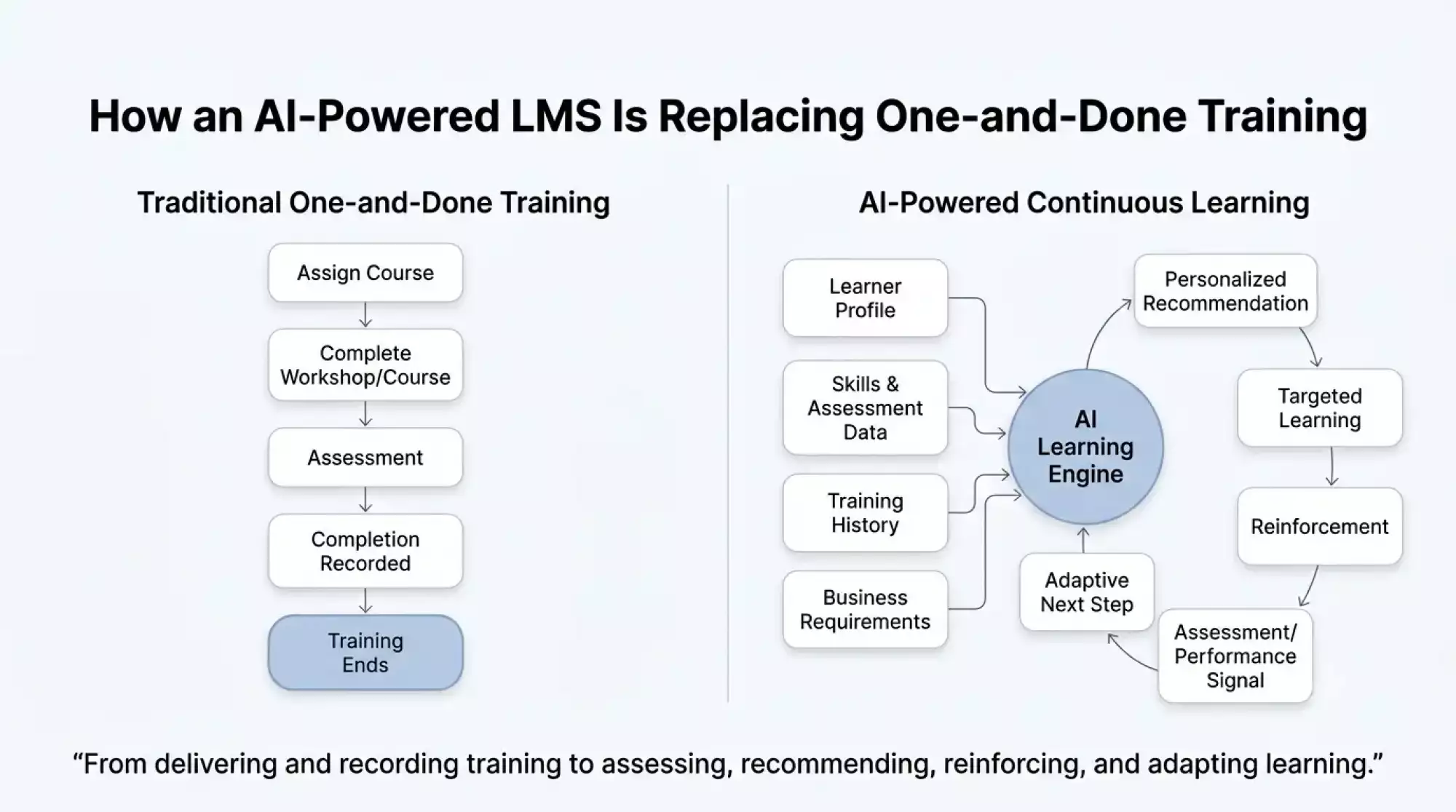
This changes the LMS from a system that mainly delivers and records training into one that can assess, recommend, reinforce, and adapt learning.
What to Test in an AI LMS Demo
Vendor demos are designed to show the platform at its best, so don't evaluate the AI using sample content supplied by the vendor. Bring your own material: a real policy document, a real employee role, and a real compliance requirement.
Then test three things:
- Content generation: Can it turn your document into usable courses, assessments, or summaries without extensive manual editing?
- Grounded answers: Can the AI answer questions using your approved content and show where the answer came from? Ask something outside that content and check whether it acknowledges the limitation instead of inventing an answer.
- Learning intelligence: Can it identify who is falling behind, explain why, and recommend an appropriate next step using your actual learner data?
If possible, also ask the vendor to show the underlying workflow, data sources, permissions, and controls behind each AI capability. A polished chatbot demo proves very little. The real test is whether the AI can perform reliably within your organization's content, data, rules, and training workflows.
Planning a custom AI-powered LMS?
Discuss your learner groups, integrations, and AI requirements with our LMS development team.
What a Corporate LMS Is Used For, and Who Is Adopting It
The right LMS use cases depend on who needs training and what the organization needs to track.
Corporate LMS Use Cases
| Use case | What the LMS handles |
| Employee training | Onboarding, role-based training, professional development, mandatory courses, and ongoing skills development. |
| Sales training | Product knowledge, sales methodology, certifications, assessments, and training for new product or market launches. |
| Compliance training | Mandatory policies, regulatory training, completion tracking, assessments, certifications, and audit records. |
| POSH training | Prevention of Sexual Harassment training, policy education, assessments, acknowledgments, and completion records. |
| Partner training | Product, technical, sales, and certification programs for distributors, resellers, implementation partners, and other business partners. |
| Customer education | Product onboarding, how-to training, certification, feature education, and self-service learning. |
| Franchise training | Standardized operational, brand, product, safety, and compliance training across franchise locations. |
| Channel training | Training and certification for dealers, agents, distributors, and other channel networks. |
| Upskilling and reskilling | Role-based learning paths that help employees develop capabilities required for changing technologies, processes, or roles. |
| Education and professional learning | Structured courses, assessments, certifications, and continuing education for professional or academic audiences. |
There is no requirement for a separate LMS for every group in the platform. A multi-audience design will enable the provision of different portals, catalogs, permissions, learning pathways, and reporting policies within a unified learning infrastructure.
Industries Using Corporate LMS Platforms
The same LMS architecture can support very different training requirements across industries. For example, healthcare organizations need to manage role-specific education, certifications, and compliance, while manufacturing organizations may need workforce upskilling tied to changing technologies and production environments.
| Industry | Typical corporate LMS training needs |
| IT and software company | Technical upskilling, cybersecurity, product training, certifications, onboarding, and continuous technology learning. |
| BFSI | Regulatory and compliance training, product knowledge, risk management, sales training, and employee certification. |
| Pharma and healthcare | Clinical and operational training, mandatory education, certifications, compliance, competency management, and workforce onboarding. |
| Manufacturing | Safety, equipment operation, quality procedures, technical skills, compliance, and workforce reskilling. |
| Retail | Employee onboarding, product knowledge, sales training, customer service, store operations, and compliance. |
| Telecom | Technical training, field-service skills, product education, safety, sales enablement, and partner training. |
| Franchise businesses | Standardized training for franchise owners, employees, operations teams, sales staff, and channel partners across locations. |
In cases where training is required for different types of audience at various locations, the requirements can be highly complicated. This is because considerations related to multi-tenancy, role-based access, localized content, certification policies, handling of external users, and integrations would need to be considered as inputs for the LMS design.
Types of LMS Softwares
Not all categories of LMSs are describing the same thing. The cloud-based, self-hosted, and open-source classifications refer to how an LMS is delivered or hosted. The categories mobile, corporate, and education refer to its main audience. An LMS can therefore fall into two or more categories.
| LMS type | Best for | Main drawback |
| Cloud LMS | Organizations that want faster deployment, managed infrastructure, automatic updates, and easier scaling | Less control over the underlying infrastructure and product roadmap |
| Self-hosted LMS | Organizations that need greater control over hosting, infrastructure, and data management | Requires more responsibility for infrastructure, updates, security, and maintenance |
| Open-source LMS | Organizations that want access to source code and extensive customization | Customization and ongoing maintenance can require significant technical resources |
| Mobile app LMS | Distributed or frontline workforces that need training through smartphones and tablets | Mobile-first delivery still needs to connect with the organization's broader LMS and training workflows |
| Corporate LMS | Employee, compliance, sales, partner, customer, and professional training | Enterprise requirements can make configuration and integrations more complex |
| Education LMS | Schools, universities, and academic institutions managing courses, students, instructors, and assessments | Academic workflows may not fit corporate requirements such as employee development, compliance, or partner training |
For the vast majority of organizations looking at a custom corporate LMS development, the question isn’t which name to select for the software they are getting. The question is what deployment options, level of control, learners, integrations, and personalization they need from their new learning management system.
Top Corporate LMS Platforms Compared
The corporate LMS market provides solutions of varying scalability, flexibility, AI functionality, and integration within an organization. What is needed, then, is not a search for the one LMS that fits all training models but rather a determination of which features suit your model.
Platform comparison at a glance
| Platform | Best suited for | Notable capabilities | Pricing | G2 rating |
| Docebo | Enterprise and multi-audience learning | AI content creation, personalization, compliance, analytics, employee, partner, and customer training | From $9/user/month; enterprise pricing is custom | 4.3/5 |
| Cornerstone Learning | Large enterprises with complex learning programs | Compliance, skills, reporting, certifications, and enterprise learning management | Custom | 4.1/5 |
| TalentLMS | Small and mid-sized organizations | Course creation, assessments, reporting, branches, and flexible user plans | From $119/month for 1–40 users | 4.6/5 |
| Moodle | Organizations requiring an open-source and highly configurable LMS | Course management, assessments, plugins, integrations, and extensive customization | MoodleCloud from $170/year | 4.1/5 |
| Absorb LMS | Employee, partner, and customer training | AI capabilities, automation, reporting, e-commerce, and multi-audience learning | Custom | 4.6/5 |
| 360Learning | Collaborative and skills-based learning | AI-assisted authoring, collaborative course creation, recommendations, analytics, and integrations | From $8/user/month; enterprise pricing is custom | 4.6/5 |
Note: Pricing varies by users, contract, modules, and implementation requirements.
Take the Best Features and Build Around Your Business
Off-the-shelf LMS systems will allow you access to a range of features, but you'll probably find yourself paying for features that aren’t used by your workers while still lacking tools that suit your unique processes.
Custom software development allows you a completely different way to build your training system. You can pick which features matter, connect existing systems, and build processes based on how your people operate.
For instance, a custom corporate LMS will allow you to integrate:
- AI-empowered feature development and personalization for role-based learning journeys and skill gap suggestions.
- Compliance management for compulsory courses, certifications, confirmations, and audit logs.
- Learning for multiple audiences including employees, customers, partners, and franchisees on one single platform.
- Workforce-specific workflows for approvals, evaluations, management reviews, training assignments, and escalation process or AI workflow orchestration.
- Not all but just the necessary modules instead of buying an entire suite of enterprise features.
- Integrations with existing systems such as HRMS, SSO, CRM, ERP, communication systems, or even intranet/knowledge management systems.
It is not just a compilation of features borrowed from various LMS products. It can be tailored to meet the needs of your learners, company policies, data structures, integration capabilities, and training procedures.
It may also save money on developing a custom product for companies with special demands. Rather than constantly paying for the features that you do not need or adapting your business processes to the restrictions of the vendor, you spend money on the features that your employees need.
Buy or Build: The Honest Comparison
The decision whether to buy or go for custom product engineering should not be based only on which solution is cheaper. Rather, it boils down to considerations such as launch time, upfront costs, deployment risks, control, and total cost of ownership.
Buy vs. Build Side by Side
| Factor | Buy an LMS | Build a Custom LMS |
| Typical deployment time | 4–12 weeks for a straightforward rollout; complex enterprise implementations can take 3–9+ months | 4–6 months for a focused platform; 6–12+ months for a complex enterprise LMS |
| Upfront cost | Lower initial cost, usually implementation plus subscription | Higher one-time development investment (one time cost), followed by hosting, maintenance, support, and future enhancement costs |
| Deployment risk | Low to medium for standard configurations and supported integrations | Medium to high because architecture, development, integrations, migration, and testing must be managed |
| Customization | Limited to configuration, extensions, and vendor-supported options | Platform, workflows, interfaces, and business rules can be developed around specific requirements |
| Integration risk | Low when required connectors already exist; higher for unsupported or complex integrations | Medium to high, depending on the number and complexity of systems being connected |
| Data migration risk | Medium to high when moving users, courses, records, certificates, and historical data | Medium to high because legacy data still needs to be mapped, cleaned, and migrated |
| User adoption risk | Medium if the platform changes existing workflows | Medium; the UX can be designed around users, but training and change management are still required |
| Pricing model | Recurring subscription, often affected by users, modules, or usage | One-time development investment plus recurring technical operating costs |
| Product control | Vendor controls the core roadmap and release cycle | Organization has greater control over the product roadmap |
| Long-term scalability | Depends on vendor infrastructure, plans, pricing, and product direction | Architecture can be designed around expected users, data, integrations, and future requirements |
It is possible for a basic cloud LMS implementation to be completed in 4 to 8 weeks if the content is prepared and the system integration is easy. However, depending on migration, integration, configuration, testing, and rollout, the time taken for a complicated implementation can be much longer.
Development from scratch will always take longer as the platform itself needs to be designed, developed, tested, deployed, and integrated. Development of a specific custom LMS would take about 4 to 6 months, whereas a custom platform for enterprises with multiple types of learners and multiple integrations and security concerns could take up to 6 to 12 months.
These are just estimates and actual durations will vary widely based on scope.
When Buying Is Usually the Lower-Risk Option
The ready-to-use LMS is easier to justify in the following cases:
- You want to go live in weeks, not months.
- You have similar training workflow processes as LMS processes.
- There is a single group of learners.
- Integrations for HRMS, SSO, CRM, and collaboration are pre-installed.
- You would like regular fees, not a large upfront fee.
- Control over the product development is not necessary.
The key benefit here is that most of the underlying platform has been developed before. Your team will mainly work on configuration, integration, migration, testing, and implementation of the system.
When Building Becomes Worth Evaluating
Custom development tends to make more sense if the LMS is going to be a part of your business infrastructure and not just a way to deliver courses.
It should be considered if you have:
- Several categories of learners: employees, customers, partners, franchisees, or other outside people.
- Complicated processes: approvals, prerequisites, assignments, escalations, certification, manager approval, or something else that cannot be implemented through standard configuration.
- Big volume or fluctuating numbers of users: if you need to calculate recurring per-user or per-module licensing.
- Many different integrations: several HRMS, ERPs, CRMs, SSO, communications, content, and other internal systems with special requirements.
- Particular demands for AI: if you want to control the way AI will interact with your content, learners, workflows, and systems.
- Ownership of the product: if it is more important for you to control the roadmap and user experience rather than wait for the vendor to release the next version.
In this case, there is a balance between benefits and costs: while you gain more freedom, you also take all the burden of hosting, updating, maintaining, supporting, paying for AI/API, and developing.
The Cost Factor
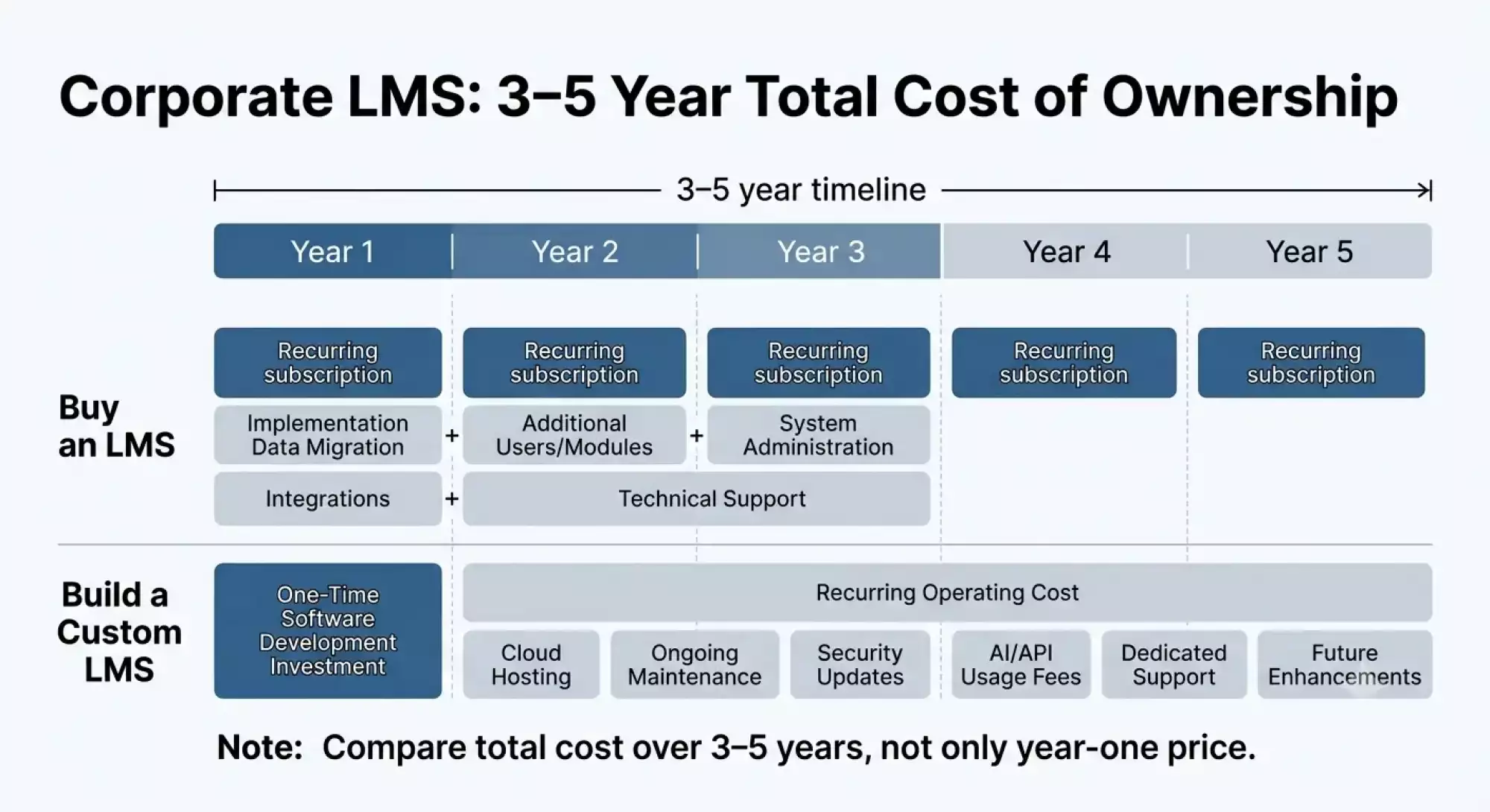
As is evident from the figure below, there are differences in the cost structures for acquiring an LMS versus developing an LMS. The cost of acquiring an LMS entails subscription and implementation cost, whereas the cost of developing a custom software is the initial development cost and subsequent operating cost. A fair comparison would be on a three to five-year cost perspective, not only the one-year cost.
The Risk Factor
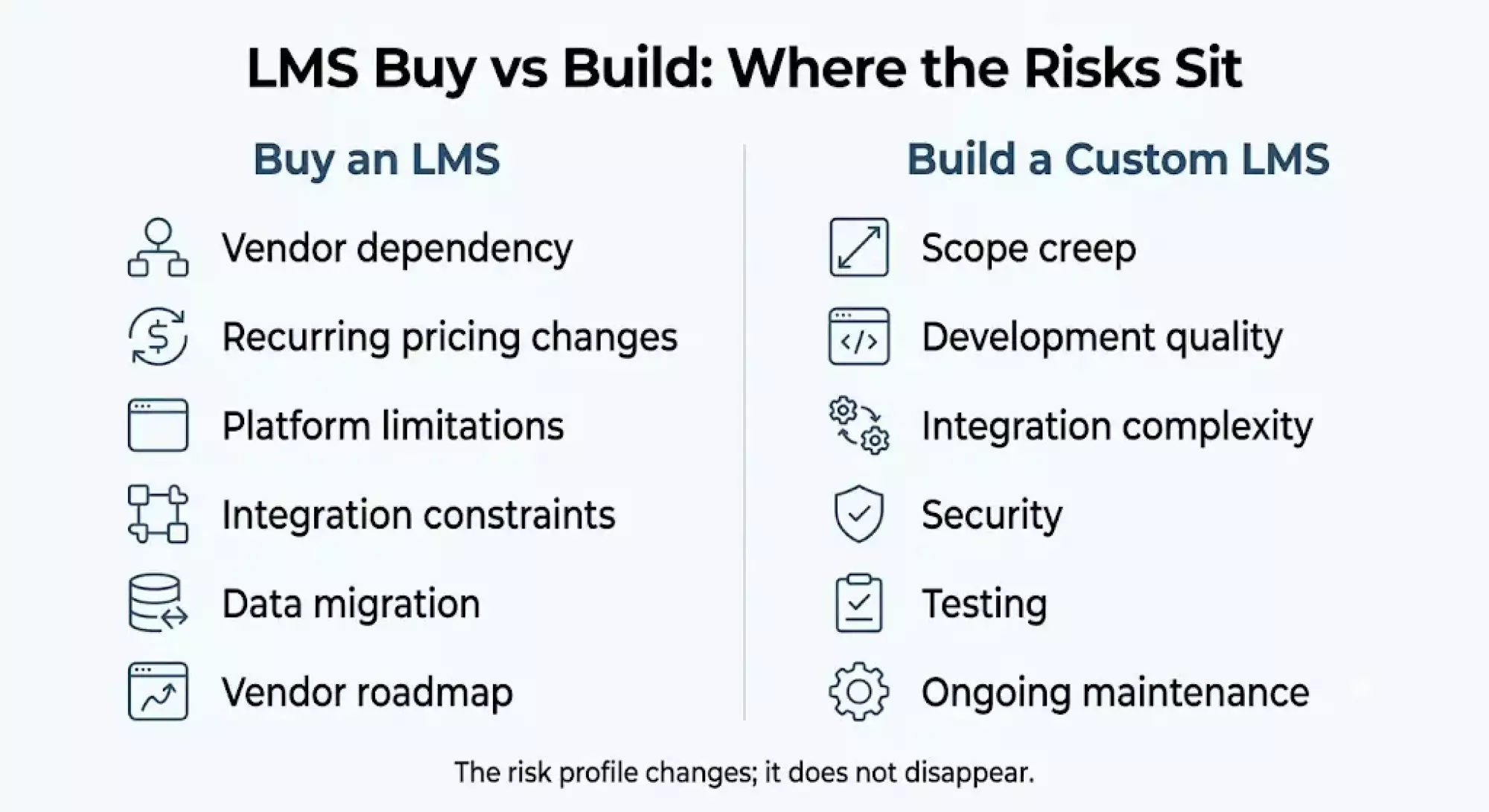
It can be observed from the diagram that there is a shift of risks in the case of purchasing an LMS system and developing one. The risks involved in case of purchasing are vendor dependence, pricing issues, platform constraints, and migration risk.
Not sure whether to buy or build your LMS?
Let’s evaluate your requirements, existing systems, and long-term costs.
Custom AI LMS Architecture: What Goes Into the Platform
A custom AI LMS platform is designed as an integrated solution, not as a single application. The architecture of such platforms usually incorporates the user experience layer, the core of the LMS system itself, AI functionality, integration with other business systems, data and security.
For a decision-maker, the key takeaway here is that AI is just one component of the overall platform architecture. The platform still requires a robust core that will manage users, courses, learning paths, assessments, certifications, and reports. On top of this, the AI will provide additional functionalities like personalization, recommendations, knowledge assistance and skill gap analysis.
The architecture will also determine how well the LMS integrates with the existing systems and controls access to the sensitive learning and employee data.
Below is the illustration of a typical set of layers of a custom AI LMS and their interactions.
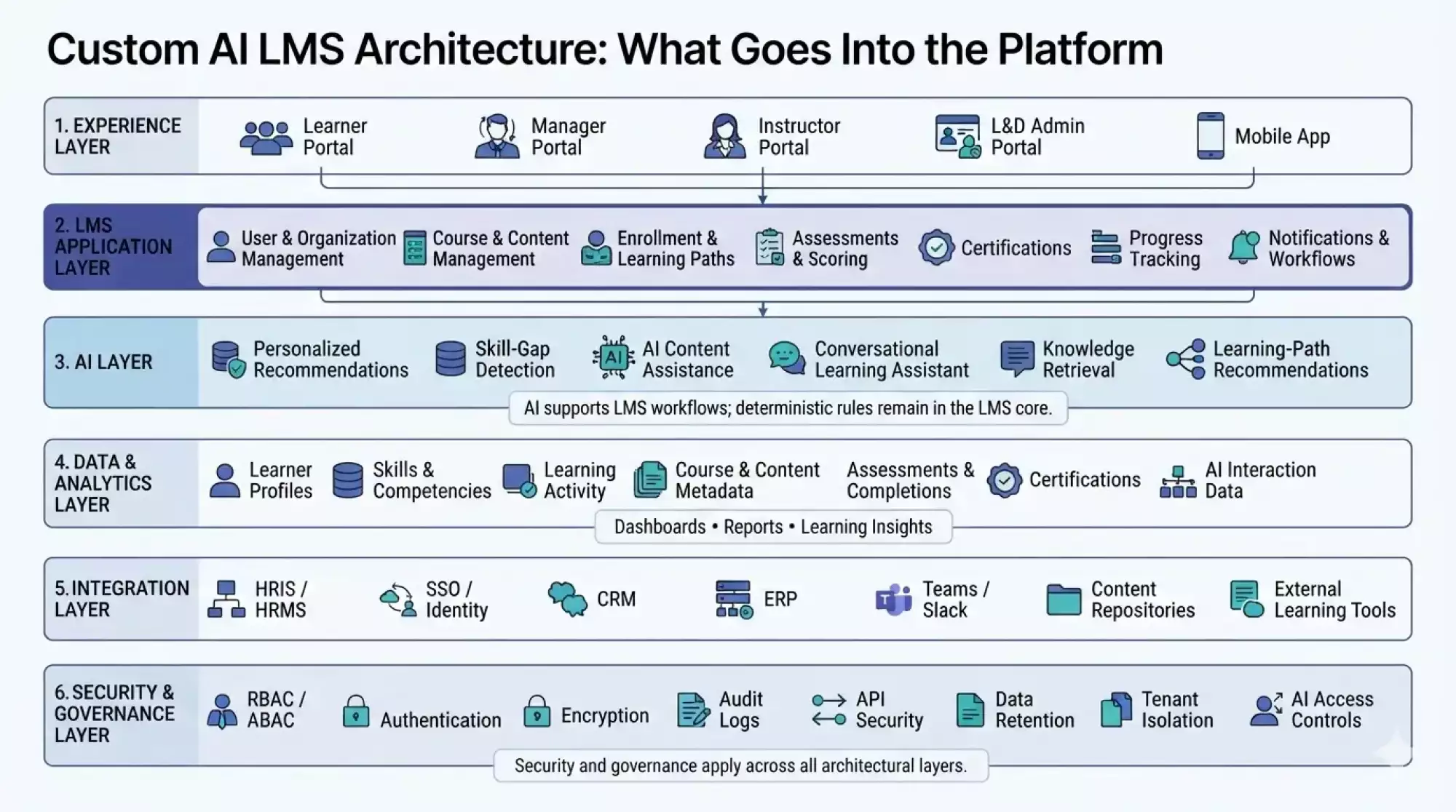
The architecture is determined by your specific learner groups, current systems, artificial intelligence needs, security requirements, and scalability. The above considerations also affect the cost and time required for development.
What You Need to Build: Key Modules and Features
The LMS designed for a company should be user-centric, content-centric, and based on the connection between the learning process and the existing systems of the company. The modules that have to be implemented depend on the purpose for which the system is to be used by the company’s employees or other third parties.
Modules determine the audience of the LMS, while features determine the actions that the LMS users can perform. For instance, an Employee Learning module could include such features as course delivery, assessments, artificial intelligence recommendations, reporting, and certification. The above mentioned features could be used in other modules, and would have distinct permissions, content, and process flows.
Core LMS Modules
The core modules define the audiences and training workflows the platform needs to support.
| Module | Primary purpose |
| Employee Learning | Internal onboarding, role-based training, compliance, certifications, and continuous upskilling. |
| Customer Education | Product training, onboarding, tutorials, certifications, and self-service learning for customers. |
| Extended Enterprise | Training for distributors, contractors, vendors, franchisees, and other external stakeholders. |
| Partner Learning | Structured training, certifications, product knowledge, and enablement programs for business partners. |
Essential Features
Once the learner groups are defined, the development scope can be organized around the capabilities each group requires.
| Feature | What it should support |
| Course creation and delivery | Create, organize, schedule, and deliver instructor-led, self-paced, video, document, and blended learning programs. |
| Assessments | Quizzes, assignments, question banks, scoring rules, retakes, pass thresholds, and assessment results. |
| AI-powered learning | Personalized learning paths, content recommendations, AI-assisted course creation, learner assistance, and knowledge retrieval based on approved content. |
| Progress and reporting | Track enrollment, completion, scores, learning activity, certifications, and performance through dashboards and exportable reports. |
| Compliance controls | Assign mandatory training, configure due dates, maintain completion records, manage renewals, and provide audit-ready evidence. |
| Certificates | Generate certificates based on defined completion or assessment rules, with expiry and renewal tracking where required. |
| Mobile learning | Provide responsive or mobile-app access for employees and distributed workforces, including learning continuity across devices. |
| Branding and administration | Configure branding, roles, permissions, catalogs, notifications, learner groups, and organization-specific settings. |
| Integrations | Connect with HRMS/HRIS, SSO, CRM, ERP, communication tools, identity systems, and other enterprise applications through APIs or supported protocols. |
| Notifications and automation | Automate enrollment, reminders, due-date notifications, certification renewals, manager alerts, and other routine learning workflows. |
It is not required for the final output to regard all of the functionalities as being mandatory. The functionalities that need to be included in the initial release and any that can be added later will depend on the users, training, integration, security, and AI.
How Long Does It Take to Build a Custom LMS?
The development of a custom corporate LMS may take from several months depending on the number of learner groups, integration features, AI features, security needs, and customization level.
| Development scope | Indicative timeline |
| Core LMS foundation | 4–6 weeks |
| Learning and assessment workflows | 4–6 weeks |
| Reporting, certificates, and administration | 3–5 weeks |
| Mobile experience | 3–5 weeks |
| AI capabilities | 3–8 weeks |
| Enterprise integrations | 4–10+ weeks |
| Testing, security, and deployment | 3–6 weeks |
| MVP development | 3–5 months |
| Full enterprise LMS | 6–12+ months |
Such time lines are indicative but not delivery milestones. Some activities may occur simultaneously, so summing up all rows would lead to overestimation of the total project period.
An LMS solution with typical workflows and few integrations can be provided within 3–5 months. An enterprise LMS platform with different learners, integration capabilities, advanced AI capabilities, and more security will take 6–12 months and even longer.
In other words, the project timeline should be determined based on the scope of the product rather than the number of its features.
How Much Does a Custom LMS Cost?
The cost of a custom corporate LMS depends on its user groups, integrations, AI scope, security requirements, and level of customization. A realistic development budget can range from $25,000 to $150,000+, with larger enterprise platforms potentially exceeding this range.
| Development scope | Indicative cost |
| Core LMS foundation | $8,000–$20,000 |
| Learning and assessment workflows | $5000–$15,000 |
| Reporting, certificates, and administration | $4,000–$12,000 |
| Mobile experience | $5,000–$15,000 |
| AI capabilities | $5,000–$25,000+ |
| Enterprise integrations | $5,000–$30,000+ |
| Security, testing, and deployment | $4,000–$15,000+ |
| Focused custom LMS | $25,000–$60,000 |
| Enterprise LMS | $60,000–$150,000+ |
Ongoing LMS Costs
Development is only the initial investment. A custom LMS also requires ongoing technical and operational spending.
| Cost area | What it covers |
| Hosting and infrastructure | Cloud resources, databases, storage, backups, and monitoring |
| Maintenance | Bug fixes, dependency updates, performance improvements, and routine maintenance |
| Security | Vulnerability monitoring, security updates, access reviews, and periodic testing |
| AI/API usage | Model inference, embeddings, third-party APIs, or other usage-based services |
| Support | Technical support, incident handling, and system administration |
| Future enhancements | New workflows, integrations, AI capabilities, and product improvements |
How to Plan Your LMS Development Process
The right scope will help you avoid unnecessary features, cost and time overruns. Before development starts, specify the users, workflows, integrations, and results the LMS should enable.
1. Review Your Existing Training Program
Outline how your training process takes place now, how it is monitored, evaluated, and reported. Note all manual activities, disconnected systems, lack of reporting, and obstacles experienced by your employees or administrators.
2. Define Your User Groups
Distinguish your employees, managers, administrators, customers, business partners, franchisees, and other learners. Different groups might need different content, permissions, dashboards, and workflows.
3. Focus on the MVP
Distinguish must-haves from features that can wait for the next releases. It will make the first release compact and set a scope for developers.
4. AI Scope Definition
Define where the AI provides measurable benefits such as recommendations, content, learner help, or knowledge access. Define the data sources, human controls, and measurement parameters in advance of implementing the platform.
5. Define Success Criteria
Identify the measurable goals such as course completion, assessment results, onboarding speed, training administration, or compliance completion. They will serve as a basis to measure the platform's performance after deployment.
6. Plan the Development Phases
Plan the MVP, integrations, AI functionality, mobile functionality, and further improvements in different phases so that the platform can be released with the most important workflows first but with the possibility to expand in the future.
Prior to obtaining the development estimates, make a list of requirements in regards to users, workflows, features, integrations, AI requirements, security, reporting, migration, and support. It will give developers sufficient information to provide reliable scope, timeline, and cost estimation.
Common Concerns When Moving to a Custom AI LMS
Transition from a current LMS system to an AI-based LMS requires more than just selection of features. The decision-makers must consider if it is possible to move forward with the existing learning environment, how employee and learning data will be used by AI, and how to perform the transition without interrupting training activities.
Can My Existing Content and Learning Tools Work With an AI LMS?
This is true for the majority of scenarios, although compatibility should always be checked beforehand.
Current courses could adhere to standards like SCORM, xAPI, cmi5, or LTI, and external learning apps could integrate using APIs.
However, adding an AI LMS means considering one more aspect: how suitable existing content is for AI-driven search, recommendations, personalization, and learning assistance.
Here are some points that must be considered prior to development:
- Which courses and assessments need to be migrated
- Which content standards must be supported
- Which external learning tools need to remain connected
- Which content AI features should be allowed to access
- Whether content needs cleaning, tagging, or restructuring
This allows the development team to design the AI LMS around your existing learning ecosystem instead of forcing unnecessary content replacement.
Can We Protect Employee Data and Control What the AI Can Access?
Certainly, application security and AI access control must both be considered when developing an AI-based LMS.
A corporate LMS can house a lot of information about employees, including their learning profile, assessment information, certifications, and skill set. An AI application may analyze the information contained in the LMS.
The platform may therefore require:
- Role- or attribute-based access controls
- SSO and secure authentication
- Encryption and API security
- Audit logs and data retention controls
- Tenant isolation where required
- Permission-aware AI responses
- Controls over the data and content AI can access
- Monitoring of important AI actions and interactions
The important thing is that AI must not automatically get access to all information contained within the LMS. The access should be granted according to the permissions and policies set by the system.
How Do We Migrate to an AI LMS Without Disrupting Training?
Migration should be planned as part of the implementation rather than left until the end of development.
Depending on the existing LMS, the migration may involve:
- User and organizational data
- Courses and SCORM packages
- Enrollments and learning paths
- Completion and assessment history
- Certificates and expiry dates
- Skills and competency records
- Instructor and administrator data
- Content metadata required for AI-powered features
Migration might become part of the legacy modernization process as well. Rather than transferring everything just as it is, companies can evaluate what from their legacy learning programs, data, and learning process needs to be migrated, reorganized, redesigned, or discarded altogether.
Any migration normally entails inventory, data mapping, data cleansing, testing, verification, and ultimately migration itself. Some pieces of legacy or incompatible content would require reorganization and redesign in order to work properly in the new AI LMS.
For bigger companies, phased or even parallel migration could come in handy for keeping learning going during the migration process. All the volumes of historical data, complexities of the content, user base, integrations, and artificial intelligence capabilities would define the migration efforts.
Key Questions to Settle With a Development Partner First
When the development starts, sort out the business, technical, and operational issues that may concern the LMS once it gets deployed.
- Who has control over code and data? Figure out the IP ownership, access to source code, the databases, and data export ability.
- How will you protect the LMS? Figure out the authentication, access control, encryption, logs, backups, vulnerability testing, and incident response.
- How will it scale? Find out how the system architecture will manage more learners, content, concurrency, integrations, and AI processing power.
- How will you handle AI data? Identify models, APIs, usage of customer data for training, and evaluation of the AI outputs.
- What kind of integration will there be? Specify what HRMS/HRIS, SSO, CRM, ERP, messaging system, and other third-party software is covered by the project scope.
- What happens after deployment? Identify the hosting, monitoring, maintenance, security updates, bugs fixing, and tech support responsibilities.
- How do you price future developments? Sort out how you will estimate and approve new features, integrations, AI capabilities, and significant changes.
- What happens when the engagement stops? Define data migration, handing of the source code, documentation, and other terms of disengagement.
Integrating an AI-Enabled LMS Without Disrupting Your Workforce
An LMS rarely operates in isolation. Connecting it with existing HR, identity, communication, and business systems allows training data to move into the workflows teams already use.
| System | Data or function synced | Main risk |
| HRMS/HRIS | Employee profiles, roles, departments, joining and exit data | Incorrect or outdated employee records |
| SSO/Identity | Authentication, roles, access permissions | Access-control errors |
| CRM | Customer or partner profiles and training status | Data synchronization issues |
| ERP | Organization, department, or operational data | Complex data mapping |
| Teams/Slack | Notifications, reminders, learning access | Notification overload or permission issues |
A Phased Rollout
Rather than moving the entire workforce to the new platform at once, organizations can reduce disruption through a phased rollout:
- Pilot: Launch with one department or learner group and validate workflows.
- Parallel run: Keep critical existing processes available while the new LMS is tested in production conditions.
- Data migration: Move users, courses, completion records, certificates, and other required data in controlled batches.
- Full cutover: Expand access after integration, data, security, and user-acceptance checks are complete.
This approach also gives the development team an opportunity to identify integration or adoption issues before they affect the entire workforce.
Want to estimate your custom LMS investment?
Discuss your features, integrations, and AI requirements to get a scope-based cost estimate. Connect now!
Conclusion
With an AI-based LMS, companies have an opportunity to take their training beyond one-time events through integration of learning with workforces, automation, and AI all in one platform. Rather than considering training as separate courses, companies will be able to implement continuous learning processes for employees, customers, partners, and other groups of learners.
The choice between buying an LMS and building a custom software will depend on your workflow, learner groups, integrations, AI, security needs, and costs. Prior to development, you need to specify modules that are required, select the MVP, clarify integrations and AI needs, and compare total 3–5 year cost of ownership.
FAQs
Can an AI-powered LMS integrate with an existing LMS or HR system?
Yes. An AI-based LMS can be integrated with an already existing LMS, HRMS/HRIS, SSO, CRM, ERP, or any other enterprise system using the API and middleware. The way of integration varies depending upon the system used and data exchange needed.
What data does an AI-powered LMS need to personalize employee learning?
Personalization may leverage data on the learners’ roles, completed courses, test scores, skills, learning styles, and allocated training. The company needs to determine which data is accessible to the AI and enforce relevant access and privacy measures.
How can organizations prevent AI from giving incorrect training answers?
Leverage credible sources of knowledge, retrieval-based AI, access control, response validation, evaluation datasets, and human escalation for sensitive queries. Do not treat AI as a source of unlimited information.
Can a custom LMS support multiple organizations or business units?
Certainly. The custom platform can be designed as a multi-tenant Learning Management System (LMS), where various businesses, subsidiaries, departments, or business divisions can have their own users, content, permissions, brandings, reports, etc.
Can an AI LMS migrate data from an existing LMS?
Yes. Migration is possible in the cases of user profiles, courses, completion, assessments, certificates, and many other supported data types provided that the existing LMS possesses necessary export functionality. It must be determined beforehand what needs to be migrated.
How should AI usage be controlled in a corporate LMS?
AI usage must be controlled via role-based access controls, validated data sources, limitations on AI tools, logging, use policies, and human authorization for high-risk activities. Administrators should also have the ability to monitor AI operations and inspect the results.
Can a corporate LMS work with existing identity and access systems?
Of course. There is a possibility for enterprise LMS systems to be integrated with identity providers or SSO systems, making it possible for employees to access them with corporate login credentials. Further on, role and permission mapping will define what content they can access.
How can a custom LMS handle rapid growth in learners?
User growth must be taken into consideration when designing the architecture. A scalable cloud infrastructure, optimized databases, caching, load testing, monitoring, and proper API architecture will assist with accommodating user growth and concurrent learning.
Who should own the source code and training data in a custom LMS?
This must be clarified through contract prior to any development activities being commenced. Ownership issues relating to the source code, custom modules, database, learning materials, learner information, documentation, and third-party dependencies must be sorted out.
How should an organization measure whether its AI LMS is working?
Use measures that relate to the original goals of training, including success rates, test scores, on-boarding time, certification adherence, learner engagement, administration time, and skills developed. These measures should be defined prior to the launch.