Key Takeaways:
- A retail IoT platform can connect sensors, RFID readers, gateways, and business applications to improve operational visibility. The value depends on device coverage, data quality, integrations, and the workflows built around the data.
- A retail IoT platform connects sensors, RFID readers, and gateways with backend systems, dashboards, and alerts. It can also integrate with POS, ERP, and inventory software.
- A reliable architecture needs secure device onboarding, event validation, duplicate handling, and recovery mechanisms to maintain consistent data during network and integration failures.
- Retail IoT development typically moves through discovery, hardware validation, MVP development, integration, testing, and a controlled pilot. The development timeline can range between 11 and 28 weeks.
- Estimated software development costs range from 10,000–25,000 for a focused proof of concept to 180,000–400,000+ for an enterprise rollout. Hardware, installation, connectivity, and ongoing operating costs may be additional.
- Before scaling, test the platform against measurable criteria and track KPIs such as inventory accuracy, alert response time, equipment downtime, and product spoilage to evaluate actual ROI.
Retailers can show a product as available in their inventory system even when it is missing from the shelf. These discrepancies can delay replenishment, frustrate customers, and distort stock decisions. In a field study, researchers reported an approximately 26% reduction in inventory record inaccuracy for one product category across 13 stores using RFID-enabled inventory visibility over 23 weeks. A second experiment across 62 stores found that results varied by product category, so retailers should not treat the finding as a guaranteed outcome.
Retail IoT software connects physical devices with systems that validate incoming data, apply business rules, and help staff respond to operational events. Depending on the business problem, a solution might support inventory tracking, smart-shelf monitoring, cold-chain monitoring, or equipment maintenance. Successful implementation requires more than connecting sensors: the system must handle data quality, integration with existing software, operational workflows, security, and failure recovery.
This guide explains how to scope a retail IoT solution, choose an implementation model, plan its features and architecture, integrate existing systems, estimate development costs and timelines, and measure results during a pilot.
What Does an IoT Retail Solution Include?
A retail IoT solution combines connected devices, data-processing software, and business applications to monitor physical operations and support defined actions. Depending on the use case, it may use RFID readers for item identification, sensors for temperature or equipment monitoring, or shelf sensors for product availability.
The platform converts device readings and events into operational information. For example, when validated data indicates a possible stock discrepancy, the system can update a dashboard and create a task for an employee to check the shelf. The exact response depends on the business rules and on which system is authoritative for inventory records.
How Does a Retail IoT Platform Work?
A retail IoT workflow usually moves through six stages, from capturing an event to recording how staff resolved it. Not every deployment needs a separate gateway or every stage as a standalone service; the design depends on device capabilities, scale, and reliability requirements.
Step 1: Collect data from the connected devices
Information is gathered regarding retail activities through sensors, RFID readers, smart shelves, etc. This can be product identification, temperature measurement, equipment status, or movement of items, depending on the application.
Example: An RFID reader reads tags of products that move in a certain area.
Step 2: Send information via a network or gateway
Devices send readings through a suitable network. Where required, a gateway can aggregate device traffic, translate protocols, filter messages, or temporarily buffer data during a connection outage.
Example: A store gateway delivers the RFID events to the retail IoT backend via the available network.
Step 3: Validate and process incoming events
The backend checks message format and device identity, adds context such as store and device location, and handles duplicate, delayed, or out-of-order events. It then routes valid events to the relevant business workflow.
Example: When an RFID event is registered with the system, it can determine if that event took place at a registered RFID reader and correlate it with the store and product referenced by the reader.
Step 4: Update the relevant operational state
The platform updates the relevant device state, event history, or operational view. It should not overwrite authoritative inventory data unless the integration rules explicitly permit that action. In many deployments, inventory changes must first be reconciled with the POS, ERP, or inventory system that owns the record.
For example, if the business rules are applied to update the inventory visibility dashboard, then it is done after a confirmed product movement.
Step 5: Trigger a business action
Business rules evaluate the validated event and trigger the configured response. Depending on the workflow, the platform may update a dashboard, send an alert, create a task, or submit an authorized update to another application.
Example: If the temperature set in the refrigerated display is exceeded, when it happens, the system alerts the responsible employee for inspection.
Step 6: Record the event and track resolution
The system records the event, timestamps, alert status, and follow-up actions. Staff may acknowledge the alert, record an investigation, and mark the incident resolved. This history supports troubleshooting and reporting.
Example: A store employee enters the temperature check and stores the incident history within the system for reporting and auditing.
IoT Device vs. IoT Application vs. IoT Platform
These components are interconnected but are used for different purposes in the development architecture.
| Component | What it does | Retail example |
| IoT device | Captures measurements, identifiers, or physical events | RFID reader, temperature sensor, connected shelf sensor |
| IoT application | Gives users an interface to monitor data and complete specific tasks | Inventory monitoring dashboard or refrigeration alert application |
| IoT platform | Manages devices, processes data, applies business rules, and connects software systems | Central platform connecting devices, store dashboards, inventory software, and enterprise applications |
Start by defining the operational problem, the data the system must collect, the actions it must support, and the systems it must integrate with. These requirements help determine whether a focused IoT application is sufficient or whether you need a broader device-management and integration platform.
Which Retail IoT Solution Should You Build?
Choose the solution by starting with the operational problem, not with a preferred device or technology. Inventory discrepancies, shelf availability, cold-chain excursions, and equipment faults require different sensors, data rules, integrations, and staff workflows. Some retailers need one focused application; others need a shared platform across several use cases.
1. Connected Inventory Management Platform
Problem: The available inventory is not properly documented, and it is therefore difficult to know when to reorder and plan the stock.
What to build: It collects inventory-related events from RFID readers, connected devices, or other types of data sources it supports. It should provide staff with visibility at the item level, highlight discrepancies, and assist them in investigating any discrepancies in stock.
Essential capabilities: The key functions needed are inventory event processing, stock visibility, discrepancy alerts, and inventory history.
Integrations: POS, ERP, and existing inventory management software.
2. Smart Shelf Monitoring Software
Problem: Products are not available on the shelves, yet they might still be in the back room.
What to build: Software that is capable of analyzing data from shelf-level sensors, cameras, or appropriate devices to detect exceptions at the shelf level and alert employees when replenishment needs to be made.
Essential capabilities: Shelf status monitoring, replenishment alerts, exception tracking, and staff task management.
Integrations: Inventory software, store management software, and task management.
3. RFID-Based Retail Tracking System
Problem: The retailer is not clearly informed about the movement of product at receiving, stockroom, sales floor, and at checkout.
What to build: An application that communicates with an RFID reader, follows RFID standards and events, and stores a record of item movements. The system should be able to deal with duplications and reader coverage.
Essential capabilities: Reader management, tag-event processing, identification of items, item movement history, and exception reporting.
Integrations: Warehouse management systems (WMS), inventory software, and POS platforms.
4. Cold-Chain Monitoring Software
Problem: The temperature in the refrigerated display, storage, or temperature-sensitive products could be outside acceptable limits.
What to build: An application that will process sensor readings, analyze pre-specified thresholds, and escalate incidents when necessary.
Essential capabilities: Temperature monitoring, configurable alerts, historical readings, incident acknowledgment, and resolution tracking.
Integrations: Maintenance systems, inventory software, and notification services.
For example, if a refrigerated display exceeds its configured temperature threshold, the system can notify the responsible employee and retain the incident record for investigation.
5. Store Equipment Monitoring Platform
Problem: Faults can happen in the refrigeration systems and HVAC systems, as well as other store equipment, without being discovered until they cause disruptions.
What to build: Collect, monitor, and audit equipment telemetry; monitor equipment and its health; detect abnormal readings; and alert for maintenance tasks. If there is sufficient historical data and models that are validated, then predictive maintenance may be integrated.
Key capabilities: Anomaly alerts, equipment status monitoring, maintenance logs, and downtime reporting.
Integrations: Asset management software, maintenance systems, and service desks are integrated.
6. Multi-Store Retail IoT Platform
Problem: Multisite retailers can suffer from a lack of device data, inconsistent monitoring practices across various stores, and no store visibility.
What to build: For retailers that need visibility beyond individual stores, decentralized IoT-enabled supply chain visibility can help connect product, shipment, location, and condition data across relevant supply chain stages.
For retailers that need visibility beyond individual stores, a decentralized IoT supply chain solution can enable multiple supply chain participants to share product, shipment, location, and condition data. Where appropriate, blockchain can provide a shared, tamper-evident record of product movements and supply chain events across participating organizations.
Key capabilities: Device registry, multi-location dashboards, role-based access, central monitoring, and operational analytics.
Integrations: POS, ERP, inventory, analytics, and reporting platforms.
It applies particularly in some cases where a retailer is forced to rely on a number of different IoT use cases in a single software application.
Turn the Business Problem into Build Requirements
Before selecting devices or software, map how the solution will work in the store. Define the business problem, device events, data-processing rules, system integrations, employee actions, and measurable acceptance criteria.
The following questions will help you transform an initial idea into development requirements:
| Requirement area | What needs to be defined? |
| Business objective | Which operational issue should the first release solve, such as stock discrepancies, temperature excursions, or equipment downtime? |
| Device and location coverage | Which sensors, RFID readers, gateways, stores, shelves, or assets need to be connected? |
| Data collection | Which readings or events are required, how frequently should they be captured, and how long should records be retained? |
| User actions | Who receives alerts, verifies an issue, assigns a task, or confirms that it has been resolved? |
| System connectivity | Which POS, ERP, WMS, inventory, or maintenance systems must exchange data with the platform? |
| Response expectations | How quickly must the system detect an event, issue an alert, and update the relevant workflow? |
| Success criteria | Which baseline and target metrics will demonstrate improvement, such as fewer stock discrepancies, faster response times, or reduced spoilage? |
Record these decisions in an initial scope specification that includes use case, device requirements, data flow, user roles, integration points, workflow, and acceptance criteria. This gives the IoT application development team a concrete reference point to estimate effort, select architecture, and design the MVP without adding any features that will not contribute to the main goal.
Have a retail IoT idea but aren't sure what you need to build first?
Turn your business requirements into a practical development roadmap with the right devices, core features, integrations, and MVP scope.
Should You Buy SaaS, Customize an Existing Platform, or Build Custom Retail IoT Software?
The implementation model affects delivery speed, integration effort, flexibility, and long-term operating cost. Compare ready-made software, customisation, and bespoke development against the requirements that the retailer cannot compromise on.
- Buy SaaS when you need it to be fast and have common functionality. If there are already plenty of devices, integrations, and workflows that are all properly supported by the pre-existing features of a ready-made retail IoT platform, it simply makes sense to use it. There is a possibility to reduce the time for the initial development, but the vendor's pricing, feature cap, and product roadmap will need to be dealt with.
- Modify an existing platform when the base is satisfactory, but some changes are needed. For retailers who want to retain a set of features and capabilities and use some dashboards, business rules, device integrations, or automated workflows. But before you do, see what API support and extension limits the platform offers. All the customization may be costly and complex to keep up to date.
- Build retail IoT software when it's not possible to have the right solution. Custom development offers greater control over architecture, device connection, data flow, integration, and business logic. It is particularly useful for complex multi-store operations or for a particular workflow. The cost is higher due to development, security, infrastructure, testing, and maintenance work.
| Decision factor | Buy SaaS | Customize an existing platform | Build custom |
| Standard workflows | Often a good fit | Good fit | May add unnecessary complexity |
| Specialised workflows | Limited by available features | Depends on platform flexibility | Greater control over requirements |
| System integration | Depends on supported connectors | Depends on APIs and extensions | Designed around required integrations |
| Initial delivery | Often faster | Moderate complexity | Requires discovery and engineering |
| Ownership and control | Governed by vendor terms | Subject to platform constraints | Greater control, with more responsibility |
| Ongoing maintenance | Subscription and vendor support | Platform and customization maintenance | Full product lifecycle responsibility |
Choose the option that meets the critical requirements with the least unnecessary complexity. Use SaaS when it fits, customize when the gaps are manageable, and build custom software when existing options cannot satisfy essential business or technical needs.
How to Make the Decision
Assess these six factors when deciding which is the best retail IoT development model to adopt.
- Business needs: Determine workflows that are needed. Standard inventory tracking and alert functionality might work in SaaS, and custom business rules might need customization or custom development.
- Compatibility with devices: Make sure it supports your existing and future devices (sensors, RFID readers, gateways, and communication protocols).
- System Integrations: Review the system integrations with your POS, ERP, WMS, and inventory system. Check availability of APIs and data sync requirements.
- Data ownership and security: Review the possibility of accessing data, storing it, and exporting it, the security features, and the dependence of the platform on the vendor before you sign up.
- Scalability: Is the solution scalable? As operations grow, how many devices, locations, users, and events will you have?
- Initial Costs: Don't only consider initial cost; consider subscriptions, licenses, integration, customization, infrastructure, maintenance, and future upgrade costs.
Compare the options against the same requirements: workflow fit, device compatibility, integration access, security and data ownership, scalability, and total cost of ownership. Document any unmet critical requirement before selecting a vendor or development model.
Essential Features of Retail IoT Software
Retail IoT software should do more than display device readings. It needs to validate incoming data, identify relevant exceptions, notify the right people, and connect those exceptions to an operational workflow. Prioritize features according to the first use case and expand only when the pilot demonstrates a need.
Core Features for the MVP
| Feature | Development requirement | Why it matters |
| Device registry | Device identity, type, location, and lifecycle status | Keeps device records organized |
| Data ingestion | Validated device readings and events | Establishes a reliable data foundation |
| Device health monitoring | Connectivity status and last-seen timestamps | Helps identify disconnected or unresponsive devices |
| Operational dashboard | Current status, historical readings, and exceptions | Gives staff visibility into issues |
| Rules and alerts | Configurable thresholds, alert routing, acknowledgment, and escalation | Turns device events into actionable tasks |
| User roles and access | Permissions based on role and store location | Restricts access to authorized users |
| Audit and event history | Timestamps, state changes, and user actions | Supports troubleshooting and accountability |
| Integration APIs | Controlled data exchange with selected retail systems | Connects IoT events to business operations |
Ensure that the entire flow is reliable. For example, when a temperature reading exceeds a configured threshold, the system should validate the reading, identify the affected location or asset, notify the assigned employee, and record acknowledgement and resolution. Define how sensor faults and missing readings are handled as well.
Advanced Features to Add When Required
Technology can be advanced and therefore be efficient, but it is important to be particular about it and ensure that it can be used in solving a particular problem and not add to the complexity of your operation.
- Predictive maintenance: Leverages past equipment information to detect equipment issues before they happen.
- Anomaly detection: It detects unusual sensor readings and inventory events that may not be detected by hard-coded rules.
- Automated replenishment suggestions: Makes suggestions for restocking based on stock levels, shelf data, and replenishment rules.
- Multi-location analytics: Analyze store performance, device health, and recurring operational issues across locations.
- Digital twins: Develop virtual models of specific assets or spaces for observing, planning, or modeling.
Enabling features need good, reliable data and a business case to justify their use of AI. Useful digital twins are most useful when they model an asset or environment that offers value beyond traditional dashboards and analytics.
How to Prioritize Features
Three-stage method for controlling early scale-up costs.
- Must have: capabilities required to complete and measure the first workflow, such as device onboarding, event validation, the core dashboard, alerts, access control, and one priority integration.
- Should have: improvements to reliability, monitoring, reporting, security operations, and staff usability once the core workflow is stable.
- Later: predictive models, advanced analytics, multi-store optimization, or complex automation that is not required to validate the initial business case.
Keep the MVP focused on one measurable operational problem. Add features when evidence from users, pilot results, or business requirements demonstrates a clear need.
Retail IoT Architecture
A retail IoT architecture defines how devices capture events, how those events move through networks and processing services, where data is stored, and how authorised applications use it. A robust design accounts for connectivity loss, duplicate or delayed messages, device identity, security, monitoring, and integration failures.
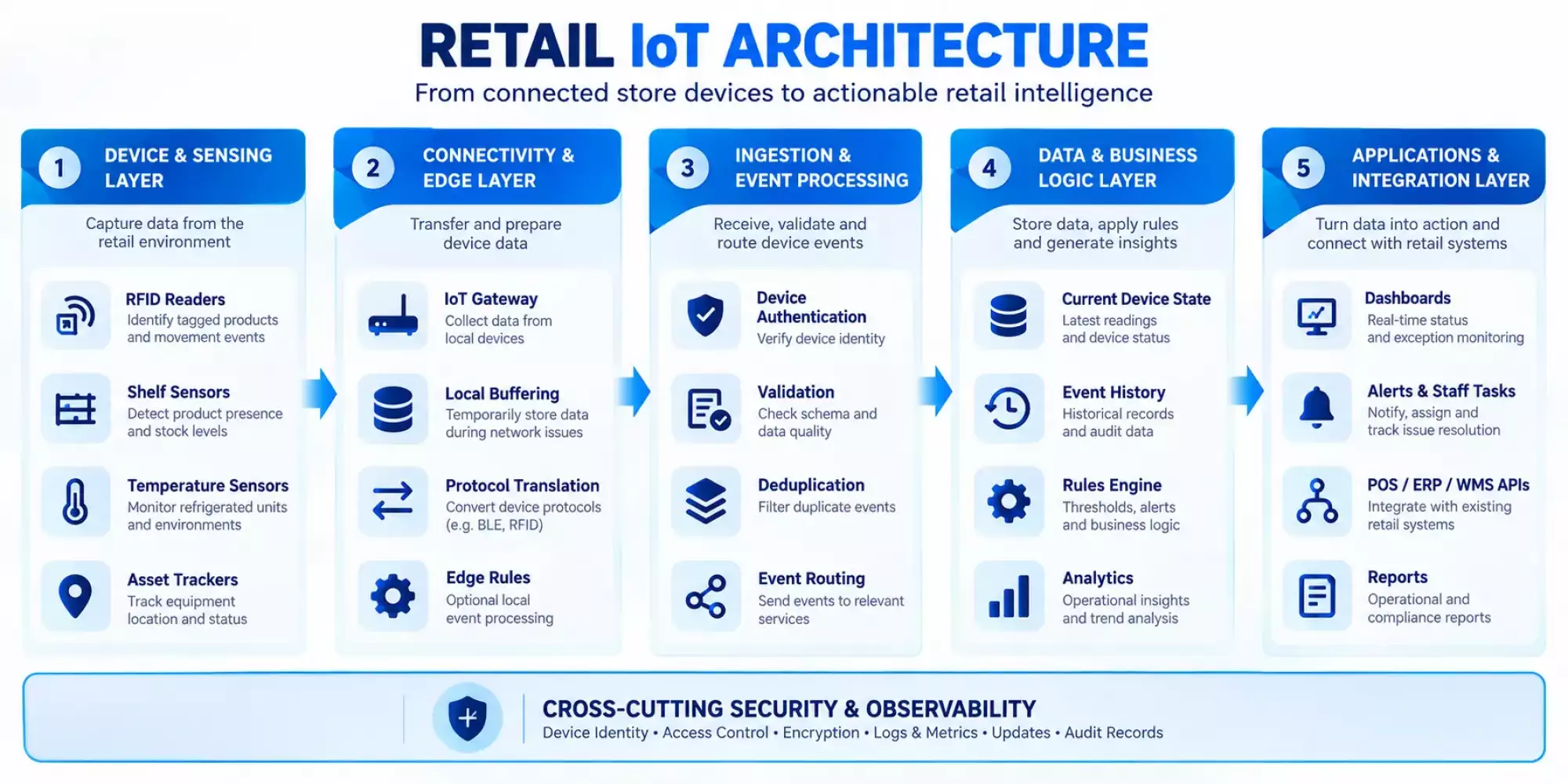
The diagram illustrates a typical flow from connected retail devices through connectivity, event processing, data and business logic, and user applications and enterprise integrations. Security and observability should span the architecture rather than exist only in a single layer.
What Is a Retail IoT Architecture?
There are five layers to this architecture where security is implemented at each level, and there is also an observation layer for monitoring purposes.
1. Device and Sensing Layer
The model is for capturing information about physical stores' operations. RFID reader identifies a tagged item; a shelf sensor detects an object on shelves, while a temperature sensor monitors refrigerator temperatures, whereas an asset Tracker reports where your items are located inside it. The hardware choice affects how much a device is capable of measuring; therefore, its specifications should be taken into account at an early stage regarding measurement precision, installation environment factors, and electrical needs.
2. Connectivity and Edge Layer
Devices send data through a suitable network to a gateway or backend. A gateway may aggregate traffic, translate protocols, or buffer events during an outage. Edge processing can apply selected rules locally when low latency or continued operation during disconnection is important; the design should define how local decisions are synchronized with central systems after connectivity returns.
3. Ingestion and Event-Processing Layer
The ingestion layer authenticates device messages, validates schemas, enriches events with context, and handles duplicates and delayed delivery. Event-time and processing-time semantics should be explicit so that late data does not silently overwrite newer states. Queues or event brokers can decouple producers from downstream services when the scale and reliability requirements justify them.
4. Data and Business-Logic Layer
This layer stores current state and historical events, applies business rules, and supports reporting. Keep the current operational state distinct from the event history used for audit and analysis. Define which system owns each business record and reconcile updates when an IoT event conflicts with an authoritative source.
5. Application and Integration Layer
Applications present device status, exceptions, and workflow tasks to authorized users. APIs and integration services exchange approved data with POS, ERP, warehouse management, inventory, maintenance, or notification systems. Record failures and provide retry or reconciliation paths where needed.
Security Controls Across the Retail IoT Lifecycle
For device-level security requirements, consult NISTIR 8259A, IoT Device Cybersecurity Capability Core Baseline. For manufacturer activities across product development and support, also consult the NISTIR 8259 series page, which lists Revision 1 (April 2026). These publications provide guidance and starting points; they do not by themselves certify a platform or guarantee compliance.
- Device identity and provisioning: Assign each device a unique identity and establish a controlled process for registration, credential issuance, replacement, and revocation. Avoid shared default credentials.
- Secure communication: Authenticate devices and services, protect data in transit, and define how credentials and encryption keys are stored, rotated, and revoked.
- Application and API access: Apply least-privilege permissions to employee roles, store locations, service accounts, and integrations. Keep secrets out of source code and application logs.
- Firmware and software updates: Define how updates are authorized, verified, deployed, monitored, and recovered if installation fails.
- Monitoring and incident response: Record security-relevant events, monitor suspicious access and device behavior, and document how teams investigate and contain incidents.
- Device retirement: Revoke access, remove device associations, and securely handle stored credentials or data when equipment is replaced or decommissioned.
Validate the security design through threat modelling, access-control testing, vulnerability assessment, update and rollback tests, log review, and an incident-response exercise. Tailor the controls to the device capabilities, deployment environment, data sensitivity, and applicable obligations.
Retail IoT Technology Stack
Choose the technology stack according to device protocols, event volume, latency, resilience, data retention, integration needs, team skills, and operating cost. Avoid selecting technologies solely because they are popular.
Devices, Sensors, and Gateway Selection
Choose a device according to what an app requires for capturing data.
- RFID readers: Capture product identification and movements. Placement of readers, tags' compatibility with them, and reading quality affect stock availability.
- Shelf sensors: Product detection sensors for shelves to detect products on them. Assess sensor precision level and installation requirements for upkeep purposes.
- Temperature and humidity sensors: They monitor cold rooms and display temperature units in warehouses. Calibration needs to be considered for measurement ranges and alerts requirements.
- IoT gateways: Collect measurements from nearby sensors, translate them according to their specifications, and send them over there via a network connection. Connectivity options and buffer size limits of vendors' SDKs are checked here.
Additionally, evaluate energy consumption needs and devices' lifespan maintenance costs for upgrades to their operating systems. A sensor reading is not always a true business fact. Readings should have validations of timestamps, locations, and contexts for them to work properly on this device.
Choose the Right Connectivity Protocol
IoT operates on various levels of technology. RFID tracking system is used for identifying tags, while Bluetooth Low Energy enables communication among devices within range, whereas MQTT transmits data from client to server applications.
| Technology | Potential role | Key consideration |
| Wi-Fi or Ethernet | Store networks and gateway connectivity | Coverage and reliability |
| Bluetooth Low Energy | Nearby sensors, tags, and beacons | Range and battery life |
| RFID | Product identification and movement events | Tag type and read accuracy |
| MQTT | Lightweight publish/subscribe messaging | Delivery guarantees and broker capacity |
| HTTP APIs | Enterprise system integration | Authentication and API limits |
| Cellular | Remote assets and locations | Coverage and data costs |
Backend, Data Processing, and Storage
Validate incoming payloads against defined schemas and normalise device-specific formats. Use idempotent processing to prevent retries from causing duplicate business actions, and define how event timestamps and late arrivals affect state updates. Store current state separately from historical events when the use case requires both operational views and audit or analytical history. Select databases according to query patterns, retention, throughput, and cost.
Cloud, Edge, or Hybrid Deployment?
- Cloud is suitable for centralized management, reporting, and analytics of various store locations.
- Edge is useful for local processing, offline operations, or low-latency response needs.
- Hybrid is a combination of on-site processing and centralization for reporting purposes, along with device management services from an office location.
Record architectural decisions made for this project, including technologies used, alternative options evaluated, along with their pros or cons, to be taken into account while making them during the development process. It provides them with an easy way to plan out their projects' costs and scale up later on.
Third-Party Integrations for Retail IoT Software
Integrations allow validated device events to support inventory, maintenance, fulfillment, and reporting workflows instead of remaining isolated in an IoT dashboard. Identify the authoritative source for each data domain before defining which systems may read or update it.
Essential Integration Points
| System | Integration requirement | Example workflow |
| POS | Exchange relevant sales and stock events | Compare sales activity with inventory records |
| ERP and inventory | Read or update authorized inventory data | Flag stock discrepancies for verification |
| WMS | Exchange warehouse locations and movement data | Connect warehouse activity with store availability |
| OMS and e-commerce | Share inventory availability and fulfillment status | Improve cross-channel stock visibility |
| Identity provider | Authenticate users and enforce access policies | Restrict access by role and store |
| Notification services | Route alerts to the appropriate recipients | Escalate unresolved equipment alerts |
| Analytics and BI | Share validated operational data | Report on store performance and recurring issues |
Integrate based on the priority of requirements for a specific application scenario. RFID inventory management might be an issue for POS system integration and stock tracking, whereas equipment monitoring would likely need a maintenance tool and alert service first.
How to Design Reliable Integrations
Before implementation, document the data exchanged, field mappings, event identifiers, authentication, permissions, rate limits, and ownership of each record. Design retries, idempotency, queueing, error logging, and reconciliation for temporary failures.
A reliable source of information about each major subject matter area is needed. For instance, an RFID reader might record a product movement. However, this information shouldn't be used to update the ERP system's stock levels directly. The platform might have to verify events, detect duplicates of readings, and enforce business rules prior to updating inventory information.
Need an IoT architecture that works with your existing retail systems?
Plan the device connectivity, event-processing pipeline, and POS, ERP, or inventory integrations around your operational requirements.
Step-by-Step Retail IoT Software Development Process
Retail IoT development includes business discovery, device and connectivity validation, architecture design, software development, integration, testing, and controlled deployment. Each phase should produce a defined deliverable and a decision gate so the team can resolve risks before committing to wider rollout.
Step 1: Discovery, Feasibility, and Requirements
Begin by mapping out current processes of sales channels, identification problems for customers, requirements, and goals. List out all of your hardware or software inventory items in this way: event definitions, type definitions, volume estimates, time constraints, security policy requirements, and availability standards. Set up initial performance metrics for evaluation purposes.
- Deliverables: Requirement document; initial scope analysis and risk register.
- Decision gate: Is there a way that these gadgets can effectively gather data for solving this issue?
Step 2: Define the MVP and Acceptance Criteria
Distinguish between core product requirements and future improvements to be added in subsequent versions of this software package. For a connected inventory pilot, the MVP might include device registration, inventory-event ingestion, a dashboard, discrepancy alerts, and one inventory system integration.
Specify requirements to validate events processed by a system; time taken between updates on its dashboard after changes are made; ability to recover from device failures; correctness of alerts compared with predefined data sets; consistency with other sources such as databases or logs. Define limits based on operational requirements and pilot tests instead of fixed standards.
- Deliverables: The MVP deliverable includes feature list, user story requirements specification sheet for acceptance testing purposes, and a test plan.
- Decision gate: Is there a way to measure an MVP's performance on defined standards that everyone agrees upon?
Step 3: Select Hardware and Validate Connectivity
Try out some of these models first before going all-in on them. Check if it is compatible with devices, available for software development kits, supports firmware; where to place a reader within an area of interest; how far away from the signal strength.
Early-stage simulation may be used for prototyping purposes, while actual devices need to undergo validation tests prior to going into mass manufacturing.
- Deliverables: Device compatibility matrix, proof of concept results, and hardware configuration plan.
- Decision gate: Is there a decision gate for these products to work well in an ideal store environment?
Step 4: Design the Architecture and Data Model
Device Registry; Event Schema; Data Ownership; Processing Flow; API; Storage Management System Access Controls and Deployment Boundaries. For offline use cases such as duplicated event handling, delayed message delivery, failure of a device replacement, and restoration during an interruption period.
- Deliverables: Architecture diagrams, data models, APIs security designs, and decision documentation delivery.
- Decision gate: Is there a possibility that this model can manage anticipated loads as well as failures while maintaining its reliability?
Step 5: Develop the Backend and User Application
Develop this app from start to finish based on dependencies like registering devices and identities first before ingesting data, validating it, then processing events while updating its state continuously. Implement an operational dashboard for alerts, acknowledgment procedures, and an escalation workflow to integrate the API with auditing logs.
Focus on what needs to be done by users rather than just showing them data that is available for viewing. Automated testing tools, deployment configurations, and technical specifications should be added during the software development process.
- Deliverables: Working MVP, automated tests, deployment configuration, and technical documentation delivery.
- Decision gate: Is there a way for users to successfully perform their main business processes between an event on devices and its outcome?
Step 6: Integrate Existing Retail Systems
Selective implementation of the chosen POS system and ERP software package for managing inventory levels within a warehouse management system. Check for data mapping, permission issues, retry logic, idempotence problems, rate limiting errors, and reconciliation failures. Scenarios for testing when there is no access to an external system; returning inconsistent results from it; processing requests slower than anticipated.
- Deliverables: Integration test reports; Interface specifications; Failure recovery plans.
- Decision gate: Is there a way for data to flow through an interface without error detection or handling issues?
Step 7: Test the System Against Real Operating Conditions
Unit testing, integration testing, end-to-end security, load, and reliability tests run. Real device testing on actual realistic hardware volume for an expected store network condition. Disconnection test cases are for failed connections, duplicate reading errors, message delivery delay time, failure statuses, and recovery process rather than success workflow tests.
- Deliverables: Test report deliverable; defect resolution; performance measurement; and release readiness evaluation.
- Decision gate: Is this a decision gate that checks whether an application meets its requirements for functionality, security, performance, and reliability?
Step 8: Pilot, Measure, and Scale
Implement this system on an isolated network, like one shop or a few places at once. Compare baseline KPI performance levels; assess service quality of operations; gather staff opinions about their work experience. Resolve problems first to expand its implementation.
- Deliverables: Results of pilot study; KPI analysis for performance measurement; implementation strategy document; operational guidelines and upkeep program.
- Decision gate: Is there a decision gate for pilots that shows enough effectiveness of operation and dependability so as to warrant further development?
Step 9: Establish Ongoing Operations
Define responsibility for device provisioning, monitoring, software and firmware updates, security patches, backups, incident response, and vendor support. Service ownership policy escalation procedures, maintenance budget, roadmap, future improvements plan.
- Deliverables: Service ownership model; support process maintenance, and budget development roadmap.
- Decision gate: Is there a decision gate for this project that includes teams, procedures, and budgets so we can run it out of the box and keep up with maintenance needs post-launch?
How Much Does Retail IoT Software Development Cost, and What Affects the Budget?
The software development estimates in this guide are illustrative planning ranges, not a quote or independently verified market average. A focused proof of concept is estimated at $10,000–$25,000; an MVP at $25,000–$75,000; a multi-system platform at $75,000–$180,000; and an enterprise rollout at $180,000–$400,000+.
The final budget depends on scope, device count, integrations, security, testing, and deployment requirements. Hardware, installation, connectivity, licenses, and ongoing operations may be additional.
Illustrative Retail IoT Development Budget
| Project category | Typical scope | Estimated software development cost |
| Focused proof of concept | One use case, limited devices, basic data flow | $10,000–$25,000 |
| Retail IoT MVP | Device management, dashboard, alerts, one priority integration | $25,000–$75,000 |
| Multi-system retail platform | Multiple device types, enterprise integrations, operational workflows | $75,000–$180,000 |
| Enterprise rollout | Multi-store management, advanced controls, high availability, complex integrations | $180,000–$400,000+ |
This range is an estimate of a plan rather than independent verification of actual values. Custom software development is not included here; hardware acquisition, major system enhancements, or large-scale installations are excluded unless they have been specified individually.
What Determines Retail IoT Development Cost?
Final budgets depend upon the size and complexity of implementation purposes.
- Hardware and Device Specifications: Types of sensors, gateways for communication purposes, procurement process, installation procedure, and calibration procedures.
- Software complexity: Back-end services, dashboard, application for mobile devices, and protocol to process events.
- Integrations: POS, ERP system compatibility, warehouse management software, online storefronts through an application programming interface.
- Infrastructure: Cloud hosting, connectivity, data retention, and scalability requirements.
- Testing and security: Hardware-in-the-loop testing, reliability testing, authentication mechanisms, and cybersecurity audits.
- Ongoing operations: Support, software upgrades, replacement of devices, and repairs are ongoing activities.
The software development price does not equal overall project expenses. Get a separate estimate on hardware costs, installation fees, integration charges, and recurrent operational costs.
How Long Does Retail IoT Development Take?
The schedule is dependent upon hardware availability, integration access, testing needs, and scaling for deployment. Proof of concept might take months to develop, whereas a product launch needs more time for development and testing. The hardware purchase process, sandbox access, and store approval may have an impact on delivery time.
| Phase | Illustrative duration | Main output |
| Discovery and feasibility | 1–3 weeks | Scope, risks, success metrics, device and integration requirements |
| Hardware proof of concept | 2–5 weeks | Device compatibility results and validated event flow |
| Architecture and MVP development | 4–10 weeks | Backend, dashboard, device management, core workflow |
| Priority integrations and testing | 2–6 weeks | Tested APIs, failure handling, acceptance results |
| Store pilot and rollout preparation | 2–4 weeks | Pilot findings, operational runbook, rollout decision |
How to Estimate Total Cost of Ownership
First-year total cost = initial implementation cost + first-year operating costs.
For the example below:
$50,000 initial implementation + $12,000 annual cloud, connectivity, and support = $62,000 first-year total. This illustration excludes taxes, future hardware replacement, major scope changes, and unexpected growth.
| Cost component | Illustrative amount |
| Software development | $40,000 |
| Hardware and installation | $10,000 |
| Initial implementation | $50,000 |
| Annual cloud, connectivity, and support | $12,000 |
| First-year total | $62,000 |
The sample does not include any tax deductions for equipment upgrades or unexpected growth of business operations. The actual cost depends on your needs for a particular application.
What will it actually cost to develop your retail IoT solution?
Get a project-specific estimate based on your device count, integrations, software scope, infrastructure, and deployment requirements.
Testing, Deployment, and Maintenance of Retail IoT Software
Test the solution under realistic operating conditions before expanding it across stores. Testing should cover normal device readings as well as network interruptions, invalid or delayed data, integration failures, security controls, and recovery. The objective is to confirm that the system can continue or recover safely without corrupting business records or losing critical events.
Functional and Integration Testing
Check all stages of a process, including registering devices for events, ingesting them on dashboards, and sending out notifications about these processes along with any modifications made by other systems. Verify that business logic is functioning properly and that users have appropriate privileges based on their roles and whereabouts within an organization.
Integrate tests for POS, ERP, and warehouse management system (WMS) integration verification of data mapping updates and error resolution process. Use representative devices and real-world events, whenever available, for modeling purposes.
Reliability and Failure-Recovery Testing
Test how this system performs under abnormal circumstances.
- Outage of network connection to device or computer.
- Duplicated, delayed, or out-of-order data points.
- Offline buffering and reconnection.
- API third-party failure rates and limit issues.
- Malformed data and invalid values.
- Service restarts and recovery.
- Alert failure to deliver or escalate.
To avoid repeating processes due to multiple occurrences of an event, implement idempotency for your application. The reconciliation process identifies discrepancies among linked components, whereas log files, statistics reports, and notifications reveal faults.
Security and Device Lifecycle Testing
Verify device identity, access controls, encrypted communication, secure software updates, audit logging, and vulnerability management. Verify if there are any broken login details or unapproved machines that can access confidential systems.
The testing process must include all stages of a product's life cycle, such as setup upgrades, modifications to software settings, hardware upgrades, replacements, and retirement. The NIST IoT cybersecurity guidance is helpful to establish an initial level of protection against cyber threats from devices during their entire lifespan.
Pilot Deployment and Production Rollout
Launch this product in some locations first, then expand it throughout all outlets. Specify acceptance requirements beforehand, such as reliability of event processing, precision of alerts, efficiency of integrations, and important metrics for businesses.
Monitor actual operation during the testing period, gather employee comments for improvement purposes prior to expansion. Develop an emergency response strategy for rolling back changes if they impact important sales processes at stores.
Common Retail IoT Development Challenges and How Suffescom Can Help Solve Them
Technical issues are encountered in retail IoT projects, which affect data accuracy, operational reliability, security, and the cost of developing them. Early identification of such hazards allows for proper design planning by a retailer to prevent costly modifications post-deployment.
Common Challenges and How We Address Them
Suffescom tackles them through identification of technical risk at an earlier stage while also ensuring that our product development is aligned to meet a retail company's needs for operational efficiency.
1. Device compatibility and unreliable connectivity
Retailers usually have various types of equipment that come from multiple vendors, having differing specifications like software versions, operating systems, and file structures. Interruptions to networks may cause delays in reading data or disruption of monitoring activities.
- How Suffescom can help: We assess devices' compatibility with gateways for integration purposes while building connection-handling processes too. If necessary, we have an offline buffer mechanism for recovery from disconnections so that our users' information is not lost due to connectivity issues on their end.
2. Duplicate events and conflicting inventory data
RFID readers and sensors may produce duplicated and lagging events, which might lead to incorrect stock levels and repeat activities.
- How Suffescom can help: We implement event validation, idempotency checks for processing tasks, timestamp management, and reconciliations between systems so as not to have duplicates while keeping track of stock levels accurately.
3. Alert fatigue and legacy integrations
Too many alerts can overwhelm store employees, while older POS, ERP, and WMS systems may have limited API support or inconsistent data formats.
- How Suffescom can help: We develop customizable alert threshold settings, severity level definitions, and acknowledgment processes. Also, we evaluate the API at an early stage for data mapping and integration errors to be handled by the current e-commerce platform.
4. Device security and access control
Poor password security, old software versions, and too many privileges may put your network at risk of being hacked or having its information stolen by criminals.
- How Suffescom can help: We incorporate device authentication, role-based access control systems, encryption of communication channels to ensure data privacy, secure update mechanisms for software patches and bug fixes, and auditing logs that track all activities within an organization’s network infrastructure.
5. Scaling across multiple locations
One-store solutions might not work well when there are more devices, events, and operations.
- How Suffescom can help: We develop for expected growth via standardization of devices during the onboarding process, a centralized monitoring system at a single point, and customizable permission levels to the store level before the rollout phase. Scalability is validated for the anticipated load during the scaling-up timeframe.
6. Vendor lock-in and rising maintenance costs
Restricted access to proprietary systems may be costly for migrating or integrating them later on.
- How Suffescom can help: Our IoT application development services prioritize documented APIs, clear data ownership, data-export requirements, and maintainable integration boundaries to help preserve flexibility as business needs evolve.
Development Challenges and Recommended Mitigations
| Development challenge | Recommended mitigation |
| Incompatible devices | Test representative hardware and maintain a compatibility matrix. |
| Poor connectivity | Assess coverage and implement gateways or offline buffering. |
| Duplicate or delayed events | Use idempotent processing and explicit event-time handling. |
| Conflicting inventory data | Define the source of truth and implement reconciliation. |
| Alert fatigue | Calibrate thresholds and prioritize alerts by severity. |
| Legacy integrations | Validate APIs, permissions, and data mapping early. |
| Device security weaknesses | Apply authentication, access controls, secure updates, and vulnerability management. |
| Scaling across locations | Standardize onboarding, monitoring, and rollout procedures. |
| Vendor lock-in | Document dependencies, data portability, and interface contracts. |
How to Prevent Scope and Cost Overruns
Here are some ways to keep retail IoT development on track according to our recommended plan of action.
- Define the MVP scope: Identify key characteristics such as hardware specifications for devices to be integrated into a product at an early stage of the design process. Non-essential improvements should be kept for future development stages.
- Validate hardware early: Test representative sensors, RFID readers, and gateway devices for compatibility problems prior to committing resources towards large-scale projects.
- Assess integrations upfront: Review API documentation, authentication, authorization requirements, data format, and compatibility with existing system. Identify any integration dependencies or limitations before the development proces begin.
- Set measurable acceptance criteria: Agree on event processing accuracy, alert behavior, and system integration reliability for this project.
- Establish change control: Evaluate each new item regarding effects on project costs, schedule length, delivery period, test duration, and upkeep prior to approval.
- Account for the full implementation cost: It includes software development, hardware, installation, cloud infrastructure, connectivity, security testing, and ongoing support.
- Plan for failure and recovery: It includes budgets for offline operations, duplication of events, system integration issues, monitoring systems, and test recoveries rather than dealing with these problems as surprises.
This helps to make an accurate estimation for projects, handle changes in needs, and avoid expensive surprises while implementing them.
How to Measure ROI From a Retail IoT Deployment
Investment in Retail IoT needs to be measured by tangible results rather than just the quantity of connected gadgets or the number of notifications sent out. Define a business issue before starting any project; set up an initial benchmark for measuring success rates of improvement in productivity levels, cost reduction, and revenue growth rate.
Key Parameters to Measure ROI From a Retail IoT Deployment
- Initial investment: The cost of initial investments such as software development, hardware purchase, installation, integration, and deployment is calculated.
- Inventory loss reduction: Reduce inventory losses by measuring differences between actual stock, theft, or shortages of goods sold out from stores to calculate realized cost reductions as well as potential revenue recovery possibilities through analysis of these metrics.
- Operational cost savings: Cost reduction through operations: Reduce costs by eliminating unnecessary manual inventory counts, regular maintenance checkups, and redundant employee duties.
- Equipment downtime: Measure the reduction to be achieved from unplanned downtime, maintenance response times, and related repair expenses.
- Product spoilage reduction: Reduce product spoilage by comparing pre- and post-cold chain monitoring rates of loss.
- Energy savings: Compare electricity usage and bills for similar businesses during the same time period.
- Incremental gross profit: Calculated gross profits on higher inventory turnover rate, less lost sales volume, and more efficient order fulfillment processes.
- Recurring operating costs: It includes cloud hosting fees, network connection charges, application service provider service contracts for software support, and devices' upkeep and repair or replacement needs.
- Annual net benefit: Subtract annual operating costs from verified annual savings and incremental gross profit.
- ROI and payback period: Calculate annual ROI based upon an amount invested while estimating time required till its total returns cover up cost of money.
Define the Baseline Before Deployment
The current status of this project is recorded prior to implementing an IoT system. Choose KPI to measure performance towards the goals of the organization.
| Use case | Suggested KPI |
| Inventory tracking | Inventory accuracy and stockout rate |
| Smart shelf monitoring | Time to detect and resolve shelf exceptions |
| Cold-chain monitoring | Temperature excursions and spoilage rate |
| Equipment monitoring | Unplanned downtime and maintenance response time |
| Energy management | Energy consumption per store or operating period |
| Store operations | Time spent on manual checks and exception resolution |
Compare post-deployment results to baselines during an equivalent time frame. Account for variations in sales volumes, seasons, footfall at stores, and working hours before blaming them on an IoT system’s performance improvement.
Calculate the Financial Return
Estimate an annual profit through transparency calculations.
Annual net benefit = verified annual savings + incremental gross profit − annual operating costs.
Annual ROI = (annual net benefit ÷ initial investment) × 100%.
For example, if a retail IoT deployment generates $80,000 in verified annual savings and incremental gross profit, incurs $20,000 in annual operating costs, and requires an initial investment of $100,000, its annual net benefit is $60,000, and its annual ROI is 60%.
This is just an example; it does not predict anything. Measured outcomes are needed for savings and incremental profits to be justified through evidence-based projections. Don't count it twice for a benefit, like counting an amount of loss from stock reductions to be both saved on costs and added income.
How to Choose a Retail IoT Software Development Partner
Selecting an appropriate developer involves much more than just looking at prices for a project. Retail IoT software involves connected hardware, event processing, enterprise software integrations, security, and ongoing maintenance. A customer needs to know how they function within an actual store setting.
Evaluate Technical and Delivery Capabilities
Assess the team's ability to explain device compatibility, architecture trade-offs, integration risks, security controls, test strategy, project milestones, documentation, and ongoing support.
- Device integration: Connecting sensors, RFID readers, and gateway hardware for various types of communications between them.
- Software architecture: Design of a software system, including reliability to backend systems, processing events through a pipeline, and database management.
- Enterprise integrations: Connecting POS system, ERP system, warehouse management system, and inventory management.
- Security and testing: Managing device identity, access controls, hardware validations, and failure recovery processes.
- Project delivery: Define MVP Scope, acceptance criteria, milestone goals, documentation, and post-launch support.
Find someone capable of explaining technical trade-offs and validating assumptions prior to going ahead with an entire project launch.
Questions to Ask Before Signing
Before finalizing an agreement, ask:
- How will you validate our hardware and device compatibility?
- How will the system handle outages, duplicate events, and failed integrations?
- Which components will be custom-built, and which will use third-party services?
- How will security updates and device replacements be managed?
- What deliverables will we receive at each milestone?
- How will scope changes, maintenance, and support costs be documented?
Why Choose Suffescom Solutions for Retail IoT Software Development?
To develop an application for smart retail products, you need knowledge of networked systems, live analytics solutions, store processes, as well as integration with business applications. At Suffescom Solutions, our retail software development integrates those requirements so that companies can design and build integrated e-commerce solutions for business operations.
Retail-Focused Software Development
The scope of this project will be aligned to meet customer needs like a stock management information system, barcode scanning technology for goods movement tracking, intelligent shelf sensor data, and device connectivity between stores' systems. We focus our efforts on selecting appropriate technology solutions for addressing particular business process problems within a store environment. We have experience in e-commerce platform development, where usability, platform scalability, and smooth online purchasing workflows are important considerations.
Connected Device Integration and Data Processing
We develop IoT applications for connecting compatible devices to process their data streams while providing real-time monitoring via a web-based interface or mobile app. For instance, we developed an IoT-enabled cold-chain management system for tracking temperatures of perishable goods through sensors that send real-time updates via email or text message when they fall outside specified ranges, so that managers have timely information about their inventory status at all times.
Integration With Current Store Management System
We integrate the POS system, ERP software for inventory control and warehousing operations, as well as an online store via API support. The aim is to establish a dependable system for exchanging information between systems rather than replacing them unnecessarily. It is especially crucial for maintaining consistency between stock levels and orders at all locations of a business or online store.
Centralized Monitoring and Operational Visibility
We develop dashboards to combine data from devices such as sensors or other sources of information like logs for analysis purposes. Centralized monitoring helps multi-store retailer managers compare stores across different sites to identify common problems so they can take action accordingly based on their device usage statistics. Dashboards and alerts need to be built for what employees must do.
Scalable Architecture and Security
We plan the architecture around expected device volumes, data frequency, integration requirements, and future expansion. This could include cloud computing services, edge computing capabilities, role-based security measures for data privacy and confidentiality of information systems; device lifecycle management; and network monitoring. They are useful for building an easy-to-maintain base without introducing any additional complexities beyond what was needed initially.
Certifications and Technology Partnerships
When selecting a retail IoT development partner, businesses should evaluate both technical delivery capabilities and the processes supporting security and quality. Suffescom Solutions' relevant credentials include ISO/IEC 27001 and ISO 9001, subject to confirmation of our current certification details and scope. Our Microsoft Solutions Partner and AWS Partner designations can also be considered when the proposed architecture uses the corresponding technologies.
Ready to turn your retail IoT concept into a working platform?
Work with a development team to define the scope, validate device compatibility, plan integrations, and prepare a realistic implementation roadmap.
Conclusion
To implement an effective solution for IoT within retail businesses, it is important to first identify the needs, then validate at the hardware development stage before moving towards building an MVP that can be tested through actual usage scenarios in a point-of-sale environment. Planning carefully can help you manage expenses for expansion projects as well as measure return on investment prior to opening more locations at once.
If it is about enhancing stock management efficiency, tracking temperature-sensitive goods for safety reasons, or integrating retail processes to increase productivity, focus on functionalities that provide quantifiable benefits. For any needs of yours, consider consulting with Suffescom for IoT app development solutions, where we can help you define specifications, integration points, and project timelines.
FAQs
1. How do you develop an IoT solution for the retail industry?
Firstly, identify a retail issue, then define quantifiable goals for it. Choose suitable hardware for this project; define an MVP specification; plan out its architecture; build it from scratch; implement it now to be tested later on. The control trial is used for testing purposes prior to large-scale implementation of an experiment or product.
2. What features should a retail IoT platform include?
The core features are device management, data ingestion, operational dashboard, configurable alert system, user access control mechanism, historical events log, and integration capabilities. Predictive maintenance and automatic inventory management are optional features that may be available based on customer needs and information accessibility.
3. What technology stack is used to build retail IoT software?
The technology stack depends on device protocols, messaging requirements, backend processing, databases, cloud or edge deployment, frontend applications, and enterprise integrations. MQTT, HTTP APIs, cloud services, and operational databases may be included as part of this solution. However, it is ultimately decided based on performance requirements.
4. How much does retail IoT software development cost?
The illustrative software development estimates in this guide range from $10,000–$25,000 for a focused proof of concept to $180,000–$400,000+ for an enterprise rollout. A retail IoT MVP is estimated at $25,000–$75,000. Hardware, installation, connectivity, and ongoing costs may be additional. These are planning ranges, not a quote.
5. How long does it take to build a retail IoT platform?
The timeline depends on the use case, device availability, integrations, testing, and deployment scope. The guide’s phase estimates are illustrative and may overlap; a production rollout requires additional validation beyond a basic proof of concept.
6. Can retail IoT software integrate with existing POS and ERP systems?
Suppose there is an available API for current applications to use, as well as a compatible interface between them so that they can be integrated together easily. Data mapping definition should be done by the development team for permission management of system interoperability issues like retries and reconciliations among them.
7. How do you secure a retail IoT platform?
Implement device identity, authentication, role-based authorization, encrypted communication, secure software updates, monitoring, and vulnerability management. The security measures must include networked computers, routers, server-side software systems, and client-side programs.
8. How do you scale a retail IoT solution across multiple stores?
Use a standardized device onboarding process, centralization of configurations for locations, permission management based on a location-awareness system, and real-time event handling capability. Use a phased approach to expansion where we validate its effectiveness as well as compatibility issues prior to opening additional locations.