The main task of RAG is to ground LLMs by connecting them to an authoritative, credible, and genuine knowledge base before responding.
Without spending millions on system migration, businesses can access their million-dollar data from legacy systems.
Highly regulated large enterprises are in a transition phase, as many COBOL experts are retiring, and finding replacements is difficult. The availability of fewer legacy system experts and the credibility of their skills are also major factors for businesses choosing RAG to access legacy data.
For those industries, RAG for legacy systems is one of the most reliable ways to access and download data before it is lost.
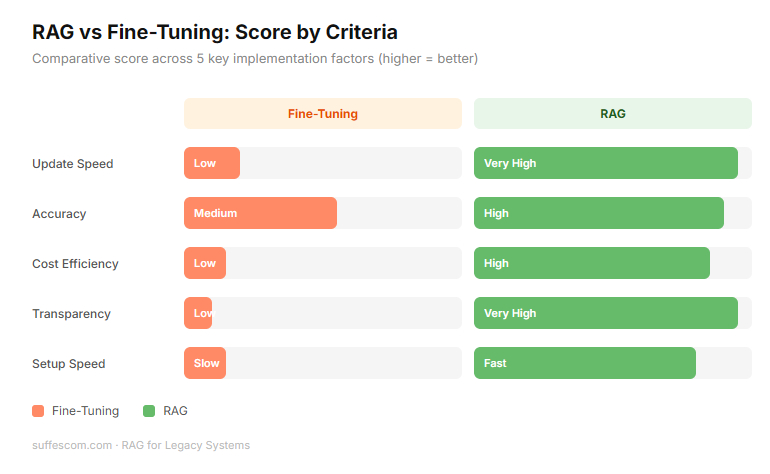
Difference between fine-tuning & RAG
| Feature | Fine Tuning | RAG |
| Knowledge Type | The AI learns the data and embeds it into its brain | The AI references the data from a separate database. |
| Updated Info | If your data changes, you have to retrain (expensive/slow) | Just update the document in the folder, and AI sees it instantly. |
| Accuracy | Risk of hallucinations. AI might misremember a fact. | Grounded in facts. The AI points to the exact document it used as a source. |
| Cost | High. Requires high GPU power and data science expertise. | Low to moderate. Cheaper to set up and maintain. |
| Transparency | Black box. You don’t know why AI gave this specific answer. | Citation. The AI can show the exact page it read to get an answer. |
Why Legacy Systems Struggle With Modern AI
Modern systems are built AI-ready (flexible, API-first & standardized). Legacy systems were built for isolation and durability. The four major friction points are:
1. Data Translation
Legacy systems often store data in proprietary or obsolete formats (such as EBDIC on mainframes or flat files without headers). Modern AI models speak JSON & English.
AI cannot understand a file if it doesn't know where the column starts or what the cryptic abbreviations mean (e.g., X-REF-99).
You must build an expensive extraction layer just to get the data into a format the AI can read.
2. Lack of APIs
Modern AI interacts with the system with APIs. Most legacy systems don't have APIs. To get data from an old system, you often have to scrape a green terminal screen or perform a massive database dump that slows the whole system down.
Real-time AI needs real-time data, but legacy systems are often batch only, meaning they update only once a night.
As a result, the team often relies on a manual extraction process just to access legacy systems, increasing operational risks and response time.
3. Rigid Security Architecture
Legacy security is often an all-or-nothing approach or relies on ancient user-permission lists that don't integrate with modern cloud security (such as SSO or OAuth).
When you connect an AI to a legacy database, it might accidentally see everything, bypassing the old security rules.
Re-mapping 30 years of complex user permissions into an AI interface is a massive technical headache.
4. Brittle Infrastructure
Legacy systems are often brittle, and a small change in one place can cause a crash in another. AI requires heavy crawling to build its memory.
This intense activity can overwhelm and crash an old server that wasn't designed for high-speed search.
What Does RAG for Legacy Systems Actually Mean?
RAG for legacy systems doesn't mean replacing the old system. It’s an augmentation strategy. It is not:
A System Rewrite: You aren’t translating COBOL into Python.
A Database Migration: You aren’t moving a 30-year-old database into a new cloud warehouse.
A Risky Overhaul: The business logic that has been worked on for decades and remains untouched.
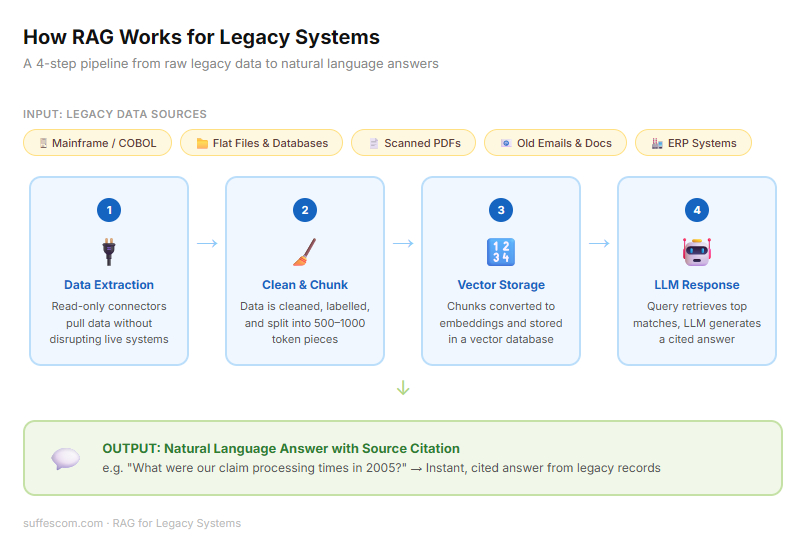
It is a four-step pipeline that turns static frozen legacy data into a dynamic conversation:
Data Extraction: Since legacy systems don’t have plug-and-play connectors, connector tools are used to extract the data. This might involve scraping old terminal screens, reading flat files, or exporting data from an old SQL database.
Secure connectors are essential because the goal is to access legacy systems in read-only mode without disrupting core transaction processes.
Indexing: Once extracted, the data is cleaned and chunked, rather than the AI trying to read thousands of pages at once. The RAG for the legacy system breaks into small pieces. Each piece is labeled so the AI knows exactly where this data came from (e.g., This is from the 1994 maintenance log, from page 12).
Vector Databases: These data chunks are converted into vectors. These are stored in a database that allows AI to search for the concepts.
Example: If you search for "powerful failure," the system is smart enough to find records of voltage drop or grid outage in the maintenance log.
LLM Integration - RAG for legacy systems acts as a non-invasive bridge. When a user asks a question, the system searches the vector databases, finds the relevant legacy chunks, and hands them to LLMs. LLMs read those legacy chunks and write a clear, human answer.
Architecture Of RAG For Legacy Infrastructure
Building RAG for legacy systems is a massive engineering challenge. It requires a specialized pipeline designed to bridge the gap between stable but isolated old tech and fast but hallucination-prone AI.
Step 1 - Accessing Legacy Data Sources
The primary challenge is getting the data out without crashing the source. Legacy systems weren’t built for high-frequency AI crawling.
Mainframe - Data is often trapped in DB2 databases or VSAM files. Extraction requires middleware or CDC (Change Data Capture) to listen for updates, without adding load to the CPU.
ERP Systems - Older versions of SAP or Oracle often have spaghetti schemas. Use specialized connectors to pull structured table data.
Unstructured File System - This includes forgotten network drives filled with 20-year-old .doc or .txt files.
Physical Archives - Critical knowledge often lives in scanned PDFs, old emails, or even handwritten maintenance logs that must be digitized.
Step 2 - Data Cleaning & Structuring
Raw legacy data is noisy. If you feed messy data into an AI, you get messy answers.
OCR (Optical Character Recognition) - For scanned documents, high-fidelity OCR converts images into machine-readable text.
Schema Mapping - RAG system translates cryptic legacy column names (such as CUST_001_A) into Human-Readable English (Customer Identification Number) so the AI understands the context.
Metadata Tagging - RAG system attaches identity tags to every piece of data. Date of creation, Original author, and system of origin. This is vital for the AI to cite sources later.
Data Normalization - Converting different date formats, currencies, or units of measure into a single standard that LLMs can process logically.
Step 3 - Embedding & Vector Storage
Once the data is clean, it is transformed into a format that AI can understand mathematically.
Embedding Models - Text-embedding-3 or Cohere to turn text into vectors, long strings of numbers that represent the meaning of the information.
Step 4 - Retrieval + LLM Layers
This is where the user interacts with the system.
Query Processing - When a user asks a question, their query is also represented as a vector to find the closest-matching legacy vectors in the databases.
Context Injection - The system retrieves the top 3-5 most relevant snippets from your legacy archives and hands them to the LLM.
Benefits of Implementing RAG In Legacy Systems
For most of the enterprises, legacy systems are too critical to shut down and too old to be useful in a modern, data-driven environment.
RAG for legacy systems provides the third way, modernizing the interface and access without the risk of full replacement.
1. Extends System Lifespan
You don’t need to decommission a mainframe, because it's simply too hard to query. By adding a RAG layer, you give a legacy system a modern brain. This allows companies to continue leveraging their assets while benefiting from the latest modern-day AI intelligence.
2. No Full Migration Needed
Full system migration is risky and costly. RAG allows you to keep your source of information exactly where it is. Years of planning, data mapping, and potential downtime associated with moving to a completely new architecture aren’t needed.
3. Faster Decision Making
In legacy systems, getting an answer often requires a specialist to write a custom COBOL or SQL query.
Without RAG: A manager waits 48 hours for a report.
With RAG: The same manager asks what our average claim processing time was in 2005 vs now? And gets an exact, detailed, accurate answer, without any coding knowledge.
4. AI-Powered Knowledge Assistant
When the old experts who built these legacy systems retire, they take their secret knowledge with them. We use RAG to read 40-year-old notes from emails. So an AI can teach new employees how the system works.
5. Reduced Operational Risks
Changing a line of code in a legacy system can cause significant damage and wipe out valuable, age-old enterprise data. RAG is safe because it only reads and stores information, not modifies it. It provides the benefits of AI without changing anything in the source code of legacy systems.
6. Lower Modernization Costs
RAG development for old systems required a fraction of the full legacy systems replacement costs..
Migration: Requires millions in consulting, licensing & testing.
RAG: Costs thousands in API tokens & vector storage. The ROI can be seen in a few months.
Real Use Cases of RAG For Legacy Systems
RAG implementation on legacy data is a primary tool for businesses looking to extract value from their most stubborn data silos.
1. Banking & Mainframe Applications
Many banks still run on COBOL systems built in the 70s or 80s. The original programmers have retired, and the documentation is either missing or thousands of pages long.
RAG Solution: A COBOL documentation assistant. By feeding the RAG pipeline the raw source code and old technical manuals, the junior developer can ask which module handles interest calculations for fixed deposit accounts.
The AI retrieves the specific code blocks and explains the logic in English, reducing maintenance time by 60%. This approach allows financial institutions to securely access legacy systems built decades ago.
2. Manufacturing Systems
Factories often use machinery that is years old, with maintenance logs and part specifications trapped in thousands of scanned PDFs or handwritten ledgers.
RAG Solution: AI-powered maintenance insights. When a machine breaks down, a technician can ask, what was the torque setting for the 1992 Model-B turbine?
RAG for legacy systems reads the scanned 1992 manuals and provides the exact specs instantly. It prevents costly downtime and avoids the need for an on-site specialist.
3. Healthcare Records Systems
Hospitals often have cold storage databases containing decades of patient history & data. These aren’t compatible with modern-day EHR systems.
RAG Solution: Context-aware patient search. Doctors can query a patient's entire 30-year medical history using natural language like ‘has this patient ever shown an allergic reaction to penicillin in their medical history.
4. Government Legacy Portals
Government agencies manage massive volumes of policy documents, legal statutes, and public records, often stored in fragmented, unsearchable legacy portals.
RAG Solution: Policy document search assistant. Citizens or civil servants can ask complex questions such as: What were the zoning requirements for residential development builds in this district under the 1988 master plan?
Challenges of Integrating LLMs with Legacy Systems
While the benefits of RAG for legacy systems are transformative, integrating LLMs with legacy systems includes some major technical hurdles.
1. Poor Data Quality
Legacy data is often messy. It contains obsolete information, duplicates, and conflicting records from different eras.
If your 1995 manual says, ‘Use Part A’ for a specific problem, but a record from 2010 says, ‘Part A has been discontinued and use Part B’, then the basic RAG system retrieves both.
You must implement the data deduplication and recency weighting during the indexing phase, so the AI prioritizes the latest information.
2. Security & Compliance Risks
Legacy systems were built before the modern cybersecurity era. They often rely on hardcoded permissions that cannot be easily translated to an AI interface.
An LLM doesn’t inherently know that user A shouldn’t see the salary data if both are in the same database.
Implementation of Metadata filtering is necessary to prevent this. This ensures the RAG system checks the user’s credentials against the document’s security tags before the AI even sees the data.
3. Hallucinations
LLMs are designed to answer queries and assist users. But sometimes ambiguous data can lead them to provide irrelevant information.
A guess or an AI hallucination in the medical or banking sectors can lead to catastrophic consequences.
Strict data grounding is mandatory. Set LLMs temperature to 0 to reduce randomness. RAG experts ensure that the system remains factual and provides accurate information.
4. Lack of Documentation
The lack of necessary documentation is the biggest hurdle, making it impossible to build the right RAG for legacy systems.
Without much documentation & accurate data, AI LLMs may misinterpret the context and provide answers without citations.
This requires a human-in-the-loop during the initial phase. When a subject-matter expert teaches AI, all critical data is important for a seamless workflow.
5. Performance Constraints
Legacy hardware is slow. Performing a massive data crawl to index a 30-year-old mainframe can spike CPU usage and crash the legacy system you want to modernize.
Running a RAG query shouldn’t take down the company’s payroll system.
Off-peak implementation and CDC (Change Data Capture). Instead of constantly hitting legacy systems, you take snapshots during low-traffic hours and move them to a modern cloud environment for an AI to work with.
Tools & Platforms For RAG Implementation On Legacy Data
Implementing RAG on legacy data requires specialized ingestion and parsing tools to handle unstructured or poorly formatted data.
1. LlamaIndex
Best for connecting LLMs with complex, unstructured data with advanced indexing (e.g, LlamaParse for PDFs)
2. RAGFlow
An open source engine, specializing in deep document parsing, layout analysis, and structure extraction.
3. Unstructured.io
The go-to library/API for ingesting and preprocessing the messy legacy data into LLM-ready texts.
4. LangChain
The standard orchestration framework for building flexible pipelines that chain together data ingestion, indexing, and retrieval.
5. Haystack
A production-ready framework by Deepset, ideal for building mature, enterprise-grade search & QA systems.
6. Pathway
A Python framework built for real-time RAG, enabling automatic updates to the index as legacy files change.
7. Weaviate
An AI native vector database offering built-in vectorization modules, hybrid search, and multi tenancy.
8. LLMWare
A specialized framework designed to run enterprise RAG on smaller private models without needing GPU clusters.
9. Azure AI Search (with RAG)
A fully managed service for enterprise search, enabling secure ingestion from legacy data sources (SharePoint, SQL).
10. Chroma
A user-friendly, open-source vector database that simplifies local prototyping of RAG applications.
11.R2R (RAG to Riches)
An advanced AI system providing agentic retrieval, knowledge graph generation, and RESTful API access. Memgraph (Unstructured to Graph)
Converts unstructured documents into a queryable knowledge graph for superior contextual retrieval.
How To Implement RAG For Legacy Systems
Modernizing a legacy system with RAG is high-stakes work. To avoid common pitfalls, follow these six steps in the RAG experts framework:
Step 1 - Audit Legacy Data Sources
Before implementing code, RAG experts must understand their data debt.
Inventory: Identify the data source (Mainframes, SQL Server 2005, local network drives).
Format Check: Determine which items require OCR (scanned images) versus those that are raw text (COBOL files, logs).
Prioritize: Don’t index everything. Start with data that provides the most value but is currently the hardest to access.
Step 2 - Define AI Use Case
Don’t try to solve all problems at once. Start small and define a specific problem for AI to solve.
Internal Knowledge - An AI that helps devs understand old code.
External Service - An AI that helps support agents find historical customer records.
Success Metric - Define the success metric clearly (like reduce time to info from 30 min to 30 sec).
Step 3 - Build Secure Data Connectors
You need only a one-way mirror into your legacy system.
Read Only Access - Ensure the connection cannot write to delete legacy data.
Batch vs. Stream - For older systems, set up a batch export to avoid overloading the legacy CPU during business hours.
Encryption - Ensure data is encrypted as it moves from the old server to your modern AI environment.
Step 4 - Create Embedding Pipeline
Chunking - Break large documents into 500 - 1,000 token sections, so the AI doesn’t lose focus.
Vectorization - Run these chunks through an embedding model (like Gemini or OpenAI) to create mathematical maps of the data.
Vector DB Storage - Save these vectors in a database like Pinecone or Milvus for high-speed retrieval.
Step 5 - Deploy Retrieval Layer
Connect the LLM with Vector DB.
Prompt Engineering - Create a system prompt that forces the AI to cite its sources (e.g., according to the manual log entry from 1998).
Context Window - Ensure you aren’t sending too much data to AI at once, which can lead to confusion.
Step 6 - Add Governance & Monitoring
An enterprise AI is only as good as its last correct answer.
Guardrails - Use tools to filter out toxic or irrelevant queries.
Feedback Loop - Allow users to thumbs up/down answers so you can see where the AI is struggling with legacy terminology.
Audit Logs - Keep a record of every question asked and every document retrieved for compliance.
Step 7 - Run A Pilot Program
Don’t launch the whole company in one day. Select a power user group (like 5 senior engineers)
Test for 30 days, using a shadow mode, where they compare the AI answers to their own manual research.
Refine the index based on their feedback before scaling to the rest of the organization.
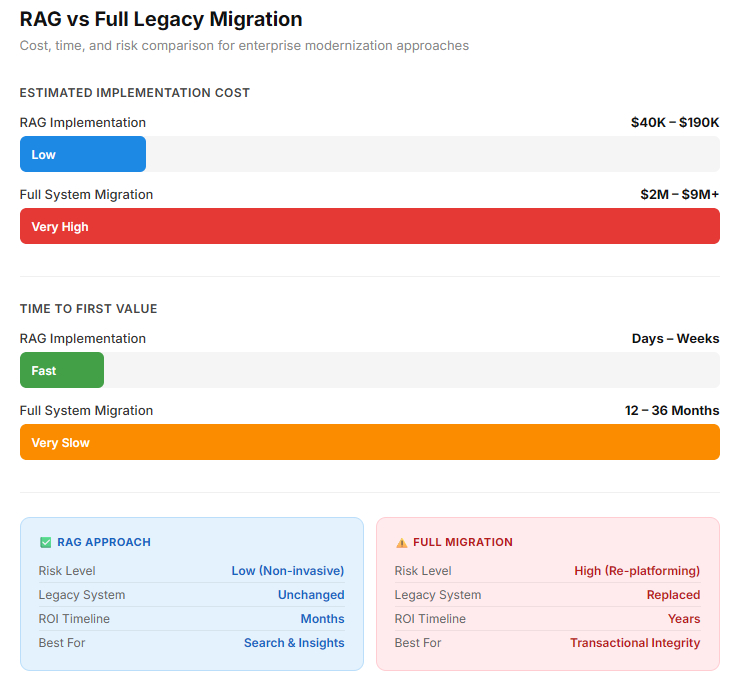
RAG vs Full Legacy Migration: Which Is Better?
A strategic comparison of ROI, risk, and total RAG development cost.
| Feature | RAG | Full Legacy Monetization |
| Speed to Value | Fast (days/weeks) | Slow (months/years) |
| Cost | Lower Upfront (OpEx) | High Upfront (CapEx) |
| Risk | Lower (Non-Invasive) | High (Re-platforming risk) |
| Data Scope | Best For Insights/Search | Best for transactional integrity |
| Maintenance | Ongoing Data Indexing | Low-maintenance post-launch |
RAG is generally better for immediate, cost-effective, and AI-driven enhancements.
Future of Legacy Modernization With AI
AI-driven legacy modernization, accelerating system upgrade by 40-60% while reducing technical debt and costs.
Generative AI enables automated code translation, documentation, and testing. This approach shifts modernization from a manual, risky process to a rapid, secure, and intelligent transformation.
1. Agentic AI
AI agents will not just find information, but also execute multi-step workflows across legacy interfaces to complete complex tasks.
2. Autonomous System Documentation
AI will continuously watch legacy system behaviour to write & update missing technical manuals in real-time.
3. AI-Powered Code Refactoring
RAG-informed models will automatically suggest and test modern code patches to safely replace brittle legacy modules.
4. Real-time Enterprise Copilots
Every employee will have a legacy expert in their pocket, providing instant, context-aware guidance across decades of the company’s history.
Turn Your Technical Debt Into Your Greatest Knowledge Advantage
Conclusion
Legacy systems are a valuable asset of an organization containing critical & very useful old data. Using AI in legacy systems is possible, but it comes with significant risk. Rewriting the code or replacing it isn’t a safe option either. It’s risky and costs millions of dollars. RAG for legacy systems offers the advantage of not only accessing legacy data but also using AI within it by connecting it to a modern system.
FAQs
1. Can RAG support legacy modernization with AI without system replacement?
Yes, RAG enables legacy modernization with AI by acting as an augmentation layer rather than a migration strategy. Enterprise can modernize access to historical data while keeping core transaction systems intact, reducing cost & operational risk.
2. Is the RAG implementation on legacy data secure?
A properly designed RAG implementation on legacy data includes encryption, metadata-based permission filtering, audit logs, and role-based access control. When configured correctly, the system retrieves only documents that the user is authorized to view before the LLM processes the response.
3. How does vector search work for legacy databases?
Vector search for legacy databases converts documents, records, or source code into numerical embeddings that represent semantic meaning. Instead of relying solely on keyword matching, the system retrieves conceptually similar records, improving accuracy and context.
4. Can RAG be used for mainframe applications and COBOL systems?
Yes, RAG for mainframe applications allows enterprises to extract value from DB2, VSAM, and COBOL-based environments. Similarly, RAG for COBOL systems helps developers interpret decades-old source code and documentation without altering the production logic.
5. Is LLM integration with on-premises systems possible?
Secure LLM integration with on-premises systems is possible through encrypted connectors, isolated embedding pipelines, and hybrid deployment models. Sensitive data can remain within enterprise firewalls while retrieval and reasoning layers operate in a controlled AI environment.